
nmjefghbgfcpoobigfbalocpncklkjhk
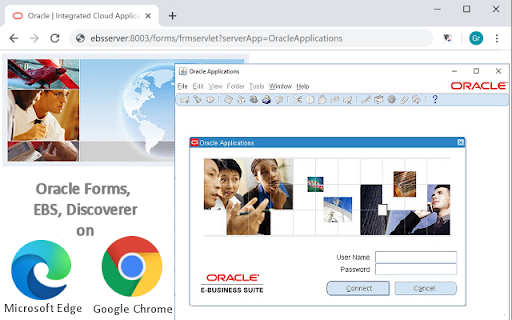
ThinForms Enterprise - Run Oracle EBS, Oracle Forms and Discoverer with Google Chrome. The ThinForms Enterprise Chrome Extension is a Helper-Addon to TalkingByte's ThinForms JavaHost Native Application, which allows you to run selected Java Applets such as Oracle Forms and Oracle EBS Applets, as well as Oracle Discoverer, directly from modern, Chromium-based browsers. Simply open your Oracle Forms URL, or use Oracle EBS in your favourite browser, and this extension will emulate the appropriate Java Environment run them. No need for Internet Explorer! In order for this extension to work, you will need to have 2 components installed: 1) ThinForms Enterprise Chrome Extension Helper Addon (this extension) 2) The Native Host Application "ThinForms Java Host", available here: https://www.talkingbyte.com/download.php?product_id=ThinForms_JavaHost_installer.zip Once installed, simply open your Oracle Forms/EBS application URL in Chrome, and ThinForms will automatically scan for and start Oracle Applets. NOTE: The related native Java Host application available at the link above is a 60-days TRIAL version. In order to acquire a full License with Enterprise Support Agreement for the ThinForms JavaHost Application, please visit our website at https://www.TalkingByte.com or contact us at sales@talkingbyte.com Please find our terms and conditions on our website: http://www.talkingbyte.com/terms_cm.txt Please note: The ThinForms Extension is a 3rd party product, with no affiliations to Oracle. The ThinForms Java Host Emulator application is maintained and supported by TalkingByte.

Reply Slack Fix
Reply Slack Fix: Quote Slack Messages Instantly and Effortlessly Ever feel like your replies in Slack get lost, or that the context of a conversation fades away? With Reply Slack Fix, say goodbye to misunderstandings and tedious searches. This indispensable extension lets you quote any specific Slack message with a single click, ensuring your replies are always clear, direct, and perfectly contextualized. How It Transforms Your Workflow Imagine the efficiency: simply select the message you want to reference in Slack. Our extension works its magic: it automatically inserts that message into your reply field, ready for you to add your comment. No more manual copying and pasting, no more jumping between windows – just a fluid, natural interaction. Key Benefits You'll Love: Instant Clarity: Ensure your messages always connect to the right conversation, eliminating ambiguity. Superior Efficiency: Save valuable time by automating the quoting process, allowing you to focus on what truly matters. Organized Conversations: Maintain a logical, easy-to-follow thread in your Slack channels, benefiting your entire team. Seamless Integration: Designed to work intuitively within the Slack interface you already know and use. Simplify Your Slack Communication Reply Slack Fix is the tool you've been waiting for to optimize your daily communication. Enhance productivity, reduce friction in your interactions, and make your Slack conversations more effective than ever. Install Reply Slack Fix today and experience the difference!

Workspaces for Oracle: Secure Browser
Open links Securely and Anonymously in the Oracle Cloud using Kasm Workspaces for Oracle. This extension provides a right-click menu context to open web links in a Workspaces for Oracle Isolated Browser instance in the Oracle Cloud. This provides a convenient way to securely open suspicious/unsafe URLs while also maintaining your browsing privacy. The On-Demand Secure Browser webpage is rendered inside the Oracle Cloud instance, rather than executed on your local computer, to ensure your browsing is safe and private.

Oracle Eloqua Sales Tools
Allows sales representatives to view contacts' profile information from Eloqua in an easy to access pop-up in your browser. Oracle Eloqua Sales Tools for Chrome is an extension for Google Chrome. The extension allows sales representatives to view contacts' profile information from Eloqua, as well as email prospects more efficiently by displaying contact information from Profiler in an easy to access pop-up in your browser. Requirements: -You must have an Oracle Eloqua Profiler and/or Engage license. -Profiler must be installed and configured in your Eloqua instance. -Sales Tools for Chrome is available with our responsive Profiler. If you are using Profiler Stream, please upgrade to our new Profiler to leverage Sales Tools for Chrome. By installing the Oracle Eloqua extension software, you are agreeing to the following terms: 1. You may use the software subject to the following: (a) the software may be used solely for your personal, informational, noncommercial purposes; (b) the software may not be modified or altered in any way; and (c) the software may not be redistributed. 2. The software is the intellectual property and copyrighted works of Oracle America, Inc. or a third party provider. All rights, title and interest not expressly granted with respect to the software are reserved. 3. You may not access, download, use or export the software in violation of U.S. export laws or regulations, or in violation of any other applicable laws or regulations. You agree to comply with all export laws, restrictions and regulations of any United States or applicable agency or authority, and to not directly or indirectly provide or otherwise make available any services and products of Oracle in violation of any such restrictions, laws or regulations, including, without limitation, laws, restrictions or regulations pertaining to the development, design, manufacture or production of nuclear, chemical or biological weapons or missile technology. 4. Disclaimer of Warranties. THE SOFTWARE IS PROVIDED ON AN "AS IS" BASIS. ORACLE EXPRESSLY DISCLAIMS ALL WARRANTIES OF ANY KIND, WHETHER EXPRESS OR IMPLIED, INCLUDING, BUT NOT LIMITED TO, THE IMPLIED WARRANTIES OF MERCHANTABILITY, FITNESS FOR A PARTICULAR PURPOSE AND NON-INFRINGEMENT. THE SOFTWARE IS USED AT YOUR OWN DISCRETION AND RISK. ORACLE SHALL HAVE NO RESPONSIBILITY FOR ANY DAMAGE TO YOUR COMPUTER SYSTEM OR LOSS OF DATA THAT RESULTS FROM THE DOWNLOAD OR USE OF THE SOFTWARE. 5. Limitation of Liability. IN NO EVENT SHALL ORACLE BE LIABLE FOR ANY DIRECT, INDIRECT, INCIDENTAL, SPECIAL OR CONSEQUENTIAL DAMAGES, OR DAMAGES FOR LOSS OF PROFITS, REVENUE, DATA OR DATA USE, INCURRED BY YOU OR ANY THIRD PARTY, WHETHER IN AN ACTION IN CONTRACT OR TORT, ARISING FROM YOUR ACCESS TO, OR USE OF, THE SOFTWARE. 6. Exclusions and Limitations. SOME JURISDICTIONS DO NOT ALLOW THE DISCLAIMER OR EXCLUSION OF CERTAIN WARRANTIES OR THE DISCLAIMER, EXCLUSION OR LIMITATION OF CERTAIN LIABILITIES. TO THE EXTENT THAT THEY ARE HELD TO BE LEGALLY INVALID, DISCLAIMERS, EXCLUSIONS AND LIMITATIONS SET FORTH ABOVE DO NOT APPLY AND ALL OTHER TERMS SHALL REMAIN IN FULL FORCE AND EFFECT. 7. All matters relating to your access to, and use of, the software shall be governed by U.S. federal law or the laws of the State of California. Any legal action or proceeding relating to your access to, or use of, the software shall be instituted in a state or federal court in San Francisco or Santa Clara County, California. You and Oracle agree to submit to the jurisdiction of, and agree that venue is proper in, these courts in any such legal action or proceeding.

CID Fusion Query
This chrome extension allows Oracle Fusion SaaS developers and business analysts to run SQL queries against database. This chrome extension allows Oracle Fusion SaaS developers and business analysts to run SQL queries against database. Installation instructions: 1. Add the extension to your chrome. 2. Go to extensions and pin the CFQ so it will appear next to the URL. 3. Login to your Fusion instance and click on CFQ icon - it will use the current session and will create environment setup for you. 4. If this is your first usage in your Fusion instance, follow the installation instructions by uploading the utility directory to your /xmlpserver. You should have a directory called /Custom/CidUtils. 5. Run, analyze queries and export the results when needed. You are welcome to rate this plugin and let us know what you think about it to info@cidsolutions.co.il.
