
bjegkkgjojmdbmbhjmgbggdfmabahbkb
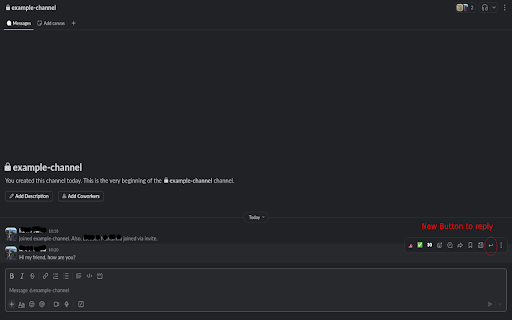

Reply Slack Fix: Quote Slack Messages Instantly and Effortlessly Ever feel like your replies in Slack get lost, or that the context of a conversation fades away? With Reply Slack Fix, say goodbye to misunderstandings and tedious searches. This indispensable extension lets you quote any specific Slack message with a single click, ensuring your replies are always clear, direct, and perfectly contextualized. How It Transforms Your Workflow Imagine the efficiency: simply select the message you want to reference in Slack. Our extension works its magic: it automatically inserts that message into your reply field, ready for you to add your comment. No more manual copying and pasting, no more jumping between windows – just a fluid, natural interaction. Key Benefits You'll Love: Instant Clarity: Ensure your messages always connect to the right conversation, eliminating ambiguity. Superior Efficiency: Save valuable time by automating the quoting process, allowing you to focus on what truly matters. Organized Conversations: Maintain a logical, easy-to-follow thread in your Slack channels, benefiting your entire team. Seamless Integration: Designed to work intuitively within the Slack interface you already know and use. Simplify Your Slack Communication Reply Slack Fix is the tool you've been waiting for to optimize your daily communication. Enhance productivity, reduce friction in your interactions, and make your Slack conversations more effective than ever. Install Reply Slack Fix today and experience the difference!

Modify Header Value (HTTP Headers)
Add, modify or remove a header for any request on desired domains. Modify Header Value (HTTP Headers) is an extension that can add, modify or remove an HTTP-request-header for all requests on a desired website or URL. This Addon is very useful if you are an App developer, website designer, or if you want to test a particular header for a request on a website. Key features: 1. Easily add, modify or remove a header for any request on desired domains. 2. For a complete list of HTTP headers, please take a look at the list of all HTTP Header Fields on the Wikipedia page (https://en.wikipedia.org/wiki/List_of_HTTP_header_fields). 3. Clicking on the Toolbar icon opens a UI to quickly switch the Addon ON or OFF, or open the options page. 4. Each header item has several options to adjust (see add-on's Options page for details) 5. You can add several header items and active or inactive them separately. 6. An example in the options page shows a tutorial on "How to add a custom header". Note: to report bugs, please visit addon's homepage (https://mybrowseraddon.com/modify-header-value.html) and fill out the bug report form.

UTN.BA Helper (ex Siga Helper)
UTN.BA Helper facilita el uso de la web de la UTN - FRBA. UTN.BA Helper facilita el uso de la web de la UTN - FRBA. - Colecta anónimamente distintos datos, para ser utilizados en las distintas secciones, como: - Las encuestas docentes para poder publicar esta información en la sección de "Buscar Docentes" e incluso mostrarla al momento de inscribirse a un curso. - Los horarios de las cursadas para mostrar esta información al momento de inscribirse a un nuevo curso, y poder intentar predecir cuál va a ser el profesor que va a estar en cada cursada. - Al momento de inscribirse a materias, muestra los profesores que estuvieron en cada cursada, basándose en data colectada, para así poder saber qué profesor va a estar en cada curso. - Agrega nuevas secciones bajo el menu "UTN.BA Helper": - "Buscar Docentes", donde se puede ver información colectada, entre ello, la encuesta docente. - "Buscar Cursos", donde se puede ver información de cursos pasados, como horarios, profesores que estuvieron en cada uno, etc. - "Seguimiento de Plan": - Se visualiza el estado actual del plan, viendo materias aprobadas, habilitadas para rendir final, por cursar, etc. - Peso académico, cantidad de finales aprobados y desaprobados. - Promedio de notas ponderadas (según Ordenanza Nº 1549) y no ponderadas, contando y sin contar desaprobados. - Agrega el nombre de la materia en la grilla de horarios en la sección de Agenda.

simple-modify-headers
The extension rewrite the headers based on a rules table. add , modify or delete header field for HTTP(S) request or response export the configuration in a file (json format) import the configuration from a file choose urls on which the modifications applies In order to work, the following extension permissions are needed : storage : needed to store the configuration activeTab, tabs : needed to show the configuration screen in the browser tab. webRequest,webRequestBlocking, : needed to modify the headers The code is opensource under Mozilla Public License 2.0

Degreed Extension
Track all your learning. Bring learning into your everyday workflow with the Degreed button. You can track your learning from any website, share content with others, save for later, add to a Pathway, or search for content in Degreed without ever leaving the site you’re on. Track your learning: Track all your learning directly from your browser without leaving the page you’re on — and save comments about what you learned. Share with others: If you love what you learned, you can recommend it to a friend or a group. Save for later: If you find an article you want to read later, you can save it. If you forget, Degreed will recommend it in your feed. Add to Pathway or Plan: When building a Pathway or plan in Degreed, you can add to it directly from the Degreed Button. Add to catalog: If you have the “Manage Content” permission, you can add directly to the catalog. The Degreed Button will scrape the title, description, and image for the content if available, removing the need to manually add the information. You can also review and modify the title and description before the item is added to the catalog. Find more learning resources: Find new learning resources and people to follow. If you want to learn more, search to see other learning items or find people to follow and see what they’re reading. Stay in touch with notifications: Your Degreed notifications are available directly. If someone recommends an item, you get notified without leaving the page you are on.
