
nmcamjnbjejckmdbobepfjdehbfillan


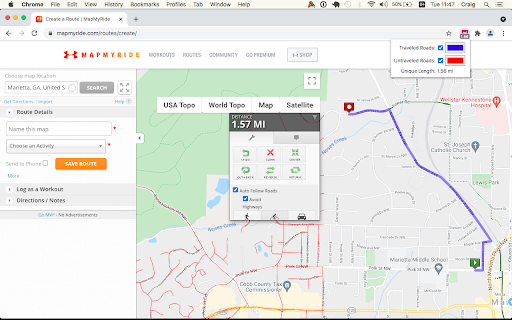

View your Wandrer map data in a variety of route planning tools, including Strava, Komoot and RideWithGPS The Wandrer Map Overlay Extension lets you view your Wandrer map data in many popular route planning tools, making it easy to plan routes that take you new places. About Wandrer Wandrer is the outdoor game that you win by going places you've never been before. The main rule is: you get credit for every road you travel, but only once. So if you want to progress, you have to go new places. Find out more at https://wandrer.earth/ Version History: 2.0.0.16: Restore Garmin functionality 2.0.0.15: Strava fixes 2.0.0.14: RideWithGPS fixes 2.0.0.13: Komoot and BikeRouter fixes 2.0.0.11: More RideWithGPS fixes 2.0.0.10: Restore RideWithGPS compatibility 2.0.0.9: Fix issues with Garmin, Strava, and Komoot 2.0.0.8: Fix issues with Garmin, Plotaroute and Bikerouter 2.0.0.7: Improve compatibility with Strava and RideWithGPS 2.0.0.6: Address an issue with the BRouter bookmarklet 2.0.0.5: Unique distance calculation is now done by clicking a "calculate" button, rather than after every change to the route. This lightens the load on Wandrer's servers and also makes it possible to report achievement data too (forthcoming) 2.0.0.4: Fix MapMyRide/MapMyRun compatibility 2.0.0.3: Improved stability with Komoot, Strava and Bikemap 2.0.0.2: Fix Komoot compatibility, improve behavior in long routes with Strava 2.0.0.1: Manifest V3 rewrite 1.0.0.63: Restore Strava compatibility 1.0.0.61: Fix compatibility with MapMyRide/MapMyRun 1.0.0.60: Fix Komoot compatibility 1.0.0.59: Fix Garmin compatibility 1.0.0.58: Some small Bikemap and Komoot fixes 1.0.0.57: Restore compatibility with Bikemap 1.0.0.56: Add support for Google map layers in RideWithGPS and fix a bug around display of untraveled roads. 1.0.0.55: Partial fix for RideWithGPS and the Wandrer extension. The Google maps layers are not yet functional, but all others should be. 1.0.0.54: Improve compatibility with Strava, RideWithGPS, and Garmin 1.0.0.53: Fix a bike/foot icon swap in RideWithGPS 1.0.0.52: Add support for toggling paved and unpaved road visibility 1.0.0.51: Update compatibility with RideWithGPS 1.0.0.50: Go someplace together! You can now display the Wandrer data for two additional friends directly in the extension to help you plan routes together. Also fix a RideWithGPS rendering issue. 1.0.0.48: Fix compatibility with Garmin and Komoot route planners 1.0.0.47: Bugfix with changing map type on Komoot 1.0.0.46: Bugfix with Strava data display 1.0.0.45: Bugfix with Komoot data display 1.0.0.44: Bugfix with Strava data display 1.0.0.43: Bugfix with Komoot data display 1.0.0.42: Bugfix with distance reporting in MapMyRide/MapMyRun 1.0.0.41: Bugfix with distance reporting in Strava 1.0.0.40: Bugfix with distance reporting in Komoot 1.0.0.39: Show Wandrer data in additional Veloviewer maps and display traveled + unpaved roads as dashed lines 1.0.0.38: Add support for viewing Wandrer map data in the Veloviewer explorer 1.0.0.37: Fix display with different map layers in Komoot. 1.0.0.35/36: Fix a bug in the previous version where map layers weren't showing correctly. 1.0.0.34: Set default road layer colors 1.0.0.33: Improve the color picker, allowing setting of transparency 1.0.0.32: Fix RideWithGPS styling to be more consistent with other sites and the Wandrer site. 1.0.0.31: Bugfixes with the Strava route planner. 1.0.0.30: Add support for Garmin Connect route maker and fix some bugs around displaying new length 1.0.0.29: Hopefully address a bug with the extension key not being properly saved. 1.0.0.28: Bugfixes 1.0.0.27: Add early support for activities on foot 1.0.0.25: Bug fix with the popup window size being too small in Chrome 94 1.0.0.24: Bug fix with changing map styles on Komoot 1.0.0.23: Bug fix with calculating route length on Strava 1.0.0.22: More bug fixes 1.0.0.21: Bug fixes with Strava 1.0.0.20: Bug fixes 1.0.0.19: Add support for BikeRouter 1.0.0.18: Bug fixes 1.0.0.17: Added support for dynamicWatch and improved Komoot compatibility 1.0.0.16: Updated to work with Komoot once again! 1.0.0.15: Added support for Bikemap.net 1.0.0.14: Bug fixes (better Komoot support, preserve color choices after sign-out/sign-in) 1.0.0.13: Add MapMyRide/MapMyRun and Plotaroute support 1.0.0.11: Add different styling for "unpaved" roads, displaying them as dashed lines 1.0.0.10: Fix an issue with the extension not loading on Komoot route edit pages 1.0.0.9: Fix an issue with the extension not loading on Strava route edit pages 1.0.0.8: Add support for additional Komoot websites 1.0.0.7: Add support for Komoot route planner 1.0.0.6: Fix a bug where some roads were incorrectly shown as ridden in RideWithGPS 1.0.0.5: Add missing support for Strava route edit pages 1.0.0.4: Adds support for the Strava route planning tool 1.0.0.3: Also display Wandrer map data in the RWGPS route edit view 1.0.0.2: Added a live tally of the expected new length for the route, displayed under the extension's icon 1.0.0.1: Added the ability to change the color of traveled and untraveled road layers 1.0.0.0: Initial release

strava-map-switcher
Map switcher for Strava website Map switcher for Strava website This extension adds additional map layers (mapy.cz, openstreetmap, mtbmap, freemap.sk, …) to Strava.com

Strava Enhancement Suite
Handy tools and improvements to Strava.com - Repeated segments: Show aggregate segment data (fastest, slowest, average, total distance, total elevation, etc.) when segments are repeated within an activity. - Annual achievements: Changes how yearly achievements (eg. "2015 KOM") are shown on the dashboard feed. "Unhighlight" keeps them visible but without making them stand out so much. - Infinite scroll: Automatically load more dashboard entries when reaching the bottom. - External links: Show links to Veloviewer, Race Shape, KOM Club etc. on activity, segment detail and Challenge pages. - Hide "find friends": Hide social networking buttons, including invitations to invite/find friends on Strava. - Hide Premium badges: Hide 'Premium' badges. - "Enter" posts comment: Immediately posts comment when pressing the "enter" / "return" key in the edit box rather than adding a new line. - Challenge feed entries: Hide challenge-related feed entries. - Club feed entries: Hide club-related feed entries. - Goal feed entries: Hide goal-related feed entris - Route feed entries: Hide route-related feed entries - Promotion feed entries: Hide promotion-related feed entries. - Training plan feed entries: Hide training plan-related feed entries. - Hide turbo trainer / virtual rides: Hide Zwift activities or rides in the feed that do not contain a map. - Compare running: Changes the default sport for the "Side by Side comparison" module to running. - Running cadence: Show running cadence by default in elevation profile. - Running heart rate: Show running heart rate by default in elevation profile. - Variability Index: Calculate a Variability Index (VI) from the weighted average power and the average power, an indication of how "smooth" a ride was. A VI of 1.0 would mean perfect pacing. (Requires a power meter.) - Estimated FTP: Select "Show Estimated FTP" by default on Power Curve. - Running TSS: Estimates a run"s Training Stress Score from its Grade Adjusted Pace distribution. - Standard Google Map: Prefer the "Standard" Google map over the "Terrain" view. - Hide shop links: Hide links to the Strava store in the header, footer and on activity pages. - Hide blog links: Hide links to Strava blog on the dashboard. - Hover actions: Make various elements (Instagram images, maps, avatars, etc.) larger when you run your mouse over them. - Swap club & challenges: Swap the ordering of the "Clubs" and "Challenges" module on the dashboard. - Hide "Yearly Goals": Hide the "Yearly Goals" module on the dashboard. - Hide "upcoming": Hide "Upcoming" module on the dashboard if you have no upcoming races, events or goals coming soon. Also hides the "Discover More" sub-module. - Improve pagination: Add "first" and "last" links to paginated features. - Improve activity upload: Add the ability to automatically "Save & View", CTRL+Enter support, and increase the size of the description boxes to the manual "Upload and Sync Your Activities" manual upload page, - Hide calories: Hide the number of calories burned on your own activity pages. - Convert units on hover: Show converted units when you hover your mouse over numbers. - Show hidden efforts: When there are too many segments/efforts on a particular ride, Strava hides them behind a "Show X hidden efforts" button. Enabling this option shows these efforts by default. - Sort starred segments first: Show 'starred' segments at the top of lists instead of in their geographical order.

VVGmap
Export unexplored tiles from VeloViewer as a map overlay for Garmin devices. This extension works on veloviewer.com website only. It adds an 'IMG' button to the download section on the Map Settings popup (Routes and Activities pages). Clicking the button will export all unexplored tiles in the current map view as an IMG file under the name of 'vvgmap.img'. All you need to do next is to connect your Garmin device to the computer and put the 'vvgmap.img' file directly into the 'Garmin' folder on the device. Next time you want to update your grid simply overwrite this file with the newly exported one. Do not upload more than one vvgmap file to your device. If you do though, still only one of them will be loaded. A new grid layer should be visible immediately after disconnecting the device. By default gridlines are solid, dark red and 1 pixel thick. The grid layer is visible on map scales up to 12km. If the grid is not visible then go to Profile -> Navigation -> Map -> Map Information and click 'VVGmap unexplored tiles' to enable the map. This extension uses an external API to generate IMG files. In case of bigger areas (thousands of tiles) it may take up to several seconds for the process to complete. During this time the 'IMG' button will remain disabled.

StatsHunters
To make it easier to create new routes to achieve new tiles you can use the StatsHunters Chrome extension to show tiles on different route builders. 1. Install the extension 2. Login to StatsHunters and copy the API-code from the settings page 3. Click the StatsHunters Chrome extension icon and past the API-code 4. Go to one of the route builders 5. Start building new routes You can use the plugin on different websites, the following sites are supported: Strava, Komoot and others. Check the full list on https://www.statshunters.com/faq
