
ldhkneiheabejbefhgjddpamijajabmm

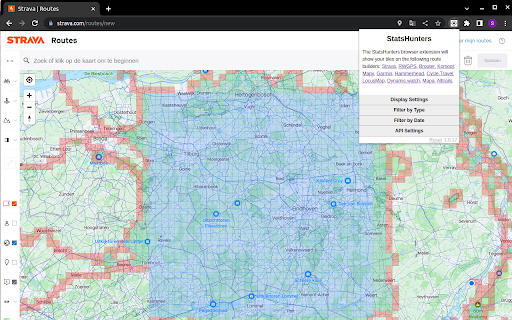
To make it easier to create new routes to achieve new tiles you can use the StatsHunters Chrome extension to show tiles on different route builders. 1. Install the extension 2. Login to StatsHunters and copy the API-code from the settings page 3. Click the StatsHunters Chrome extension icon and past the API-code 4. Go to one of the route builders 5. Start building new routes You can use the plugin on different websites, the following sites are supported: Strava, Komoot and others. Check the full list on https://www.statshunters.com/faq

strava-map-switcher
Map switcher for Strava website Map switcher for Strava website This extension adds additional map layers (mapy.cz, openstreetmap, mtbmap, freemap.sk, …) to Strava.com

Strava Heatmap
Overlay Strava Global Heatmap in iD & GPX.studio editors to reveal popular routes and patterns. This browser extension seamlessly integrates the Strava Global Heatmap into popular mapping editors, including the OpenStreetMap iD editor and GPX Studio, enhancing your mapping and route analysis capabilities. 1. Click `Add to Chrome`. 2. Confirm permissions by selecting `Add extension`. 3. Chrome will briefly display a popup and show the new extension icon in the top-right toolbar. 4. Right-click the extension icon and choose `Pin` to keep it visible. 5. Alternatively, open the puzzle-piece Extensions menu and click the 📌 next to Strava Heatmap extension. If you don’t already have a Strava account, you’ll need to create one (free) to use the Strava Heatmap. Go to https://www.strava.com/register/free Sign up using Google, Apple, Facebook, or your email To enable the Strava Heatmap in the iD editor: 1. Open the iD editor: https://www.openstreetmap.org/edit?editor=id 2. Press B or click Background settings, then scroll to Overlays. 3. Select a Strava Heatmap overlay from the list. 4. If you see the message "Click the Strava Heatmap extension icon to log into Strava…", click the red extension icon to authenticate. 5. After logging in, use the extension icon to configure heatmap layers — choose activity type, color, and manage layer order or deletion. 6. In the editor, press Shift + Q to toggle the heatmap, and Shift + W to toggle data visibility. To enable the Strava Heatmap in GPX.studio: 1. Open GPX.studio: https://gpx.studio/app 2. Hover over the layers menu icon then scroll to Overlays. 3. Choose a Strava Heatmap overlay from the list. 4. If you see the message "Click the Strava Heatmap extension icon to log into Strava…", click the red extension icon to authenticate. 5. Once logged in, use the green extension icon to configure, reorder, or delete heatmap layers by activity and color. Also available as a Firefox extension: https://addons.mozilla.org/en-US/firefox/addon/strava-heatmap/ Please note that we haven't tested or fully supported it on other Chromium-based browsers like Brave and Opera.

Strava, export gpx track
Added button to map in activities, segments and routes Full export only with your auth.

Strava Helper
Some tweaks for Strava. Adds a "Give Kudos to All" button, removes clutter and provides UI tweaks. This Chrome extension aims to provide some tweaks for the Strava Website. Follow @strava_helper on Twitter for Updates! A button in the upper left of every Strava page can be used to give Kudos to all visible activities. It saves you a lot of time and your Strava friends get the litte dose of motivation they deserve! Removes all social media and premium clutter from the dashboard and activity pages, such as: “Find friends” “Upcoming events” “Discover more” “Follow suggestions” Promotional footer at the bottom “Shop” link “Get Premium” link “Get Premium” box on dashboard “Get Premium” boxes on profile page Social media dropdown menu in activity feed “Create target” link Social media buttons on activity detail page and Flyby page Zwift activities Peloton activities Achievement celebrations in feed Pins the top navigation to the top! Scroll and don’t get lost! Adds a link to VeloViewer to the main navigation bar Adds a deep link to the VeloViewer activity details page (next to the Flyby link)
