
nmahlbngglnabceabpgifacibgoogjcb
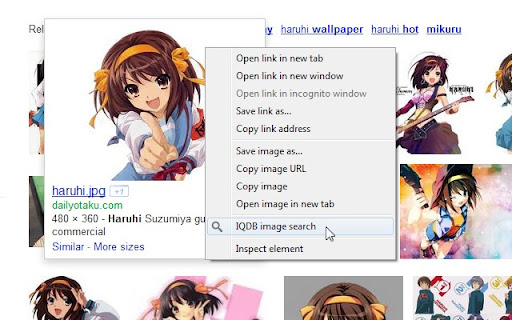

Right-click anime images to reverse-image-search for larger versions through IQDB. Right-click on anime images to reverse-image-search for larger/similar versions through iqdb.org. Results open in a new background tab. (Can change settings to open in foreground.) This is an unofficial extension; I am not related to IQDB. 2.0: - Updated to extension manifest v3. Minimum Chrome version increased to 88. If you need the previous version of the extension (0.6.1), it can be downloaded here: https://drive.google.com/file/d/1A_LMEQG3obQSDRhAHn2ze5PjV7rkxi82/view?usp=sharing - Settings code revised for manifest v3 compatibility. You may need to reapply your settings. - Added option to always spawn the Results tab next to the current tab (enabled by default). - Closing the Results tab now returns to the tab you searched from. 0.6.1: - Changed tab-creation setting to use "active" instead of "selected", since the latter was deprecated after Chrome 33. 0.6: - Now with HTTPS, thanks to the site admin adding support. Merry Christmas! 0.5: - Changed from background page to event page, so the extension process is only loaded when needed. - Minimum Chrome version increased to 22, due to above change. - permission removed, since the contextMenu permission made it redundant at some point. 0.4: - Updated to extension manifest v2, per Chrome requirements going forward. - Minimum Chrome version increased to 18, due to above change. - Removed defunct iqdb.hanyuu.net mirror from options. 0.3.1: - Added 48x48 and 128x128 icons from the "Token" iconset by Evan Brooks (http://brsev.com), used under the Creative Commons attribution-noncommercial-share-alike 3.0 license. - Added credits file. 0.3: - Filenames with spaces and special characters should now work correctly. - Added 48x48 icon.

Reverse Image Search
Adds an option to the context menu to reverse search an image on various services Adds an option to the context menu to search with an image on various predefined or custom search engines with your own URL. If you choose more than one search engine, they will all be shown in a handy submenu! If more than one search engine is selected, a new entry "Open All" will also be shown. You can even choose the tab behaviour that suits your needs! Submit translations to the GitHub repo: https://github.com/Brawl345/Image-Reverse-Search-WebExtension

Pixiv Fanbox Downloader
Batch download files on Pixiv Fanbox. Supports filtering file types, custom file names, and supports multiple languages. Open fanbox.cc and click the blue download button on the right side of the page to get started. Note: This extension cannot bypass paid restrictions.

Reverse Image Search
Right click on an image and find it's origin in Google image search. Search by image! Reverse image search extension allows you to search Google by image. Right-click on an image and discover where else it has been used of find it's origin. This tool is powered by Google Image Search.

Media Harvest : X (twitter) Media Downloader
Download videos and images from twitter or TweetDeck with only one click. With this add-on, you can download videos and images from twitter or TweetDeck with only one click without any third-party service. ** It will cause race condition if you installed other download management extension. ** This extension provides, + Custom filename + Auto reveal sensitive content + Keyboard shortcut + Download video thumbnail This extension is not a web crawler. This extension doesn't provides, + Tweet crawling + Batch download + File compression
