
ihnfpdchjnmlehnoeffgcbakfmdjcckn


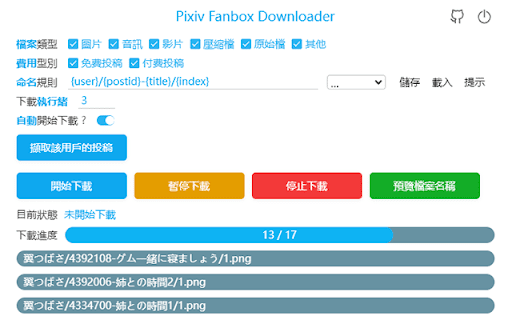


Batch download files on Pixiv Fanbox. Supports filtering file types, custom file names, and supports multiple languages. Open fanbox.cc and click the blue download button on the right side of the page to get started. Note: This extension cannot bypass paid restrictions.

Twitter用 センシティブ画像大好き君
Twitterでセンシティブ設定がされている画像を常に表示するようにします Twitterで内容の警告ラベルが付けられている画像に対して、操作する事無く画像を表示できるようにします。 自分しか利用しないパソコンで利用する事で快適にTwitterを利用出来ます。 リリースノート 2024/04/24 ・twitter.comにてSpaceの開始ボタンが表示されない不具合を修正しました。 2023/12/29 ・twitter.comにてツイートの「・・・」が非表示になる不具合を修正しました。 2023/12/26 ・メディア欄の表示方法変更に対応しました。 2023/12/03 ・旧TweetDeckのURL変更に対応しました。 tweetdeck.twitter.com → pro.twitter.com 2023/02/13 ・Beta版のTweetDeckに対応しました。 2022/08/15 ・TweetDeckに対応しました。 2022/03/26 ・初版リリース

pixiv smart downloader
Allows downloading multiple artworks and comics from pixiv at the same time. 🐍 What functionality does it offer? Allows you to select multiple manga and illustrations and download them all at once. 🐍 Why is it necessary? I found it cumbersome to download each piece from my smartphone or PC one by one. I tried using a similar extension, but it was subscription-based and too complicated to use. So, I created this. It focuses solely on downloading illustrations and manga, so no complex settings or operations are needed, and it operates smoothly. 🐍How to use it While on the Pixiv page, hover over the thumbnail of the artwork you want to save, and click the "Select" button that appears. Or, if you have opened the artwork you want to save, you can press "Select the currently opened artwork" from the popup. Continue selecting other artworks you wish to download. Press the "Execute" button to start the download process. 🐍Testing environment This has been confirmed to work on the following environments, but operation is not guaranteed: - Chrome - Vivaldi 🐍 Background Operation This program does not operate in the background. However, it works on pixiv pages to fetch artworks and generate buttons. On the download page, it shows the download progress and closes automatically when the download is complete. (It won't steal focus, so it shouldn't be disruptive.) Please do not manually close this page, as the download process is being handled here. 🐍 Reporting issues Please contact the author X (@sunrise_orz) or email (sunrise.creeper.xor@gmail.com). ※Originally on Twitter 🐍 Disclaimer Please use it at your own risk. We are not responsible for any losses or damages caused by this Chrome extension. Thank you for your understanding. 🐍 Update history Released version 1.0 on May 14, 2024. Released version 1.1 on May 14, 2024. Minor fixes. Released version 1.2 on July 15, 2024. Fixed the issue where files were being downloaded in a smaller size. Released version 1.3 on July 20, 2024. Fixed the issue where some files were failing to download. Released version 1.4 on July 23, 2024. Optimized the download process and made it easier to see when a download is in progress.

Patreon Downloader
Download media and attachments from Patreon pages. An extension to help you download all of those attachments quickly, to a folder of your choice. Please note that most videos will not be included. When viewing a Patreon Post page, you can use the `Patreon Downloader` to quickly download the media and attachments from that post into your Downloads folder. The zip filename will be pre-filled for you based on the Patreon creator's name and the title of the post. For example, if you were downloading from creator `JohnSmith` and the title of the post was `These are some of my favourite things...` you would be given a filename of `johnsmith-these-are-some-of-my-favourite-things.zip`. Patreon Downloader will download 3 files concurrently, to prevent the downloads timing out. The downloads will continue even if you close the Patreon Downloader window.

Pixiv Filter
Hide illustrations, comics, novels, and ugoira of users and tags you don't want to see on Pixiv. Currently, only the search page is supported. The top page is not supported. If you want to block a user or tag, click the plus button next to it. You can see the list of blocked users and tags in the settings screen of this extension. It is also possible to remove users and tags from the list. This extension is open source and is available on GitHub. https://github.com/kazu-ux/PixivFilter Reviews, bug reports, and requests for additional features are welcome. v 1.6.2 - Fixed minor bugs and improved behavior on the options page. v 1.6.0 - Updated the library. v 1.5.0 - Added a feature to add users to the block list from the settings page. v 1.4.3 ・bugfix ・Added a feature to add tags to the block list from the settings page. v1.2.0 Supported Manifest v3. Supported novels. Fixed the design of the settings screen. v1.1.0 Added support for English.
