
gmmdlghnjobnnkochmhgbmdaoncibakj
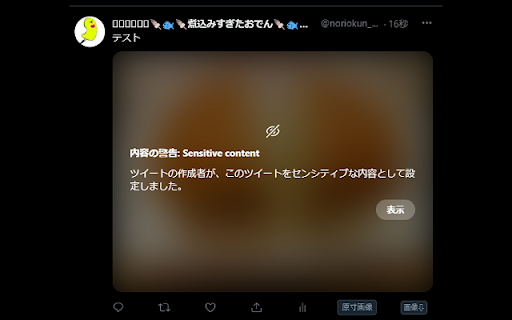

Twitterでセンシティブ設定がされている画像を常に表示するようにします Twitterで内容の警告ラベルが付けられている画像に対して、操作する事無く画像を表示できるようにします。 自分しか利用しないパソコンで利用する事で快適にTwitterを利用出来ます。 リリースノート 2024/04/24 ・twitter.comにてSpaceの開始ボタンが表示されない不具合を修正しました。 2023/12/29 ・twitter.comにてツイートの「・・・」が非表示になる不具合を修正しました。 2023/12/26 ・メディア欄の表示方法変更に対応しました。 2023/12/03 ・旧TweetDeckのURL変更に対応しました。 tweetdeck.twitter.com → pro.twitter.com 2023/02/13 ・Beta版のTweetDeckに対応しました。 2022/08/15 ・TweetDeckに対応しました。 2022/03/26 ・初版リリース

twitter画像原寸ボタン
This extension adds "Original" button on the image-embedded tweet in Twitter. Click the "Original" button to open image(s) in original size. [注 / Note] この拡張機能は、譲渡・売却の予定はありません。そのような連絡はお断りします。 I WILL NOT transfer/sell this extension under any condition. I REFUSE such requests.

Pixiv Filter
Hide illustrations, comics, novels, and ugoira of users and tags you don't want to see on Pixiv. Currently, only the search page is supported. The top page is not supported. If you want to block a user or tag, click the plus button next to it. You can see the list of blocked users and tags in the settings screen of this extension. It is also possible to remove users and tags from the list. This extension is open source and is available on GitHub. https://github.com/kazu-ux/PixivFilter Reviews, bug reports, and requests for additional features are welcome. v 1.6.2 - Fixed minor bugs and improved behavior on the options page. v 1.6.0 - Updated the library. v 1.5.0 - Added a feature to add users to the block list from the settings page. v 1.4.3 ・bugfix ・Added a feature to add tags to the block list from the settings page. v1.2.0 Supported Manifest v3. Supported novels. Fixed the design of the settings screen. v1.1.0 Added support for English.

Control Panel for Twitter
Gives you more control over Twitter and adds missing features and UI improvements Control Panel for Twitter is a browser extension for Twitter - its main goals are to reduce the amount of algorithmic content you see, give you more control over your timeline and make the UI less distracting. By default, your Home timeline will be the reverse-chronological "Following" timeline, which will only contain tweets and quote tweets from the people you follow. The algorithmic "For you" timeline will be hidden, and Control Panel for Twitter will keep you on "Following" if Twitter tries to automatically take you off it. Everything is configurable, so start by opening the options popup and customizing to your liking. Changes you make in the options will be applied immediately. • Use the "Following" (chronological) timeline by default • Hide the "For you" (algorithmic) timeline • Retweets • Show in separate tab / Hide • Quote Tweets • Show in separate tab / Hide • Enable muting of Quote Tweets • Hide "See new Tweets" • Hide "Who to follow", "Follow some Topics" etc. in the timeline • Hide inline prompts in the timeline • Full-width timeline content • Hide the sidebar and let timeline content go full-width • Add "Add muted word" to the "More" menu • Fast blocking (skips confirm dialog) • Hide quotes and replies to blocked and muted accounts • Hide Retweets in user profiles • Retweets in Lists • Default to "Latest" tab in Search • Hide the quoted tweet when viewing Quote Tweets • Redirect to twitter.com • Tweak new layout • Hide Toggle navigation • Replace X branding changes • Hide Views under tweets • Hide "Verified" Notifications and Followers tabs • Restore headlines under external links • Restore Quote Tweets link under Tweets • Restore other links under Tweets • Default sorting of replies • Latest / Likes • Premium blue checks • Replace with Twitter Blue logo / Hide • Hide Premium blue check replies • Hide Premium upsells • Hide Grok • Hide Jobs • Hide Subscriptions • Don't use the Chirp font • Disable bold and italic text in tweets • Use normal text font style in navigation bar • Navigation density • Comfortable / Compact • Use normal font weight in dropdown menus • Uninvert Follow / Following buttons • Monochrome / Themed • Unblur sensitive content • Hide sidebar contents • Hide Explore page contents and use it only for searching • Hide "Discover more" tweets • Hide metrics • Reduced interaction mode • Hide the action bar under tweets – replies are now the only means of interacting • Hide the Compose Tweet button • Disable the home timeline • Find yourself wasting too much time on Twitter? Try preventing use of the home timeline • Notifications • Hide badges only / Hide Hide UI items you don't use • Bookmark button under tweets • Share button under tweets • "View post engagements" under your tweets • Tweet box in timeline • Account switcher • Messages drawer • Explore • Communities • Hide "More" menu items you don't use TWITTER, TWEET and RETWEET are trademarks of Twitter Inc. or its affiliates

Illust Downloader for pixiv.net
You can easily download images, comics, and novels from pixiv.net! *This extension is unofficial and is not affiliated with Pixiv Inc. "pixiv" is a registered trademark of Pixiv Inc. *As of May 17, 2025, this extension has been renamed to "Illust Downloader." [About Illust Downloader] Illust Downloader is an extension that allows you to automatically assign file names and download illustrations, manga, and novels from Pixiv. It also offers features to enhance your Pixiv experience, such as the ability to enlarge illustrations directly on the gallery page. [Introducing Illust Downloader EX] The basic features of Illust Downloader are available for free indefinitely. However, by purchasing a license (¥195 per month), you can upgrade to Illust Downloader EX. Illust Downloader EX allows you to download Ugoira (animated illustrations) as video files (AVI, WebM, etc.), APNG, GIF animations, SVG, and more. Additionally, it offers advanced features such as organizing illustrations into folders based on criteria like artist or time, compiling manga into ZIP files, identifying downloaded items directly on the gallery page, batch downloading, and many other convenient functionalities. The premium features are available for a one-month free trial, so feel free to try them out. [Regarding Bugs and Suggestions] If you encounter any bugs, have suggestions for improvements, or other requests, please use the "Feedback, Suggestions, and Bug Reports" option within the Illust Downloader settings to get in touch with us.
