
nlmcbmeicbooompjafliaoiodifdhnpd
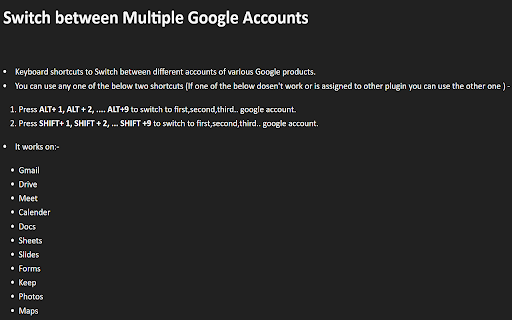
You can use any one of the below two shortcuts (If one of the below doesn't work or is assigned to other plugin you can use the other one ) -

Google Default Account
This extension is designed for users who work with multiple Google accounts and want to set a default account for these services, specifically for Google Meet. Whether the primary Google account you are logged in to, this extension allows you to pick a default account to use for Google Meet, Gmail, Google Drive and Google Photos. With this extension, you can easily switch between your personal and work accounts without annoying switching every time. How to find the account id from URL? !!Attention!! This extension only redirect to default account when url DOES NOT specify a user id. For example: When default Google Photo account id is 3 https://photos.google.com/ -> redirect to -> https://photos.google.com/u/3/ If you specify a account id 4, for example: https://photos.google.com/u/4/ Then extension will avoid to redirect to account 3, let you can use account 4 to use Google Photo. Other Google services are the same behavior.

Preferred Google Login
Automatically use your preferred Google account for each Google service. No more switching between accounts! Tired of being logged into the wrong Google account? Preferred Google Login solves this common frustration by automatically adding the appropriate authuser parameter to Google domains based on your preferences. If you use multiple Google accounts (personal, work, school), you know how annoying it is when YouTube opens with your work account or when Google Drive defaults to your personal account when you need your work files. This extension lets you set which account should be used for each Google service, ensuring a seamless experience across the Google ecosystem.

Google Account Chooser new
Automatically select a Google Account for OAuth 2.0 flows. Google Account Chooser - Automatically Select Your Google Account Streamline your Google authentication experience with this essential Chrome extension! If you frequently use Google Account authentication across multiple applications and websites, this extension is designed to save you time and clicks every day. 🚀 HOW IT WORKS: After you log in to any third-party site using your Google Account, this extension intelligently remembers which account you selected for each specific domain. The next time you visit the same site, simply click "Sign in with Google" and the extension will automatically select your preferred account - no more manual clicking through account lists! Using a single google account? Even better, you will not have to select that single item anymore. 🔒 PRIVACY & SECURITY: This extension only accesses Google's Account Selection page and stores your chosen account/email per domain. It does NOT store passwords, authentication tokens, or any other sensitive data. It does NOT access or store data from the pages you visit. 📝 ABOUT THIS VERSION: This is a modernized fork of the original Google Account Chooser extension (https://chromewebstore.google.com/detail/google-account-chooser/fldnfjcbkcklcbcbjojlinecjpbmiapi) which is no longer maintained.

Profile Manager Pro – Turbo Login, Smart Cookie Control
Advanced profile management for your favorite websites Profile Manager Pro 🗂️ is your all-in-one cookie, session and account toolbox built for people who live online with more than one identity. Imagine you are a developer who needs to test the same website with staging, production and client accounts, a freelancer who manages multiple client dashboards, a social media manager who jumps between pages, or simply a power user who keeps personal and work life separated. Traditionally you would have to: • constantly sign out and sign back in 🔑 • juggle incognito windows 🙈 • run an extra browser profile for every account 🐇 • or reset cookies every time you switch 🚿 It is slow, easy to mess up and often breaks two-factor auth or custom settings. Profile Manager Pro eliminates that friction by giving every site its own set of reusable login cookies that you can save, name and reload in one click, right from the toolbar popup. No servers, no registration, no hidden sync – everything happens locally in your browser. ─────────────── 💎 WHY IT STANDS OUT ─────────────── • Privacy-first: data is stored with chrome.storage in your profile; nothing is phoned home • Ultra-fast: swapping 80+ cookies takes milliseconds, faster than typing a password • Universal: supports every website, SPA or legacy web app because it manipulates the browser cookie jar—not the page ─────────────── 🚀 CORE FEATURES ─────────────── • 🔄 Save & load complete cookie / localStorage sets per domain • 🏷️ Unlimited named profiles – 'Work A', 'Work B', 'Staging', 'QA', 'Admin', anything • 🗑️ One-click cookie clearing for a clean slate without refreshing the whole browser • 📤 Import / 📥 Export profiles to JSON for backup or sharing with a teammate • ☁️ Encrypted cloud sync via Google Drive (two‑way with remote detection) • 🔔 Auto sync with conflict resolution (Merge default; Local or Remote optional) • 🔍 Instant search bar and keyboard navigation; no more scrolling huge lists • 🌓 Dark mode that respects system preference plus manual toggle • 🛠️ Context-aware actions (e.g., export only profiles related to the current domain) • 🪄 Magic favorites: pin most-used profiles to the top for lightning access ─────────────── 🎒 QUICK START IN 20 SECONDS ─────────────── 1️⃣ Browse to a site you want to manage. 2️⃣ Log in normally, then open the extension popup. 3️⃣ Type a name (e.g., 'Personal') and hit Save 💾. 4️⃣ Clear Cookies and log back in with another account. 5️⃣ Save as 'Work'. That's it! Now toggle between profiles by clicking Load. No reload required; the page instantly adopts the new session. ─────────────── 🔐 SECURITY & PRIVACY DETAILS ─────────────── • Data storage: Profiles are kept inside chrome.storage.local, sandboxed to your browser profile. • Encryption: Local storage is already protected by your OS account; optional cloud sync re-encrypts with a key derived from your Google account that only your browser can read. • Permissions used: – cookies: read & write cookie data for the active tab only. – storage: store your profiles. – unlimitedStorage: let power users keep hundreds of profiles without quota issues. – identity (optional): used only to obtain an OAuth token for uploading your encrypted backup to Google Drive. – activeTab: isolate operations to the site you're viewing, never in the background. • No analytics, no tracking pixels, no crash reports.
