
njbmhlokbhcncpcjakgkacnlfkimomka

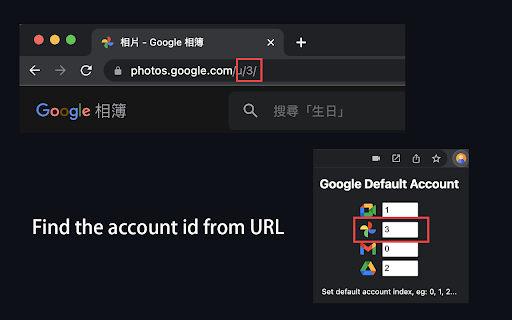
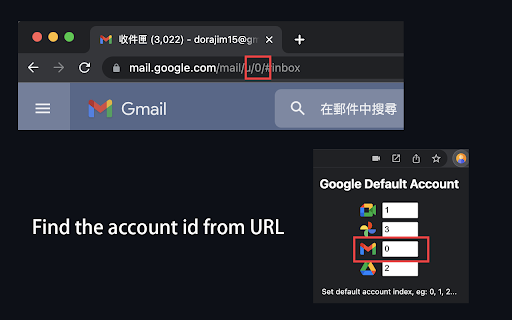
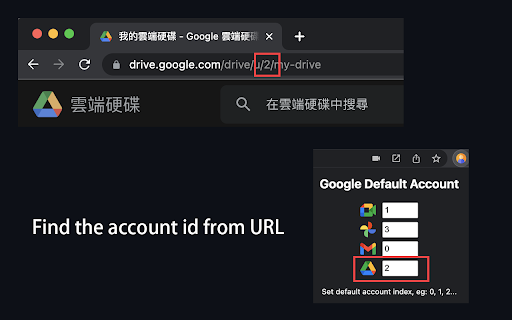

This extension is designed for users who work with multiple Google accounts and want to set a default account for these services, specifically for Google Meet. Whether the primary Google account you are logged in to, this extension allows you to pick a default account to use for Google Meet, Gmail, Google Drive and Google Photos. With this extension, you can easily switch between your personal and work accounts without annoying switching every time. How to find the account id from URL? !!Attention!! This extension only redirect to default account when url DOES NOT specify a user id. For example: When default Google Photo account id is 3 https://photos.google.com/ -> redirect to -> https://photos.google.com/u/3/ If you specify a account id 4, for example: https://photos.google.com/u/4/ Then extension will avoid to redirect to account 3, let you can use account 4 to use Google Photo. Other Google services are the same behavior.

Google Account Easy Switch
Light weight extension that aids in Google Account switching without having to click on the account selector. Boost your productivity with this sleek, time-saving extension that makes switching Google accounts a breeze. With two effortless methods to toggle between your Google Accounts, you’ll stay in control: 1. Simply click the extension to cycle through the Google Account IDs you set in the options. 2. Use custom shortcuts (default: Alt + ID [e.g., 0, 1]) to instantly switch accounts. Install now and experience the convenience of managing your accounts with just a click or a keystroke!

Default Account+ for Google
Select and manage your default account for Google Meet, Gmail, or any other Google product. A maintained fork of default.wtf. Default Account+ lets you choose which Google account loads by default. Never get redirected to the wrong account again! FEATURES: • Set a global default account for all Google services • Configure different defaults for specific services • Quick keyboard shortcuts (Alt+1 through Alt+9) to switch accounts • Supports 30+ Google services including newer ones HOW IT WORKS: The extension automatically redirects URLs to use your preferred account by adding the correct authuser parameter. PRIVACY: This extension does not collect any data. All settings are stored locally in your browser. OPEN SOURCE: View the source code and report issues at github.com/badrisnarayanan/default.wtf

Deletecy - Easy delete account
Easily find and delete accounts you no longer want. Deletecy - Take Control of Your Online Presence Deletecy is a browser extension designed to simplify the process of managing and deleting your online accounts. With its user-friendly interface and unique categorization system, Deletecy helps you regain control over your digital privacy by guiding you through the account deletion process on over 650 websites and apps. No more tedious searches: Deletecy provides direct links to the pages where you can delete your accounts. Instantly know how challenging the deletion process will be with a clear color-coded system: 🟢 Green: Quick and straightforward process. 🟡 Yellow: Requires a few extra steps. 🔴 Red: Requires contacting customer support. ⚫ Black: Deletion is not possible. 🙈 Privacy and Security First Deletecy is an open-source project, ensuring transparency and trust. It is distributed under the MIT license. In a world that’s increasingly connected, managing your online presence can be overwhelming. Deletecy saves you time and reduces stress, offering an easy solution to remove unused or unwanted accounts while keeping your digital footprint in check. 📥 Download and Try Deletecy Today Don’t wait! Simplify your online account management with Deletecy.

Auto Redirect
A Powerful URL redirection tool - supports multiple matching modes and URL template replacement. **AutoRedirect** is a Manifest V3 Chrome extension for URL redirection — environment switching, domain migration, and redirect link optimization. - **Multiple matching modes** — Exact, prefix, suffix, and wildcard patterns. - **URL templates** — Rewrite paths and migrate domains with `{1}`, `{2}` placeholders. - **URL extraction** — Skip intermediate redirect pages, go straight to the target. - **Local file mapping** — Redirect local `file://` paths to remote servers. - **Multi-result selection** — Choose from multiple targets when a rule has several matches. - **Batch testing** — Built-in batch URL testing tool to verify rules quickly. ## Who is it for - **Developers** — Switch between local, dev, staging, and production environments. - **Site admins** — Handle domain migrations and URL restructuring. - **Everyday users** — Skip ad pages and redirect intermediaries. Full guide and more examples: [https://playeryk.github.io/AutoRedirect/](https://playeryk.github.io/AutoRedirect/) - Redesigned options page with a cleaner, modern visual style - New batch URL testing tool for validating multiple rules at once - Enhanced rule editor: line numbers, syntax highlighting, error line indicators, comment toggling
