
nljcaloohhfbdjepadpljocilfeekohn
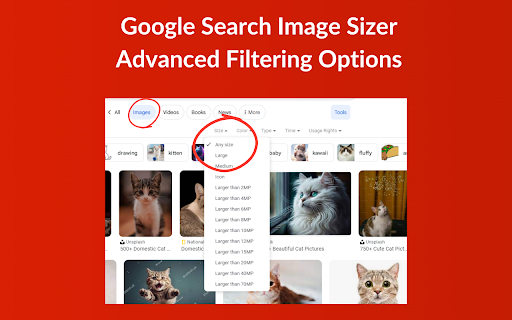
Enhance Google Image searches with custom size filters for precise image dimensions. Find the perfect image faster. Google Search Image Sizer - Advanced Filtering Options is a powerful Chrome extension designed to enhance your Google Image Search experience by providing advanced and precise filtering options. With this tool, users gain the ability to specify the exact dimensions and resolutions for the images they're searching for, making it easier than ever to find the perfect image for every need. Whether you're a graphic designer in search of high-resolution images, a marketer looking for specific-sized images for your campaigns, or just someone who appreciates finding the right image quickly and efficiently, this extension is for you. Google Search Image Sizer integrates seamlessly with Google Image Search, adding a user-friendly interface that allows you to apply custom size filters without any hassle. Key Features Include: Custom Image Size Filtering: Specify the exact height and width in pixels to find images that match your criteria perfectly. Resolution Selection: Choose from standard resolutions or enter custom dimensions to suit your specific requirements. Easy-to-use Interface: A straightforward and intuitive interface that integrates directly into Google Image Search, making it easy to adjust filters on the go. Save Time: Reduce the time spent scrolling through irrelevant images by applying precise size filters to your search. Free to Use: This extension is completely free, offering an enhanced image search experience at no additional cost. Google Search Image Sizer - Advanced Filtering Options is here to revolutionize the way you find images online. Say goodbye to endless scrolling and hello to efficient, targeted searches that deliver exactly what you're looking for. Install the extension today and take your Google Image Search capabilities to the next level! Changelog: Bugs Fixed, Popup Added. UI improved. Sorry for delay.

Google Images Restored
This extension may break at any time, as Google Images randomly changes their back end occasionally causing the extension to stop working. Feel free to leave a comment in the reviews if the extension stops working. In the event that the extension does stop working, please use the following link to check for updates:

Reverse Image Search
Search similar images in the WEB from context menu You can find out who stole your pictures. Image search extension allows you to search in almost all search engines by image. Right-click on an image and discover where else it has been used to find it's origin.

Reverse Image Search
Adds an option to the context menu to reverse search an image on various services Adds an option to the context menu to search with an image on various predefined or custom search engines with your own URL. If you choose more than one search engine, they will all be shown in a handy submenu! If more than one search engine is selected, a new entry "Open All" will also be shown. You can even choose the tab behaviour that suits your needs! Submit translations to the GitHub repo: https://github.com/Brawl345/Image-Reverse-Search-WebExtension

Disable Google Lens
Redirects Google Lens to the normal image results This extension bypasses "Google Lens" results and takes you to the normal image results like how it used to be. It also adds a "Search Google for image" context menu item that will open the image results in a new tab. Post-installation instructions for manually removing the old "Search image with Google Lens" context menu item (the one that opens results in the Side Bar) can be found at https://github.com/fanfare/disablegooglelens/blob/master/CHROME.md
