
nlcnfpbbappbnebnhgeinbbadhkmcfik

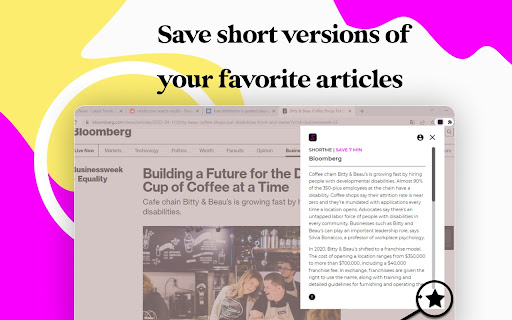
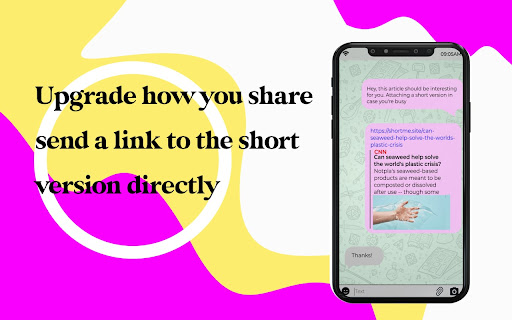

ShortMe Chrome Extension AI-powered reading assistant that summarizes text, so you can read the short version and then decide even it worse your time or not. Automatically summarize documents with ShortMe extension. Extension generates automatic text summaries that rival human authors. It is capable of using its own words and sentences with artificial intelligence, understanding the meaning of text you feed it. Ideal for anyone trying to make sense of large volumes text, condensing it to bite-sized material.. Indispensable for students, teachers, corporate documentation personnel, and content professionals, to save time and money. Chrome extension which allows you to turn any lengthy article into short bite-sized summary Our Chrome extension to produce summaries of news articles. 1. Scrape Article heading and body from the current active tab using jQuery. 2. Pre-process the body by removing stop words and stemming words using the AI algorithm. 3. Produce an array of sentence which will make up nodes in the graph. 4. Produce the graph using TF-IDF values of the sentences and the cosine similarity as the weight between nodes. 5. Run the graph through Google's PageRank algorthim. 6. Choose the highest ranking nodes to produce a summary. Summarizer will save you the time-consuming pain of reading long articles and comments. On any website, you can select a long, boring article, right-click and summarise it in a few sentences! Increase your research productivity with real-time article summarization. Ideal for news and blogs. We designed AI-Powered Text Insights with simplicity in mind. It is compatible with almost all text, regardless of source, including web apps such as Trello or Slack, social networks such as Facebook or Linkedin, review sites such as Tripadvisor or Yelp, online e-mail services such as Gmail, and much more. This summarizer stands out from others by focusing on the writer's choice of words to extract their most important points while filtering out weak arguments, speculation and asides. We value the trust our customers put in us to keep their information safe and secure. Speed up your SEO routine with our SEO extension.

Chrome Dice
A simple dice rolling extension for Google Chrome Chrome Dice is a simple dice rolling extension for Google Chrome. Simply click the button and click a die to roll, wherever and whenever. * Ad-free * Works offline * Very small (less than 0.1mb) * No permissions and no data

Simplified Chrome Extension
Simplified is the one app to create, collaborate, and scale your marketing. Design, write marketing copy, create videos, collaborate, and publish to socials—all in the same place. Built for speed and simplicity, Simplified helps creators, marketers and businesses to scale their marketing, streamline their workflows, and get work done in a few clicks. With a no-code design editor, AI writer, stunning templates, multiple brand kits, unlimited workspaces, and in-app publishing, you can start and finish your marketing without switching tabs. Ever.

Nice Speed Dials
Nice and Simple Speed dials Extension for Chrome Nice Speed Dials is a Chrome extension With a sleek and intuitive interface that allows you to organize your browser's new tab page with your favourite websites and links. With just a few clicks, you can create and organize a collection of speed dials that can be accessed from any new tab you open. Unlike other speed dial extensions or the default new tab page, Nice Speed Dials stores your speed dials as bookmarks in your Chrome account. This means that even if you change devices or uninstall the extension, your speed dials will remain safe and accessible. Simply log in to your Chrome account on any device, and your speed dials will be there waiting for you. Features: - Sleek and intuitive interface - Create and organize speed dials - Access speed dials from any new tab - Speed dials are stored in your Chrome account - Sync speed dials across multiple devices (if your chrome sync is on) - Reorder speed dials via drag and drop - Keyboard accessibility - Options for customization - Nice animation on any actions Future Plan: - Import and export speed dials - Support for folders - Better Keyboard accessibility - More features to come! IMPORTANT: Please remember that your speed dials are not stored on our server, but in your own Chrome account's bookmarks. So please do not delete the bookmark folder "NICE_SPEED_DIALS_BOOKMARKS\_[DO_NOT_DELETE]", as this is where your speed dials are stored. If you delete this folder, you will lose your speed dials. or any update in that folder will be reflected in your new tab speed dials. However, you can use this to your advantage by saving any bookmark to this folder, and it will appear on your new tab speed dials! Try Nice Speed Dials today and streamline your browsing experience!

Extensity
Tired of having too many extensions in your toolbar? Try Extensity, the ultimate tool for lightning fast enabling and disabling all your extensions for Google Chrome. Just enable the extension when you want to use it, and disable when you want to get rid of it for a little while. You can also launch Chrome Apps right from the list. * Keep your browser lean and fast - disable extensions that you won't use right away. * Keep your toolbar clean. * Turn all extensions off (and back on) with a single click. * Quick switch between several extensions groups using the Profiles feature. * Allow your most important extensions to be always enabled. * Keep computers in sync with Chrome Cloud Storage support. * Ideal companion for extensions collectors.
