
njpilngdjodbciagblmkceapenlpnjhl
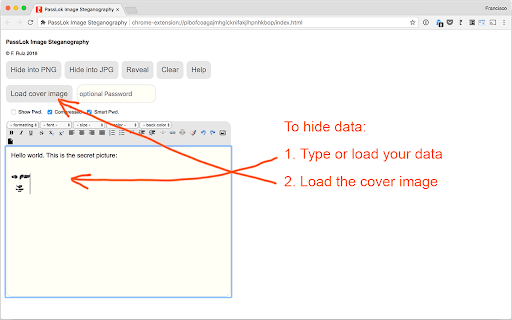

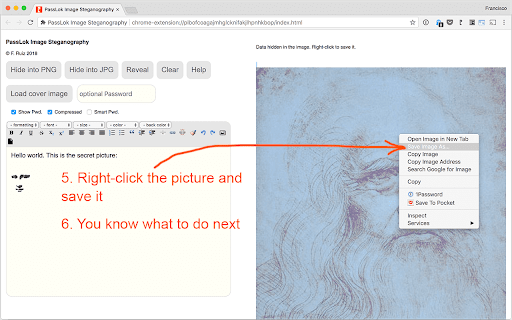


The reigning champion of image steganography PassLok Stego is a specialized tool for the secure embedding of data within digital images. It utilizes an enhanced implementation of A. Westfeld's F5 algorithm, designed to mitigate statistical traces detectable through standard steganalysis. This methodology was presented at the ForenSecure 2017 conference on Cyber Forensics and Information Security. ARCHITECTURE: This extension operates as a purely client-side utility. All cryptographic and embedding operations occur within the browser's local memory; no external network calls are required for core functionality. DATA DISTRIBUTION: The engine employs a Pseudorandom Number Generator (PRNG) to distribute hidden data across image pixels. This non-linear distribution is a critical component in providing resistance to forensic discovery. PLAUSIBLE DENIABILITY: The implementation supports the embedding of a short secondary message protected by an independent password. This feature is designed for high-risk scenarios where the presence of the primary hidden message may be compromised. FORMAT SUPPORT: Data can be embedded into JPG or PNG carriers. PNG is recommended for larger data payloads where pixel-perfect integrity is required. ENTROPY HARDENING: We recommend the use of high-entropy passwords to initialize the embedding process. Without the correct key, it is computationally difficult to distinguish an altered image from a standard carrier. Input or load the target data into the primary interface. Select a cover image (JPG or PNG) to serve as the carrier. Define the initialization password. Execute the "Hide into PNG" or "Hide into JPG" routine. Save the resulting image locally via the browser's context menu. Load the carrier image containing the hidden data. Provide the original initialization password. Ensure the "Compress" and "Smart Pwd" parameters match the original embedding settings. Execute "Reveal" to extract the data payload. LICENSE AND METADATA AUTHOR: Francisco Ruiz, Associate Professor at the Illinois Institute of Technology. LICENSE: Open Source software released under the GNU General Public License v3.0. ECOSYSTEM INTEGRATION: The algorithm used here serves as the core steganography engine for the Privacy Bar extension (https://chromewebstore.google.com/detail/privacy-bar/objpfdibjogbdpjjpomnoaflkgdeaanb). AUDIT AND ADOPTION: The source code (specifically plstego.js) is available for public audit and community adoption on GitHub at: https://github.com/fruiz500/PassLok-stego.

Privacy Bar
Your private data should stay exactly that: PRIVATE. Privacy Bar is a comprehensive, serverless security suite that lives in your… Your private data should stay exactly that: PRIVATE. Privacy Bar is a comprehensive, serverless security suite that lives in your browser, providing high-level tools to encrypt, hide, and isolate your digital communication. Designed with a "Servers are Evil" philosophy, every operation happens locally on your machine—no tracking, no backdoors, and no third-party storage. Because your machine can be stolen or hacked, nothing sensitive is ever stored unencrypted. The only thing to remember is your Master Key. It is never stored and only exists in volatile memory for five minutes after use before a mandatory Security Auto-Wipe purges it. CORE UTILITIES (FREE FOREVER) THE VAULT-LESS PASSWORD ENGINE: Most managers store secrets in a "vault" that can be hacked. Privacy Bar doesn't store passwords; it SYNTHESIZES them on the fly. UNHACKABLE BY DESIGN: Since there is no database, there is nothing for a hacker to steal. THE "HASHILI" CHECK: A unique mnemonic confirms you've typed your Master Key correctly without ever revealing it. THE LOCK & KEY SYSTEM: Stop sharing passwords. Exchange "Locks" (Public Keys) for secure, asymmetric communication that only your Master Key can open. DIGITAL CAMO (STEGANOGRAPHY): Weave encrypted data undetectably into the pixels of JPEG or PNG images. THE PROFESSIONAL SUITE (PRO UPGRADE) PQ-READY: Future-proof your data with NIST-standardized ML-KEM (FIPS 203) for key encapsulation. PAD MODE: Extract the entropy of any file to create a "One-Time Pad" that is mathematically impossible to crack. Now optimized for multi-gigabyte files with a high-performance streaming engine. READ-ONCE: Encrypt data so it can be decrypted only once. Once read, the keys are purged from existence by session-ephemeral math. HIDDEN MESSAGE: Hide 100 extra bytes of data in any output for total plausible deniability. REMOTE SANITIZER: Right-click links to open them in a "Reader Mode" sandbox, stripping scripts and tracking metadata before they touch your browser. BUILT FOR REAL-WORLD USE FOR JOURNALISTS & ACTIVISTS: Smuggle reports inside social media photos with LSB Embedding, and use Read-Once to ensure tips leave no digital trail for forensic discovery. FOR PROFESSIONALS: Securely exchange confidential contracts over standard email providers without allowing them to scan your content. FOR ACADEMICS & RESEARCHERS: Isolate site-specific research with Encrypted Notes in the sidebar, keeping your intellectual property entirely on your machine. WHY PRIVACY BAR? ZERO-KNOWLEDGE: Everything happens locally. We never see your keys. PERMISSION-LIGHT: We use the activeTab model. We only access site data when you explicitly click the extension. SOURCE AVAILABLE: Audit our logic directly in your browser or visit our GitHub. PENCIL-AND-PAPER LOGIC: Includes PolyCrypt, an algorithm you can calculate manually if you're ever without a computer. Privacy is not a victimless crime. It is a right. Claim yours with Privacy Bar.

Omnifriend
Quick access to friends' social profiles via the omnibox. Omnifriend caches a list of social contacts from Facebook, Twitter, Google+, Steam, Reddit and more. You can then search from Chrome's omnibox (or from the dedicated search page) to instantly find and open profile pages. The extension gathers links to friends based on the currently logged in user, so no site-specific app permissions are needed. Chrome permissions are granted as needed, and you can disable each site to revoke the permissions. v1.1 (10/09/2014): * fuzzy search algorithm (e.g. for initials) * email address book import * multiple account sync v1.0 (12/08/2014): * Facebook, Twitter, Google+ sync * omnibox search * custom search page

Breakbot
Quickly add disruptive unicode, naughty strings, and more to your clipboard. Save yourself from googling for RTL characters, Zalgo, general unicode naughtiness, the EICAR string, and more - Breakbot makes them available for quick copying to the clipboard. With a fast search and one-click copy, fuzzing and pen testing is just a little bit easier (and no more copy-paste-type-paste-type to check if you got that RTL character copied correctly!) Just search and click the one you want to copy, or strike enter to copy to top result. Launch the popup with +B. Add your own strings at https://github.com/jkingsman/Breakbot.

Security Tweaks
Improve your online security with few tweaks via toolbar popup! Security Tweaks is an extension that helps you improve your security while browsing by using eight different techniques. Simply open toolbar popup UI and mark a desired tweak. Please note that, only few tweaks are selected by default. There are few settings (related to JavaScript, inline-script and cookie) available in toolbar popup to adjust. Currently there are 8 tweaks available for this add-on: 1. Block most common ads. 2. Block third-party JavaScript. 3. Enable safe-browsing. 4. Block cookies. 5. Block inline-script. 6. Block Flash contents. 7. Disable window.eval(). 8. Block most common malware URLs. Note 1: I have made this extension with Yubi's collaboration. This add-on is inspired by Speed Tweaks made by Yubi: https://chrome.google.com/webstore/detail/speed-tweaks/afebilemcaepdkmhmibgmnpfppnjimjf Note 2: to report bugs, please fill the bug report form in the addon's homepage (https://mybrowseraddon.com/security-tweaks.html).
