
njopknnjcnnjcabniccieedkcpaabbpk

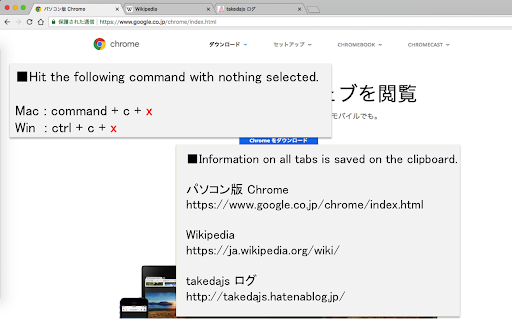

When you press command+c(mac) or ctrl+c(win) with no character selected, save the page title and URL on the clipboard. When you press command+c (mac) or ctrl+c (win) with no character selected, save the site title and URL on the clipboard. When you want to acquire all tabs: command+c+x (mac) or ctrl+c+x (win). ■option setting ・You can select the information that can be copied from "title & URL", "title only", "URL only" or "Markdown". ・You can choose whether or not to activate functions that can obtain all tabs ■supplementary information ・Currently does not work on some sites, such as the following https://chrome.google.com/webstore/category/extensions

EasyCopyLink
You can copy page link from right-click menu to clipboard in various formats: Title, URL, Title+URL, HTML, Markdown, RichText. The available formats that can be copied are as follows: "RichText" is a text with link that can be clicked on to open in a browser, making it useful for pasting into chat rooms such as Slack. You can turn the display on and off from the menu of this extension, so you can display only the formats you use most often in the right-click menu. Note: This extension does not work on special pages as followings, due to the functional limitations of the Chrome extension API ( "chrome.scripting.executeScript" ). - Settings page of Chrome ( chrome:// ) - Chrome Web Store ( https://chromewebstore.google.com )

Just Copy URL
閲覧中のページのtitleとURLを即座にクリップボードにコピーする。ただそれだけのエクステンション。 アイコンを押せばすぐに見ているページのURLをクリップボードにコピーできます。「たくさんメニューがあると条件選択が煩わしい」という方に。「title(改行)URL」の形でコピーするので、メール・ブログ・資料作成などに便利かと思います。 【利用方法】 エクステンションをインストールし、有効にする アイコンをクリックすると即座にクリップボードにコピーされるので、必要な場所にペーストする 【更新履歴】 v1.0.4: 選択中のページがアクティブでない場合にコピーが失敗する問題を修正し、以前と同様に拡張ボタンを押すだけでタイトルとURLがコピーされるよう改善しました v1.0.3: Manifest V3移行に伴い、CSPの修正と外部スクリプト(Google Analytics)の削除を行いました 拡張機能の機能はこれまで通り「1クリックでタイトルとURLをコピーする」だけです

BlogLinkClipper
This extension copies to clipboard URL, and Title for various formats. For link shareling with title or writing documentation. Awesome Copy Extension(Google Chrome) that copies TITLE/URL combination to clipboard with various formats in current tab. It's useful to share URL with Title or writing documentation, and more. - Copy TITLE/URL combination to clipboard in various format. - Get short url with Firebase - Cleanup Amazon Product URL(ASIN) - Simple format: between title and url, be inserted line feeds - HTML link tag format: `title`. (`_target="blank"` supported.) - Markdown: `[title](url)` - Redmine: `"title":url` - JIRA: `[title|url]` - reSTructuredTest: ``title `_` - MediaWiki: `[url title]` - PukiWiki: `[[title:url]]` - DokuWiki: `[[url|title]]` - Hatena notation (Japanese hacker popular): `[url:title=]`

uAutoPagerize
A browser Extension for auto loading paginated web pages!!! *What's this This is an extension that provides infinite scrolling on various sites. It is a derivative of AutoPagerize. It is an extension that automatically loads and appends the "next page" in search engine, blogs, etc. * How to use When you scroll to the bottom of the page, the page will be added without your permission. When you cannot use the comment box due to the addition, click the green icon in the page to pause it. This may not work well on sites that change pages dynamically using JavaScript. In that case, right-click on the toolbar icon and select "Disable on this page".
