
njmfdgbnfpedmffpabdlhhfapncpkhbf
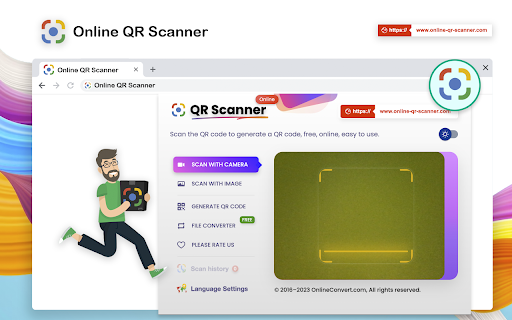

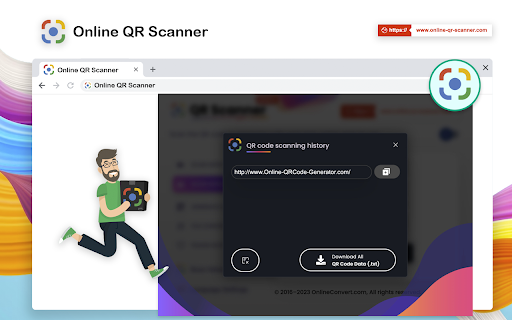

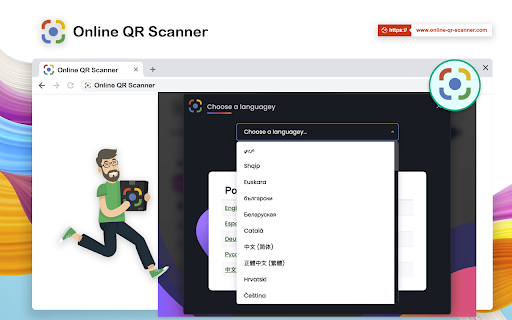
Online QR Scanner allows you to obtain QR codes through camera and picture scanning, online, free and easy to use. Online QR Scanner allows you to obtain QR codes through camera and picture scanning, online, free and easy to use. This is a Chrome QR code scanner plug-in extension that quickly reads QR codes from web pages. Read QR code from website Read QR code from image file on computer Read QR code from webcam. To do this, you need to grant access to your webcam, which will scan the QR code you hold Save your scanned QR code data. All QR code data can be downloaded at the same time. Scan the QR code data to edit them again. Create your QR code data. Download PNG, SVG, JPG. The QR code scanner plug-in extension supports up to 50 languages. Scanner plug-in extension supports black and white skins. QR Code scanner plug-in extension will make you fall in love with it.

QR Code Reader
This simple QR Code Reader app lets you scan QR codes from a web page or uploaded image, or via your camera or screen sharing Looking for a simple and effective way to scan qr code directly in your browser? The image qr code reader Chrome extension makes it easy. No need to juggle multiple devices. This extension works entirely in your browser. You don’t have to download app on your computer anymore. With this Chrome extension, everything happens on your desktop. 💪 Where can this app scan QR codes from? 1. Uploaded images 2. The current browser tab 3. Your PC’s camera 4. Other apps via screen sharing ▸ Key reasons users love this tool: 1) Works directly in Chrome - no switching apps 2) Supports live scanning from web pages 3) Your privacy is protected - no data shared 4) Clean interface with no learning curve 5) Fast, accurate, and ad-free 6) Ideal for business, education, and daily browsing 7) Maintains browser speed and performance Need to access links, documents, or contact details? This qr code reader application decodes them instantly. It’s a smart solution for busy users who don’t want to reach for their phone every time. 1️⃣ Here’s how it works: 1. Visit any web page with a visible QR code 2. Click the extension icon in your Chrome toolbar 3. Instantly decode and view the content 4. Or, upload a file to use decode from image feature 5. Copy, open, or save the decoded result as needed Not all data matrixes are printed or physical - many are in digital form. That’s why the qr code reader from image feature is so helpful. Drag and drop any image into the extension popup to decode instantly. ➤ Top use cases include: - Accessing event check-ins directly from invitation emails - Read qr code from image , invoices, brochures, or ads - Scanning from product pages to get bonus content - Testing encoded data during web development and marketing - Viewing Wi-Fi or business card info from screenshots For anyone who regularly interacts with quick response content, having a dedicated qr code reader pc tool can save time. There's no need to grab your smartphone. Just scan and go from your browser—whether you're at home, at work, or managing an online team. 📋 Frequently Asked Questions: * Does this extension store my scans? No. All scans are processed locally in your browser. * Can it read blurry or small QR codes? Yes, the scanner is optimized for common formats. * Is it compatible with all types of images? It works with standard data formats like links, text, and contact info or any other encoded text • Main benefits at a glance: • Scan fast from any webpage • Upload and read images quickly • No external software or mobile device needed • Safe and easy to use right inside Chrome • Perfect for students, professionals, and developers Unlike many tools that require cloud access or background tracking, this qr code reader online extension runs privately within your browser. There's no login required, and your data never leaves your device. It's a simple, secure solution for quick decoding. If you’re tired of interrupting your workflow, this extension is for you. Our quick response code reader app is built for seamless desktop use. No popups, no lag—just immediate results from the web or any uploaded file. 🌟 Why it’s better than using your phone: 1️⃣ No camera aiming or shaky hands 2️⃣ Saves time when browsing or researching 4️⃣ Use QR Code Reader for pc to read images that aren’t scannable via smartphone 5️⃣ Streamlines tasks directly in your browser tab Whether you need a qr reader for occasional scans or daily use, this Chrome extension is always ready. It's the ideal quick response code scanner for desktop users who value speed and simplicity. Don’t overlook the convenience of a browser-based code reader qr tool. It’s especially handy for team environments, online classrooms, or remote workspaces where link sharing happens often. • Additional features to love: * Lightweight and doesn’t slow down Chrome * Recognizes most images instantly * Drag-and-drop interface makes uploads simple * Easy access from the browser toolbar * Updated regularly for performance and compatibility This quick response code scanner helps you stay focused and organized. You no longer have to stop what you're doing to grab your phone or search for a mobile app. Everything works in-browser—right when you need it.

QR Code Generator
Have you ever felt the need to quickly open an URL on your smartphone while browsing the page on your desktop or laptop? Entering it manually in your mobile browser address bar, copying and sending it via email or messenger are some of the tedious ways to achieve it. QR Generator extension to scan and generate new QR code. This extension offers a set of very unique features. Which enable users scanning and creating new QR within just a click. A powerful Barcode Scanner supports scanning from the camera or local image files and keeps the history of the last 100 scans. It supports almost all known formats, including text, link, ISBN, coupon, and contact. What is a Barcode? It is a method of representing data in a visual, machine-readable form. Initially, barcodes represented data by varying the widths and spacings of parallel lines. Thank you for use it, if you like our app, please give it 5 stars for the QR scanner extension!

QR Code Reader
a multiple QR- and bar-code scanner that supports scanning from webcam and local images A powerful QR-code (Quick Response code) and barcode scanner supports scanning from the camera or local image files and keeps the history of the last 100 scans. It supports almost all known formats, including text, link, ISBN, coupon, and contact. Privacy: This extension does not rely on any external services to perform detection. There is no server-side interaction whatsoever. Features: 1. Read multiple QR-codes on a single image 2. Supports multiple protocols 3. Saves the history of scanned items 4. Drop local image files to the user interface 5. Uses both native method and ZBar library to maximize the detection power. This extension uses ZBar c-library, to extract multiple QR-codes and barcodes in a single image frame. What is a QR code? It is a type of matrix barcode that is a machine-readable optical label. A QR code contains information about the item to which it is attached. A QR code uses four standardized encoding modes (numeric, alphanumeric, byte/binary, and kanji) to store data efficiently. What is a barcode? It is a method of representing data in a visual, machine-readable form. Initially, barcodes represented data by varying the widths and spacings of parallel lines.

Make QR Code
Create QR codes with Make QR Code extension easily, generate or scan one in a snap. Make QR Code has all you need. 🚀 Introducing Make QR Code: Your all-in-one solution for seamless QR code interactions in Chrome. With this extension, you can swiftly generate a code from your current page URL or make a custom one from data you provide. But out extension isn’t just about creating codes, it boasts a powerful scanner too. Scan codes directly from web pages or uploaded files, delve into their content, or instantly follow the linked URLs. 🤝 Networking: Elevate your connections by creating encoded, easlily-scannable links to digital business cards or vCards. 🎨 Personal Portfolio: Freelancers and artists can generate QR links to portfolios, be it on LinkedIn or a personal website. 🎉 Events: Generate encoded links to invitations with embedded RSVP forms, directions, or additional details. 📚 Learning: Students and lifelong learners can embed QR links in notes, granting easy access to supplementary online resources, videos, or literature. 🛜 WiFi: Let your guests access your network easily. Swap complex Wi-Fi passwords for a simple QR scan. 💲 Payments: Amplify the checkout process with QR-based payment solutions. 📦 Product Enhancement: Enhance product labels with QR links leading to detailed information, video demos, or user manuals. 🎯 Marketing & Promotion: Direct potential customers to special offers, landing pages, or app downloads via QR. From event ticketing to real estate listings, loyalty programs to feedback surveys, and intricate supply chain tracking—this extension got you covered. 🔗 Popular Platforms: Effortlessly craft QR links for platforms like YouTube, LinkedIn, Pinterest, Twitter, and more. Want a QR code directing to your latest Instagram post, TikTok video, or Medium article? You are looking at the right tool. Direct audience traffic to Spotify playlists, SoundCloud tracks, or Anchor podcasts. Showcase designs on Behance or Dribbble, or list products on Etsy—all made easy and at your fingerprint. Whether scheduling on Calendly, hosting on Zoom, or pinpointing a location on Google Maps, Make QR Code simplifies the process. - 🎥 YouTube & Streaming Platforms: Generate codes seamlessly to direct viewers to your latest YouTube video or a complete channel. Enhance user engagement and streamline their journey from QR scan to video playback. - 💼 Professional Networking: Encode links tailored for platforms like LinkedIn and Pinterest. Professionals can easily create QR codes linking directly to their LinkedIn profiles, making networking more efficient. Similarly, showcase your curated boards on Pinterest just by letting others scan a code. - 🐦 Social Media: Stay ahead in the social media game, by creating codes links for Twitter, directing followers to specific tweets or profiles. Additionally, if you wish to highlight your latest Instagram post or a buzzing TikTok video, generate QR codes and make sharing effortless. - 📝 Content Platforms: Content creators can leverage Make QR Code for platforms like Medium. Guide readers directly to your articles, essays, or stories, enhancing their reading experience with a simple scan. - 🎵 Music & Podcasts: Direct your audience to Spotify playlists, SoundCloud tracks, or Anchor podcasts effortlessly. Whether you're a budding artist, a renowned musician, or a podcast host, Make QR Code offers an easy solution to increase your reach. - 🎨 Design Portfolios: As a designers, showcase your designs on Behance or Dribbble easily by creating QR codes. Let potential clients or employers scan and view your work portfolio in an instant. - 🛍️ E-commerce & Listings: Sellers on Etsy can utilize the power of this extension to direct shoppers to specific product listings or entire shops. Enhance the shopping experience and boost sales with easily scannable QR codes. - 📅 Scheduling & Meetings: Streamline your scheduling process with Make QR Code. Whether setting up appointments on Calendly, hosting webinars on Zoom, or providing directions via Google Maps, transform user experience with easy-to-create QR links. ⭐ Why Choose us?: With features enabling you to create, generate, link, and scan, Make QR Code stands out as the ultimate companion for Chrome users.
