
njlnfkifnhnbhclecinmajfccpenpbol
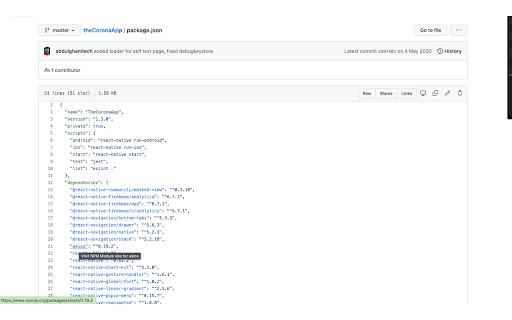
Enhance Github's package.json file viewing experience by making npm dependencies as direct links to npm package page. An extension for enhancing Github's package.json file viewing experience by making NPM dependencies as direct hyper links to corresponding NPM package page Features: 1. Adds links to NPM page for all packages listed as dependencies and devDependencies 2. Easily navigate to package page right from GitHub without googling or searching. 3. Displays Links button to manually toggle NPM links for all packages 4. Enhances any package.json file viewing experience on Github. 5. Supports linking for dependencies, devDependencies, optionalDependencies, peerDependencies, bundledDependencies from package.json 1. "*://*.github.com/*" - for running on github.com domain. OPEN-SOURCED and LICENSE: For more updates, please stay tuned! For any feedback or issues please open an issue on https://github.com/abdulghanitech/github-package-json-enhancer/issues

StarterCSS
Rapidly implement CSS layouts, effects, and designs without parsing through online docs StarterCSS is a beginner-friendly version of devtools that cuts out time spent Googling for CSS docs and tutorials. StarterCSS provides a dashboard to implement, experiment with, and visualize CSS features at just a few clicks. The dashboard is directly embedded as a devtool panel (alongside the "Styles" and "Computed" panels) for quick access. Simply inspect an element and quickly make changes to it in the StarterCSS panel. With StarterCSS, you can: ✅ Add and customize layouts like flexboxes and grids, in addition to various visual attributes, in seconds ✅ Visualize and test CSS code in isolated environments ✅ Encounter fewer context switches from needing to look up CSS docs ✅ Export created designs/layouts into CSS for copying into your local code editor To access the extension, go to the "Elements" Tab in Chrome Devtools (Right Click > "Inspect" or Command+Shift+C). You should see a separate row with tabs like "Styles", "Computed", and "Layout". StarterCSS will be another panel here; if you've just downloaded the extension, you may have to click the ">>" (see more) icon to see all panels. If you'd like to leave feedback, visit bit.ly/startercss-feedback.

Npm Package Manager
Multiple package managers support for the npm registry website This extension adds support for multiple package managers to the npmjs.com registry. - Support for multiple package managers (npm, yarn, pnpm, ni & bun). - Display both the command to install a package as dependency or development dependency. - Display an extra command to install TypeScript declarations for packages having external declarations. - Use package version in install commands when visiting a specific version package page. - Add back the ability to click on the entire command to copy it. - Remove the layout shift of the entire page when copying a command. - Pin the sidebar so it is always visible even when scrolling down long package descriptions.

Open with Code
Works for: * Github * Azure devops

npmhub
On every GitHub repository or folder with a package.json file, scroll to the bottom of the page to see a list of its npm dependencies and their descriptions. - the package.json file - npmjs.com - RunKit to test the package - BundlePhobia to see the package size when bundled - PackagePhobia to see the package size when installed - NPMGraph to explore the sub-dependencies - UNPKG to see the exact contents published to npm GitHub Enterprise is also supported by right-clicking on npmhub's icon in the toolbar and selecting Enable npmhub on this domain.
