
mkflcfbfnijaofdeeflecnjlooefmcka
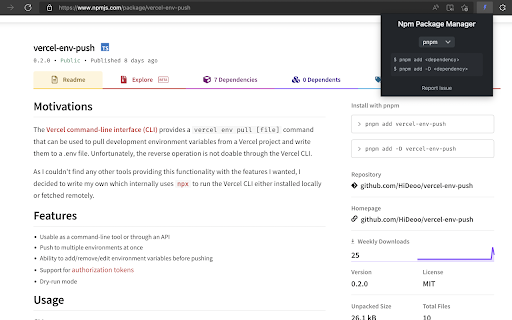

Multiple package managers support for the npm registry website This extension adds support for multiple package managers to the npmjs.com registry. - Support for multiple package managers (npm, yarn, pnpm, ni & bun). - Display both the command to install a package as dependency or development dependency. - Display an extra command to install TypeScript declarations for packages having external declarations. - Use package version in install commands when visiting a specific version package page. - Add back the ability to click on the entire command to copy it. - Remove the layout shift of the entire page when copying a command. - Pin the sidebar so it is always visible even when scrolling down long package descriptions.

Tanuki Utilities
Provide useful utilities for GitLab users. * Change the GitLab favicon to a project icon; you can easily distinguish many GitLab tabs. * Move "Copy reference" button on top bar; the button is always shown for your easy access. This extension tries to change favicons in the **all** sites by default. You can specify which GitLab site (e.g. gitlab.com or your self-hosted site) you would like to change favicons. #### Change the GitLab favicon to a project icon

StarterCSS
Rapidly implement CSS layouts, effects, and designs without parsing through online docs StarterCSS is a beginner-friendly version of devtools that cuts out time spent Googling for CSS docs and tutorials. StarterCSS provides a dashboard to implement, experiment with, and visualize CSS features at just a few clicks. The dashboard is directly embedded as a devtool panel (alongside the "Styles" and "Computed" panels) for quick access. Simply inspect an element and quickly make changes to it in the StarterCSS panel. With StarterCSS, you can: ✅ Add and customize layouts like flexboxes and grids, in addition to various visual attributes, in seconds ✅ Visualize and test CSS code in isolated environments ✅ Encounter fewer context switches from needing to look up CSS docs ✅ Export created designs/layouts into CSS for copying into your local code editor To access the extension, go to the "Elements" Tab in Chrome Devtools (Right Click > "Inspect" or Command+Shift+C). You should see a separate row with tabs like "Styles", "Computed", and "Layout". StarterCSS will be another panel here; if you've just downloaded the extension, you may have to click the ">>" (see more) icon to see all panels. If you'd like to leave feedback, visit bit.ly/startercss-feedback.

npmhub
On every GitHub repository or folder with a package.json file, scroll to the bottom of the page to see a list of its npm dependencies and their descriptions. - the package.json file - npmjs.com - RunKit to test the package - BundlePhobia to see the package size when bundled - PackagePhobia to see the package size when installed - NPMGraph to explore the sub-dependencies - UNPKG to see the exact contents published to npm GitHub Enterprise is also supported by right-clicking on npmhub's icon in the toolbar and selecting Enable npmhub on this domain.

NPM Stats for GitHub
📊 NPM Stats for GitHub adds a handy NPM insights panel to GitHub repositories, showing download statistics of NPM packages. 💡 Free & Open-Source! If you enjoy using NPM Stats for GitHub, consider supporting its development with a small donation here: https://ko-fi.com/katranci ☕
