
nicniafaonbgngeafndijllgloaockkf
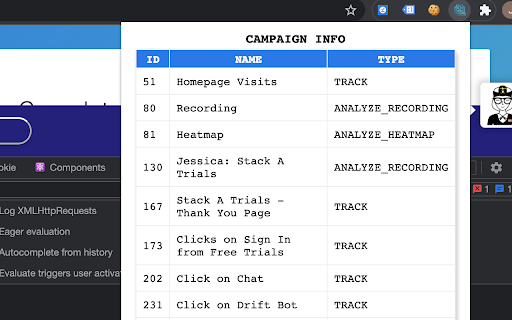
View all VWO campaigns running on a page When an application is integrated with VWO A/B testing tool and campaigns are configured to be running on its pages, this extension will be of help to identify all the campaigns running on each page.

Regna | Ens Discovery Tool
Inspired by the rise of ens clubs, we have decided to make a tool that makes it easy to inspect all profiles on Twitter with a valid ENS name Currently, you can see all of their ENS names filtered by clubs. F.A.Q. 1) Do I need to log in with Metamask? No. The extension uses the same on chain data available on Etherscan or Opensea. 2) How do you detect what a person owns? When an ENS name is displayed, you can easily search for the owner of that name. Once you know the adrress of the owner, you can see all their assets. 3) Why have you built this? This extension was built because searching what ENS names someone holds on Opensea is not practical. Imagine being 1-click away from seeing what your Twitter frens have. 4) How do I start using the extension? Once installed, it works automatically. No further configurations needed. Simply start browsing on Twitter.

Appdron AI
Powerful & Sleek ChatGPT UI For Marketers & Content Creators Experience Appdron AI's ChatGPT UI, perfect for savvy marketers and content creators. Simply press the launch button at the bottom right of the page or press Command+J ("command" key on Mac or the "Windows" key on Windows) and instantly Become a Productivity GOD. Get it now and unleash your potential. This Preloaded AI tool will be ready to help you. It comes preloaded with many useful tools and functions. Unleash your inner copywriting god and revolutionise your sales game with AI-powered assistance that helps you effortlessly craft high-converting sales copy. Overcome writer's block and supercharge your productivity with AI-powered article writing that frees up valuable time to earn more money. And never struggle with email responses again with AI-powered epic replies that allow you to effortlessly compose captivating emails in mere seconds. With these powerful tools at your disposal, there's no limit to what you can achieve!

Meet Lattice
Lattice Web Extension for Google Meet

MOPPI - my Optimizely Power Inspector
Get all runtime information to boost your quality assurance while building and running online tests and experimentation. MOPPI – The Ultimate Toolkit for Optimizely, Tracking & QA Stop digging through the browser console. Start optimizing. MOPPI is the powerful, all-in-one browser extension designed specifically for CRO managers, QA engineers, and web analysts who want to master Optimizely Web and Web Tracking. Whether you are running complex A/B tests or validating intricate tracking setups, MOPPI turns hours of technical troubleshooting into seconds of clarity. 🚀 Why MOPPI? Testing and QA shouldn't feel like detective work. MOPPI provides a crystal-clear lens into your website's data layer. From real-time event monitoring to effortless screenshot documentation, MOPPI is the "Power Pack" that ensures your setups are flawless before they ever hit your users. 🛠 TWO MODES, ONE GOAL: TOTAL CONTROL MOPPI adapts to your workflow with two specialized interfaces: 1. Simple Mode: Efficiency for Everyone Perfect for project managers and stakeholders who need a quick status check or easy documentation. Experiment Overview: See exactly which tests are live on the current page. Variation Switcher: Change your assigned variation via a simple dropdown to inspect different test scenarios instantly. One-Click Screenshots: Generate standardized QA documentation. MOPPI automatically includes technical metadata (URL, Viewport) and can even hide the Optimizely preview overlay for a clean shot. 2. Professional Mode: The Deep-Dive Dashboard Built for the power user who needs to see every moving part under the hood. Campaign Central: Manage A/B tests and personalizations, check Holdback status, and view detailed Experience IDs. Advanced Experiment Power: Compare traffic shares or open all variations in new tabs simultaneously for side-by-side visual QA. Visitor Insights: Instantly view the Optimizely End User ID (oeuid), decoded DCP tables (Dynamic Customer Profiles), and granular Geo-data. The Log: No more console chaos. View cleanly formatted debug info directly in your dashboard via console.optly. 📡 REAL-TIME MONITORING: THE SIDE PANEL The MOPPI Side Panel is your live command center. Observe the data stream as you interact with your site across 7 specialized categories: Navigation & Redirects: Reveal hidden redirect chains and analyze URL parameters at lightning speed. Optimizely Pages: See exactly when a page activates or deactivates, ensuring your triggers are firing perfectly. Decisions: Watch Optimizely make decisions in real-time. See why you were assigned to a specific variation. Custom Events: Monitor your unique event triggers and associated properties as they hit the data stream. Google Events: A game-changer for analysts! Monitor GA4, Google Ads, and Doubleclick events. MOPPI translates cryptic Google parameters into readable, plain-English insights. MOPPI Log: View your custom code’s debug events in a structured, real-time feed. 💎 STANDOUT FEATURES Intelligent Icon Status: The MOPPI icon changes color (Blue for active, Grey for inactive) and displays a badge with the number of running experiments so you know exactly when to start your QA. Cookie Management: Set or delete the Optimizely test cookie with a single click—no more digging through browser settings. Custom Tracking Patterns: Support for Server-Side Tracking! Define your own URL patterns to make custom or server-side requests visible in the event stream. DCP Mapping: Import attribute definitions from the Optimizely backend to transform cryptic IDs into understandable visitor profiles. Multi-Language Support: MOPPI speaks your language. Available in English, German, and Spanish, with automatic browser detection. 🔒 PRIVACY & TRUST Developed by Michael Richter, MOPPI is built by an optimizer, for optimizers. It is designed to be lightweight, secure, and purely functional, respecting your workflow and your data. Stop guessing. Start knowing. Install MOPPI today and take your Optimizely QA to the professional level.
