
jmhajofndhmoidmnpoceegmjgceeckgp
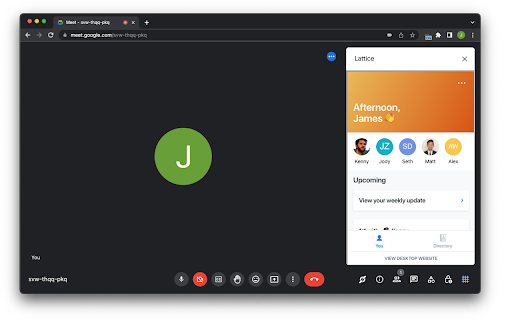
Lattice Web Extension for Google Meet

20Q Text Converter with AI
Enhance text editing: remove accents, filter characters, replace spaces, substitute strings, adjust text case and more. 20Q Text Converter with AI Elevate your text editing experience right within your browser with the 20Q Text Converter! Designed with precision and simplicity in mind, this extension caters to diverse text manipulation needs and now includes translation capabilities: 🖋 Accent Removal: Make your content universally readable by eliminating diacritical marks. 🤖 AI-Powered Text Enhancement: Elevate your content with AI-driven improvements in clarity, tone, and style. 🔒 Special Character Purge: Cleanse your text of distracting or unnecessary symbols with ease. ↔️ Customizable Space Replacements: Personalize spacing by replacing empty gaps with a character of your choice. 🔄 Quick String Substitutions: Instantly replace selected text portions with your desired alternatives. 🎨 Flexible Text Styling: Choose from UPPERCASE, lowercase, or capitalize formats to set the right tone. 🔢 Live Text Analytics: Get immediate feedback with dynamic character and word counts. 📋 Effortless Clipboard Actions: A single click to copy your processed text or to reset your workspace. 🌐 Seamless Translation: Instantly translate text to multiple languages with just a few clicks. Maximize productivity and ensure your content's best version with the 20Q Text Converter. Ideal for content creators, developers, and everyday Chrome users seeking to enhance their text manipulation capabilities.

Naro
Naro is an always-on sales knowledge assistant that helps sellers organize and surface the right content and knowledge in every customer interaction -- email, in meetings, demos, and beyond. We work right alongside the apps you use today (Gmail, Gong, Zoom, etc.) and pull in data from your CRM (Salesforce, Hubspot) and LinkedIn. We remove the need to search by unifying everything a seller might need (from slides to snippets) so teams can trust everything they need is in one platform.

LeadhuntAI - Chrome Extension
The extension will allow you to easily retrieve session cookies each time you use Leadhunt 🚀 Elevate Your Sales and Networking with the GrowthEffekt - Leadhunt Chrome Extension! 🚀 Transform your browsing experience and supercharge your sales and networking efforts with the Leadhunt Chrome Extension, designed meticulously for professionals seeking to optimize their interactions and streamline their workflows. ✨ Seamless Session Cookie Updates: Ensure a smooth and uninterrupted experience on Leadhunt by effortlessly updating your session cookies. Stay logged in and maintain your productivity without missing a beat! We achieve this by securely fetching cookies from multiple domains. ✨ Automated Prospect Identification: Turbocharge your lead generation with our intelligent prospect identification. The extension smartly recognizes potential leads as you browse, providing you with crucial information and insights to make informed decisions. ✨ Instant Access to Message Templates: Enhance your communication with access to a plethora of customizable message templates. Located conveniently in a sidebar, these templates are designed to suit various scenarios, helping you save time while maintaining a personalized touch. ✨ Synced Conversations with Leadhunt CRM: Say goodbye to manual updates! Our extension ensures that all your messages and conversations are automatically logged and synchronized with the Leadhunt CRM. Keep your sales pipeline up-to-date and track your interactions effortlessly, ensuring you never miss an opportunity. 🔗 Easy Integration, Unmatched Productivity: The Leadhunt Chrome Extension integrates seamlessly with your browser, offering a lightweight yet powerful solution to elevate your networking and sales strategy. Don’t let manual tasks slow you down. Install the Leadhunt Chrome Extension today and experience a world of efficiency, precision, and growth! 💼✨

OpenText Core SCA Select Extension
Open Source Select will help developers find and use the right open source and reduce friction between organisations and developers Open Source Select helps you find and use policy compliant and great open-source for any development project. The OpenText Core SCA Select Extension is a free plugin created with developers in mind, enabling you to check the health metrics and license information of an open source project at a glance. If you need more granular data, the extension can lead you to Open Source Select for more detailed information. The three types of metrics you can examine are: Community - How healthy the community around a project is. Popularity - Is it used by many? Is the usage declining? Security - How well does the maintainers apply security best practices. The extension now supports Start Left Policies. This lets you immediately see if the open source you are browsing is compliant with your company’s open source policy, without the need to import and scan code with Software Composition Analysis tools and common source code repositories and package registries such as GitHub, pypi, npmjs, nuget and many others are supported.
