
niaholaehmipmbpoagjmdlocnhakeonl
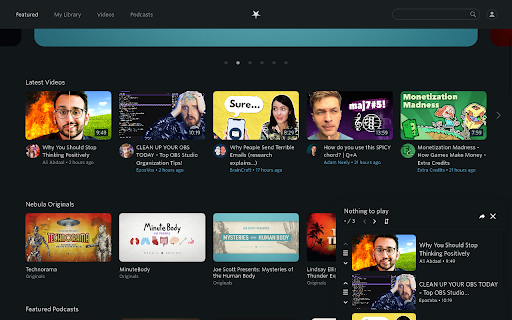


Enhancer for Nebula. Adds some quality of life features to the nebula player. Heavily inspired by Enhancer for YouTube™. This extension aspires to bring some useful features to the Nebula.tv site. **Features** Page: - Queue: Add videos to watch queue - Share: Queue is shareable -- Bookmark and Share your list! - YouTube Link: This extension can try to find the corresponding YouTube video (enable in settings) - Watch on Nebula: On any YouTube video page tries to find the corresponding Nebula video (enable in settings) -- Optionally automatically open it in a new tab - Hide creators: Enables you to hide videos by certain creators - Hide watched videos: Hides videos that Nebula says you've watched - RSS: Add feed button to creator page via external tool (enable in settings) - Style visited links to mark visited videos Player: - Quick dial to set speed: New button in player to increase/decrease speed by scrolling - Scroll over player to set volume (enable in settings) - Toggle time display between current/remaining time - Autoplay: Start videos automatically - Keyboard shortcuts: Shortcuts in video player - Customize buttons in player If you have any suggestions, please open a new issue. Full information and changes: https://github.com/cpiber/NebulaEnhance#readme

StreetPass for Mastodon
Find your people on Mastodon StreetPass is a browser extension that helps you find your people on Mastodon. Here's how it works: 1. Mastodon users verify themselves by adding a custom link to their personal site. 2. StreetPass lets you know when you've found one of these links, and adds them to your StreetPass list. 3. Browse the web as usual. StreetPass will build a list of Mastodon users made up of the websites you go to.

Video Enhancer for YouTube™
Increase playback rate up to 16x, boost the audio, adjust both the brightness and contrast and add various filters to your video. Enhance your video with various useful and helpful options and filters. Features: • Adjust the playback rate of the video from 0.1x to 16x • Boost the audio • Loop the video • Loop over specific sections of the video • Adjust the brightness • Adjust the contrast • Add and adjust up to 7 more filters • Toggle Picture-in-Picture(PiP) mode • Customize the theme and font size of the extension You can report issues and request features here: https://github.com/isgkm/VEfYT Version 2.0.0: • Refactored the majority of the codebase fixing some bugs and improving performance • Redesigned the UI • Added the ability to edit filter values directly in the text fields to allow more precise inputs • Added the option to loop the video • Added the option to loop the specific sections of a video • Added the font size option to the settings page Version 1.2.0: • Added the option to toggle Picture-in-Picture(PiP) mode Version 1.1.0: • Now you can adjust the filter values more precisely with the mouse wheel • Added the option to not reset filters on video change • Added the option to customize the colors of the extension

YouTube Refined: Improve's YouTube UI
Updates the Desktop YouTube UI to have rounded corners and further enhancements and tweaks. Refine and enhance the desktop experience of YouTube with more consistent UI, rounded corners and general tweaks. This extension does not change any functionality of YouTube, this is simply an UI polish and enhancement. The UI tweaks will work in both light and dark mode and will adapt accordingly. Below is a list of the UI tweaks that have been currently made: SUBSCRIPTIONS: - Increased spacing between each video - Added a hover animation to each video, making it clear which video you are clicking and to add some flare. - Video thumbnails now use rounded corners VIDEO PLAYER: - Adds rounded corners to video player - Increased the roundness of corners on action buttons - Adds rounded corners to the individual flyout cards - Adds a hover animation to the individual flyout cards - Fixes the flyout menu appearing below end slate elements - Adds a background colour to the Share, Download, Clip and Save buttons to make them more consistent with other action buttons - Increased the spacing of elements within the channel strip and top comment strip - Adds rounded corners to the channel strip and top comment sections - Adds rounded corners to the hover boxes of end slate items and video thumbnails COMMENTS - Adds clear separation of each comment by adding a faint border and increased padding - Increases the spacing between comments and the "See more replies" button. - Adds clear separation to each comment within the reply chain including a faint border RELATED VIDEOS - Adds a hover animation to each video (slight slide out) - All thumbnails have rounded corners - Made the progress indicator bar of unfinished videos slightly transparent - Adds a background colour and CONTINUE WATHCING label to videos that have been previously watched but not yet finished. This makes it super clear what is a new recommendation and what is a previously watched item. VIDEOS (Displayed anywhere) - Added a red background colour to the Live and Premiere indicators with white text. Also increased the rounded corners and padding. - Increased the roundness of corners of video length indicator - Slightly increased the padding of video length indicator SEARCH BAR - Adds rounded corners to the top search bar - Reduced the width of the search button v1.0.1 - Updated the extension to support the latest version of YouTube's UI

Video Dominator
Hover over any video, hold the right mouse button down, and use mouse wheels or buttons to seek, adjust volume, speed, and more. Hover over different areas of any video, hold the activation key down (right mouse button by default), and use mouse wheels or buttons to perform an unlimited number of custom actions such as: - play/pause the video - seek by, seek to (units available: second, frame, %) - adjust or set playback rate (0x to 16x) - adjust or set volume - toggle mute - toggle picture-in-picture mode - toggle custom player On some websites, you can also: Overlay Element - hover over a video, hold the activation key down and use mouse wheels or buttons - activation key can be the Right Mouse Button, Ctrl, Alt, or Shift - available on almost any website Video Element - hover over a video and use mouse wheels or buttons - works only when the video is a top-most element (on websites such as YouTube, Odysee, Nebula, CuriosityStream) - customizable overlay temporarily shows you info depending on the last action, such as: - volume - playback rate - current time, current time / duration, remaining time - time can be based on the current playback rate - a full window or full screen player with minimalist UI and no popups or any other distractions - you don't need to hold the activation key down while using mouse controls - unlimited number of custom keyboard shortcuts - customizable progress bar - none - the extension will run on all domains - blacklist - the extension will not run on listed domains - whitelist - the extension will run only on listed domains Storage - for storing extension settings Downloads (optional) - for downloading media files This extension does not collect personal data from users, and it does not send any user data to a remote server. The only data it collects are extension settings, and this is stored locally on your PC.
