
nhloiohdkbjmbmkoblicepmblbgiploo


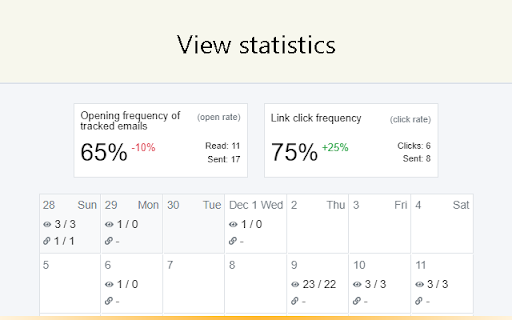
How to know if an email has been read? TraksPaks solves this problem for Yandex.Mail users. How it works: After sending an email from the web version of Yandex.Mail, a gray check mark next to this email will appear in the Sent folder. When the recipient opens it, the checkmark color will change to green. Thus, the sender can find out about the reading of the email sent by him. Features: - Email open tracking - Link click tracking - Checkmarks in the Sent folder show the status of email openings and links clicks - Various email notifications - Real-time read notifications - Reports: "Last read" and "Unread" letters, "Clicks on links", "Summary statistics", which also shows Open Rate and Click Rate - Segmentation of report data using email categories. For example, you can view statistics only for "Important" emails - Statistics export

Email Tracker + Pixelblock Detector & Blocker
Find out if your emails get read + pixelblock. Free & unlimited email tracking for Gmail, Outlook, Hotmail, Office 365 & Yahoo Mail Find out if your emails were read. Simply install and any future emails are automatically tracked. A circle will appear when the tracking is enabled on the sent email and a checkmark will appear when it has been read. Works for unlimited email accounts and sent emails. Works with Gmail, Outlook / Hotmail, Office 365 Outlook, and Yahoo Mail. For compatibility with other email clients contact us at info@emailtracker.website Now with Email Tracker Detector and Blocker (PixelBlock / Ugly Email Privacy Protector). Email Tracker Blocker detects and automatically blocks other email tracking pixels. This prevents others from seeing that you opened their emails. Email tracker does not ever store or transfer your email contents in order to ensure your privacy. Emails sent to only yourself are not tracked. If you want to test the extension send an email to another email account. Upgrade to pro and get full statistics, link tracking, and more. Visit https://emailtracker.website/pro For more information or help please visit https://emailtracker.website/help

Email Tracker for Gmail
Find out when your emails are read Email Track is the ultimate upgrade for your Gmail inbox. Designed to seamlessly extend the functionality of your inbox, this extension automates the tracking process so you never have to remember to click a button. Whether you are in sales, recruitment, or simply want to know your message landed, Mail Track for Gmail provides the insights you need to follow up with confidence. 📲 Integrated on Mobile: Email Track can be launched directly from the Gmail App on iOS and Android. Our system is fully integrated for mobile, allowing you to track and manage your emails on the go. ⚡ 100% Automatic: Forget manual inputs. We automatically insert tracking pixels into every outgoing email, ensuring you never miss a data point. 🔔 Real-Time Intelligence: Receive instant notifications the moment a recipient opens your email. Know exactly when and where your message was read. 📨 Detailed Read Receipts: Access a comprehensive history of opens and interactions directly within your Gmail interface. ⚙️ Smart Privacy Controls: Need to send a distinct email off the record? Easily exclude specific recipients or domains from tracking to tailor your privacy strategy. 🔒 Secure & Confidential: We adhere to strict privacy standards. Your email content and personal data remain secure at all times. 📥 Download Email Track today and turn your Gmail outbox into a powerful productivity tool.

MailTracker: Email tracker for Gmail
Track if your emails are opened & how many times. Be notified when your emails are read with our advanced Email Tracking extension. MailTracker – The Best Gmail Email Tracking Extension Receive real-time alerts and detailed insights whenever your emails are opened, so you can follow up at the perfect moment. With simple, one-click installation, MailTracker seamlessly integrates into your Gmail account to help you stay on top of every outbound email—scheduled or otherwise. • Real-Time Email Tracking Know exactly when and how many times your emails are opened. MailTracker’s invisible tracking pixel notifies you immediately whenever a recipient views your message. • Scheduled Email Tracking MailTracker is one of the only solutions that lets you track emails you’ve scheduled to send later. Stay informed even when your messages go out at a future date. • Multiple Inbox Support Connect all your Gmail accounts for multi-account tracking in one place. Easily switch between inboxes without losing visibility. • Individual Recipient Tracking in Group Emails Track exactly who opens your email when you send to multiple recipients. MailTracker identifies each recipient’s open activity so you can follow up accordingly. • IP Location with Link Tracking See where your recipients click links. Identify IP-based locations to gain extra insights into your email engagement. • CSV Export Export your open and click data for advanced analytics and reporting. Perfect for teams that want in-depth metrics or need to integrate with other tools. • Privacy-Friendly & GDPR-Compliant We never read your emails, store IP addresses, or share data with third parties. MailTracker is fully GDPR-compliant and undergoes Google-audited security checks for a trustworthy experience. • No Branding or Signatures Keep a professional, ad-free look: we don’t add logos or footers to your outgoing emails. • High Deliverability By sending directly through your native Gmail account (not a separate API), MailTracker ensures high deliverability so your emails are less likely to end up in spam. Get real-time alerts via email or Chrome notifications the moment your message is opened. You can also receive reminders if an email remains unopened for 48 hours, ensuring you never miss an opportunity to re-engage. Access a centralized, up-to-date feed of all recently opened emails. Easily spot which messages remain unopened and follow up with a single click. Fully Integrated with Gmail 1. Compose Window: Toggle tracking on/off for each new email (including scheduled ones). 2. Inbox View: Instantly see which messages are read or unread via MailTracker icons. 3. Conversation View: Review the complete open history and details right inside Gmail. • Free Plan: Track up to 20 emails per month with unlimited history, alerts, and notifications. • Premium Plans: Unlock unlimited tracking across multiple Gmail accounts. All premium plans include every feature—choose the plan that fits your team size and workflow. • Timely Follow-Ups: Send a friendly nudge when you see your prospect or client has opened (or not opened) your email. • Job Interviews: Know if a recruiter or hiring manager has viewed your resume or follow-up messages. • Quotes & Invoices: Verify when your clients receive crucial payment information and respond promptly if needed. • Real Estate Agents: Track property listings or contract details you’ve shared, so you can engage clients at the right moment. • Prospecting: Monitor opens and clicks during email outreach campaigns to optimize your sales or lead generation efforts. MailTracker adds an invisible tracking pixel to your email. As soon as your recipient opens it, we detect that event and send you an alert (via email or Chrome notification). When an email is opened, the tracking pixel loads on the recipient’s device. We record the open event, the time, and the device used—without ever accessing the content of your email. • Built by Hunter.io: A leading email-finding platform with over three million users and trusted by companies like Google, IBM, Adobe, and Microsoft. • Simple Setup: Quick Chrome extension—no technical expertise required. • Data Privacy & Security: We never store or read the content of your emails. • Proven Reliability: Over 150,000 active users rely on MailTracker for precise email open tracking and link click insights. MailTracker adds a tiny, invisible image to your outbound emails. When your recipient opens the email, that image loads, allowing us to instantly inform you. We also detect the device type—desktop, mobile, or tablet—for better engagement insights. Ready to Elevate Your Email Outreach? Install MailTracker today and experience a new level of efficiency and clarity in your Gmail. Stay on top of every conversation, know exactly when to follow up, and take full control of your email communication—even for scheduled messages! Make every email count with MailTracker—the easiest, most secure way to see who’s opening your Gmail messages.

Email Tracker For Gmail - MailerPlex
Free email tracker for Gmail. See email tracking and link click stats in real-time Mailerplex email tracker extension is a simple tool, which lets you see email opens and clicks in real-time. It's available as a chrome add-on for Gmail. With the extension, you can track your email opens, clicks and do appropriate follow-ups. Depending on your profession, email open tracking can give a boost to your outreach. For example, if you know when someone opens your email, how often, you can gauge their engagement levels and tailor appropriate content. Also you can reach them as soon they open, so that your email is fresh in their mind. If you are sending a number of emails from your Gmail account, here are some of the questions that are important for you. What happens after you send an email? Are your important emails being read? Do your prospects click on the resource links that you send them? With Mail Tracker extension, you can get these questions answered. You can also track Gmail location of your recipient and know if they have clicked on any link included in your email. It also comes with real-time notifications and detailed dashboard for your analysis. Listed below are the features of the chrome extension. REAL-TIME EMAIL OPEN NOTIFICATIONS (How do I know when someone opens my email) You will get a real-time notification, as soon as your email is opened by the recipient. This will help you to do perfectly-timed follow-ups and make your overall communication better. WE OFFER A FREE VERSION in the free version of MailerPlex, you can send 30 tracked emails per months without any signature. Also, it comes with real-time notification and access to a detailed dashboard. QUICK AND DETAILED DASHBOARD ACCESS Both free and paid versions come with access to a real-time dashboard. The dashboard has a detailed activity stream for your emails. Also, you can access your quick dashboard by clicking on the extension icon. MULTIPLE EMAIL ACCOUNTS IN THE SAME BROWSER Want to use both professional and personal email? MailerPlex comes with a robust multi-account feature. IDENTIFY ENGAGED LEADS AND THOSE WHO NEED FOLLOW-UPs With our detailed dashboard, you can easily identify the leads that are engaged with your content. Also, you can identify the ones who are not opening your emails and tune your communication accordingly. GET STARTED INSTANTLY. VERY SIMPLE TO USE We have designed MailerPlex to be extremely simple to use. And we would like to keep it that way. AFFORDABLE PAID VERSION Our pro version is priced at $6/User/Month ($4/user/month for annual plan) and comes with additional capabilities such as link click tracking, email support and other advanced features. We continuously add useful and essential features to our pro version, so that we can deliver more value to your sales process. WHAT OUR CUSTOMERS SAY - *Very useful for sales professionals like me. Helps with right communication and follow-ups. Add low price and simplicity to that.* - Kurt Eichenwood, VP Sales *Mailerplex enables my team to hire premium candidates better. We immediately act on the ones who have opened or clicked our mails. Those who don't open, we try to pitch them better. Must have for recruiters.* - Amy Christian, Recruitment Lead The $6/User/Month ($4/user/month for annual plan, cancel anytime) Mailtrack extension Pro version comes with link click tracking and additional pro-level functionality. For our customers, MailerPlex is an essential tool for their overall outreach and follow-up strategy. If you send professional as well as personal emails, tracking email opens and clicks could be very useful for you. Knowing whether someone opened your email, when they opened, their devices and location etc. may help you for better outreach. Here are some of the the ways you can use this information. To Do Better Followups - If you know that someone opened your email at a particular time, you can do a follow-up immediately to get better response. This is very useful when you are doing sales, business development, recruitment, job search and in many other professions. Studies have shown that if you reach your prospect at a time she is going through your content, you can get much higher response rate. To Know Highly Interested Prospects - If you see your recipient is opening your email multiple times and clicking on multiple links in your email, they are more interested. So you can tailor your follow-up email accordingly and can get better response. To Improve Subject Line or Offer More Value - If your emails are not getting opened, that may mean the subject line is not generating enough interest. You may need to work upon your subject or offer better value, so that they can engage with you. Depending on what you do, email open and click tracking may be very useful or even essential for you. But the challenge here is most of the email providers don’t track this information. For this you have to use a email Tracking tool like MailerPlex. MailerPlex is a simple Chrome extension for Gmail. Using MailerPlex, you can get detailed insight into the emails that you are sending.
