
nhcoglopkiacbogcjdcbhooedkaddimi

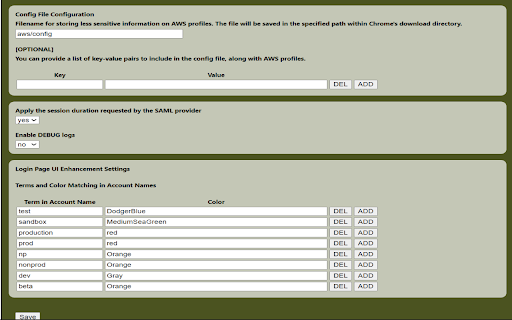
Generates credential/config file with multiple AWS STS Keys after logging in to AWS webconsole using SSO (SAML 2.0). Overview Generates a credentials (and an optional config) file with AWS STS Keys after logging in to AWS webconsole using SSO (SAML 2.0). It leverages 'assumeRoleWithSAML' API. Google Chrome Extension which converts a SAML 2.0 assertion to AWS STS Keys (temporary credentials -> AccessKeyId, SecretAccessKey and SessionToken). This extensions allows you to save keys in different configurations. 1.save keys for recent role logins (up to a maximum of 5). 2.save keys for user provided roles only. 3.save keys for all roles on the login page. Also have the ability to store a configuration (config) file for storing less sensitive information and add optional keys for this file like region, ca-bundle,.... Also this provides some login page improvements like: 1.Option to configure accounts by color based on a specific term. 2.Optimized the Login Page UI by removing the logo (option to restore it will be available in future updates). 3.Aligned roles horizontally on the Login Page to prevent scrolling and reduce strain on engineers' hands, fingers, and wrists (option to revert to the previous layout will be available in future updates). 4.Replaced radio buttons with role buttons on the Login Page to eliminate extra clicks and enhance user experience (option to switch back to radio buttons will be available in future updates). 5.Moved the Recent Logins section to the top of the Login Page and added the last login time for improved visibility.

Pokok JSON Viewer
Show the JSON in tree view or table view Provide a better view for JSON file - raw view - pretty printed view - tree view - table view - Swagger view

AWS AlwaysON
Stay logged in to AWS console and get STS credentials for CLI access. This extension enhances the daily work with AWS when using Google Workspace (formerly GSuite) as it's Identity Provider. Assuming you already have everything configured on both sides, this extension will help you with the following: - Keep your AWS Web Console session refreshed. You will not have to press the AWS link in the Google apps section every hour. - Get temporary STS credentials for CLI access (Replacing tools like aws-google-auth) After installing this extension you need to configure multiple options to get the extension to work properly. Each property has an info tooltip which will explain everything in more detail. This project is completely open source, so you can check it for any security concerns you might have. v1.2.1 - Updater client now supports both Windows and Linux. Check the GIthub page for more info. - You can now select the name of the SAML Provider you set in AWS. It was statically set to 'gsuite' till now. - Default values for options are now set each time you start the extension and not only on the first run.

AWS SAML to STS
Captures AWS SAML sign-ins and turns them into temporary STS credentials for the AWS CLI and SDKs. A Google Chrome extension for engineers who authenticate to AWS with SAML 2.0 and want temporary STS credentials they can copy into the AWS CLI or AWS SDK tooling. When you sign in to the AWS console through a SAML identity provider such as Okta, Azure AD, or ADFS, AWS receives a SAML assertion at https://signin.aws.amazon.com/saml. This extension intercepts that assertion, extracts the IAM role details, exchanges the assertion for temporary AWS STS credentials, and makes the credentials available in copy-friendly formats. Federated AWS access often works well in the browser but leaves a gap for local developer workflows. If your organisation uses SAML sign-in for the AWS console, getting short-lived credentials into the CLI or SDKs can still be awkward. This extension closes that gap without adding another service or credential broker.

SAMLify for AWS
Improvised AWS Saml Login Page for multiple Accounts & Roles This plugin enhances the login experience for AWS accounts with SAML-based SSO setup and multiple AWS accounts and roles. Quickly find and access the right account with powerful search, organization tools, and a modern interface. Plugin Features: - Modern UI/UX - Clean interface with dark mode support and compact/grid view options - Smart Search - Filter accounts by name, ID, or role name with match highlighting - Recently Used - Quick access to your last 5 signed-in roles - Favorites - Mark accounts as favorite to keep them at the top - Account Nicknames - Set custom display names for easier identification - Tags - Organize accounts with custom tags and filter by tag - Usage Statistics - Track your most frequently used roles - One-Click Sign In - Sign in directly from any role with a single click - Copy Account ID - Easily copy account IDs with visual confirmation - Keyboard Navigation - Navigate accounts using arrow keys DISCLAIMER: This extension is provided "as is" without any guarantees or warranty. The author shall not be held liable for any damages or losses arising from the use of this extension. Use at your own risk. The author reserves the right to modify or discontinue the extension at any time without prior notice. The author is not affiliated with AWS or endorsed by any third-party services or companies mentioned in the extension.
