
ckophogmplajjdapfhomdemkomjlnkpp
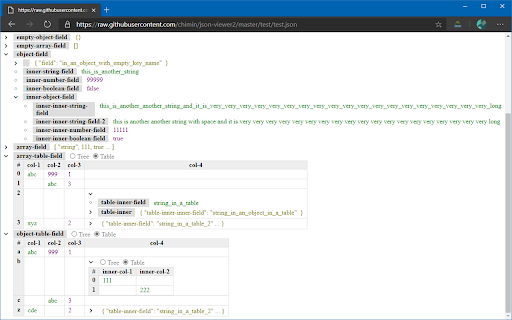
Show the JSON in tree view or table view Provide a better view for JSON file - raw view - pretty printed view - tree view - table view - Swagger view

GitHub Minesweeper
Minesweeper game on GitHub profile page using calendar contributions chart GitHub Minesweeper extension lets users play the classic minesweeper game directly on GitHub contributions calendar grid. After installing it, you will see main game controls just above the contributions grid. Choose a number of mines and click the "Play" button to start a new game and the contributions grid will become a minesweeper board. Rules of the game are the classic ones: each cell could have a mine or not, if you click a cell that contains a mine, the game is over, otherwise, the cell will reveal how many adjacent cells contain mines. Using these clues, the goal is to reveal all non-mined cells. Of course, you can hide the game board anytime to be able to keep using GitHub profile pages as usual by clicking the "eye" button. Left mouse click to reveal a cell content and right mouse click to mark a cell as mined. There are 3 difficulty levels with different numbers of mines: 30 (easy), 50 (medium), and 80 (hard). Enjoy the game!

PT QA HELPER
Very useful QA tool for copying test results and viewing the build information of the current browser tab. The “QA Helper” extension is a powerful Google Chrome tool designed to streamline QA workflows by enabling quick copying of test results and easy access to build information for the current browser tab. With this extension, you can: View the current tab URL and identify portal URLs. Quickly access build details for the portal’s Front End, Back End, and CMS components. Copy test statuses directly to the clipboard. Copy the developer’s fix stamp to the clipboard. Copy a preformatted bug template to the clipboard. View the latest GitLab commits. Register new users. Generate test credit cards. Create QR codes.

Tanuki Utilities
Provide useful utilities for GitLab users. * Change the GitLab favicon to a project icon; you can easily distinguish many GitLab tabs. * Move "Copy reference" button on top bar; the button is always shown for your easy access. This extension tries to change favicons in the **all** sites by default. You can specify which GitLab site (e.g. gitlab.com or your self-hosted site) you would like to change favicons. #### Change the GitLab favicon to a project icon

Auto Bookmark
Keeps a pinned bookmarks page open to prevent the browser window from closing when the last tab is closed. [Overview] A simple extension designed to prevent browser windows from accidentally closing when you close your tabs. ・Automatic Pinning: Automatically opens and pins the bookmarks page (or favorites page) at the far left of every normal window. ・Prevent Window Closure: Even if you close the last active tab, the pinned bookmarks page remains open, preventing the entire window from closing. ・Duplicate Cleanup: If multiple bookmarks pages accidentally open, it automatically cleans them up and keeps just one. The extension monitors tab states in the background to ensure that at least one pinned bookmarks page is always safely maintained.
