
nfpoemjdmpnbcnidaedpngfikhlchicf

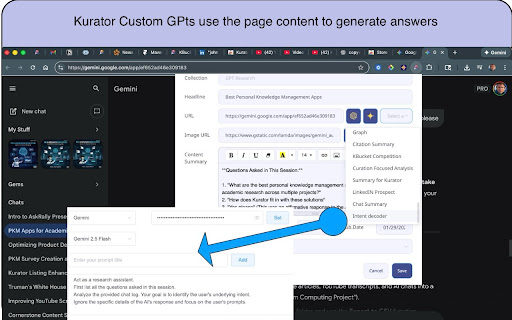
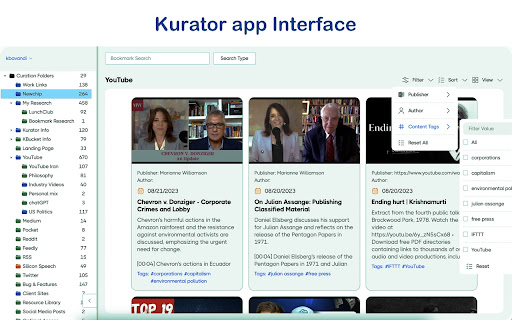

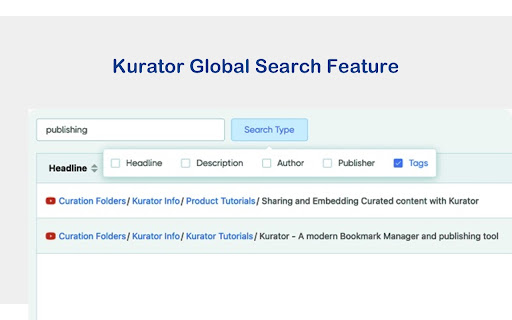
A Smart Way To Save And Share Your Research! Turn your curated links into action. Kurator is an all-in-one curation tool designed to help you: - Sync effortlessly with 𝑵𝒐𝒕𝒆𝒃𝒐𝒐𝒌𝑳𝑴 for advanced research. - Power your AI by managing the knowledge base for you 𝑨𝑰 𝑪𝒉𝒂𝒕𝒃𝒐𝒕 (𝑲𝑪𝒉𝒂𝒕) - Publish curated 𝒀𝒐𝒖𝑻𝒖𝒃𝒆 𝒂𝒏𝒅 𝑪𝒐𝒏𝒕𝒆𝒏𝒕 𝑮𝒂𝒍𝒍𝒆𝒓𝒊𝒆𝒔 to your website. Turn scattered tabs, YouTube videos, and AI chats into a structured, reliable Second Brain. Most web clippers act like a digital junk drawer, and 93% of people find it impossible to locate a specific link they saved just 30 days ago due to "context loss". It is a reliable, AI-native research engine that captures your discoveries in a structured and consistent format, with rich metadata, and organizes them into structured, searchable and filtered collections. . Stop hoarding links and relying on glitchy, unreliable extensions Kurator captures the intelligence you generate with your custom GPTs and the web, and organizes it into permanent, searchable collections you control. ✅ Save full AI sessions (OpenAI, Gemini, and more) as structured research notes ✅ Capture articles, PDFs, and videos with clean metadata, transcripts and summaries ✅ Create your own 𝗰𝘂𝘀𝘁𝗼𝗺 𝗚𝗣𝗧𝘀 for summarizing, analyzing, and extracting from saved links ✅ Sync selected collections to 𝗞𝗖𝗵𝗮𝘁 as your research corpus ✅ Publish curated collections to your website via 𝗲𝗺𝗯𝗲𝗱𝗱𝗮𝗯𝗹𝗲 𝘄𝗶𝗱𝗴𝗲𝘁𝘀 ✅ Sync Folder with NotebookLM and manage your sources in Kurator Kurator is built around data agency and transparency. ✅ 𝑼𝒔𝒆 𝒚𝒐𝒖𝒓 𝒐𝒘𝒏 𝑨𝑷𝑰 𝒌𝒆𝒚𝒔 Connect your own Gemini or OpenAI keys. Your research and chats stay between you and the model you choose. 𝗖𝗹𝗲𝗮𝗿, 𝗽𝗿𝗲𝗱𝗶𝗰𝘁𝗮𝗯𝗹𝗲 𝗰𝗼𝘀𝘁𝘀 Start free. Gemini offers free API access for many users, and OpenAI can be used starting from a low pre-paid balance (for example, $5). - You decide what gets shared - In Kurator, you choose what to save and how to tag it. - You choose 𝘄𝗵𝗶𝗰𝗵 𝗰𝗼𝗹𝗹𝗲𝗰𝘁𝗶𝗼𝗻𝘀 to sync with KChat. - You choose which collections to publish via 𝘄𝗲𝗯𝘀𝗶𝘁𝗲 𝘄𝗶𝗱𝗴𝗲𝘁𝘀. - You choose which collections to Sync with NotebookLM Everything else remains private to your account. Do not lose strong ideas in 20-page chat histories. 𝑷𝒓𝒐𝒋𝒆𝒄𝒕𝒔 𝒂𝒏𝒅 𝒕𝒂𝒈𝒔 Title sessions by project (for example, “Q3 Brand Strategy”) and tag them instantly so you can find them later. 𝑺𝒆𝒔𝒔𝒊𝒐𝒏 𝑸𝒖𝒆𝒓𝒚 𝑬𝒙𝒕𝒓𝒂𝒄𝒕𝒐𝒓 Use customizable prompts to pull out: - Every question you asked - The key answers and insights returned - Action items and next steps - No more re-reading long chat logs Kurator is for capturing and organizing research. 𝗞𝗖𝗵𝗮𝘁 is a separate AI assistant that can use your Kurator collections as its knowledge base. 𝑺𝒚𝒏𝒄 𝒐𝒏𝒍𝒚 𝒘𝒉𝒂𝒕 𝒚𝒐𝒖 𝒕𝒓𝒖𝒔𝒕 Choose specific Kurator collections to sync with KChat. Those collections become KChat’s private research corpus. 𝑺𝒐𝒖𝒓𝒄𝒆-𝒂𝒘𝒂𝒓𝒆 𝒂𝒏𝒔𝒘𝒆𝒓𝒔 When you ask KChat questions, it answers based on the synced Kurator collections—articles, PDFs, notes, and videos you’ve already vetted. 𝑭𝒖𝒍𝒍 𝒄𝒐𝒏𝒕𝒓𝒐𝒍, 𝒓𝒆𝒗𝒆𝒓𝒔𝒊𝒃𝒍𝒆 𝒂𝒕 𝒂𝒏𝒚 𝒕𝒊𝒎𝒆 You can add or remove collections from KChat’s access at any time, keeping a clear boundary between your private research and what the assistant can see. 𝗣𝘂𝗯𝗹𝗶𝘀𝗵 𝗿𝗲𝘀𝗲𝗮𝗿𝗰𝗵 𝘃𝗶𝗮 𝘄𝗲𝗯𝘀𝗶𝘁𝗲 𝘄𝗶𝗱𝗴𝗲𝘁𝘀 Turn your best research into live, public-facing resources. 𝑪𝒖𝒓𝒂𝒕𝒆 𝒐𝒏𝒄𝒆, 𝒑𝒖𝒃𝒍𝒊𝒔𝒉 𝒆𝒗𝒆𝒓𝒚𝒘𝒉𝒆𝒓𝒆 Take any Kurator collection and publish it as an embeddable widget on your website, blog, or client portal. 𝗔𝘂𝘁𝗼-𝘂𝗽𝗱𝗮𝘁𝗶𝗻𝗴 𝗰𝗼𝗻𝘁𝗲𝗻𝘁 When you update a collection in Kurator, the widget updates automatically - no need to manually edit pages. 𝗜𝗱𝗲𝗮𝗹 𝗳𝗼𝗿 𝗰𝗿𝗲𝗮𝘁𝗼𝗿𝘀, 𝗮𝗴𝗲𝗻𝗰𝗶𝗲𝘀, 𝗮𝗻𝗱 𝗲𝗱𝘂𝗰𝗮𝘁𝗼𝗿𝘀 Share reading lists, resource hubs, or research libraries with your audience while keeping your internal workflows inside Kurator. 𝗘𝘀𝗰𝗮𝗽𝗲 𝘁𝗵𝗲 “𝗬𝗼𝘂𝗧𝘂𝗯𝗲 𝘃𝗼𝗿𝘁𝗲𝘅” Get the answers you need from long videos without watching every minute. 𝑺𝒂𝒗𝒆 𝒂𝒏𝒅 𝒆𝒏𝒉𝒂𝒏𝒄𝒆 𝒀𝒐𝒖𝑻𝒖𝒃𝒆 𝑻𝒓𝒂𝒏𝒔𝒄𝒓𝒊𝒑𝒕𝒔 Capture full transcripts with timestamps in one click. Strip out filler words automatically. Break long videos into clear sections with headlines. So instead of scrubbing through a 20-minute video, you jump straight to the exact moment you need. Professionals and teams ✅ Build a shared library of “known good” sources for your projects ✅ Use Session Query Extractor to turn meeting or workshop notes into organized action lists ✅ Sync select collections to KChat so your team can ask targeted questions against vetted material ✅ Publish curated collections as client-facing resource hubs via widgets ✅ Students and lifelong learners ✅ Organize YouTube tutorials, PDFs, and documents into a single, searchable study brain ✅ Turn scattered research into clean topic notes you can revisit before exams or projects ✅ Content creators and curators - Maintain research folders for each topic - Sync research to KChat for quick Q&A while drafting content - Publish collections as embedded “resource libraries” on your site with a few clicks 𝗛𝗼𝘄 𝗞𝘂𝗿𝗮𝘁𝗼𝗿 𝗶𝘀 𝗱𝗶𝗳𝗳𝗲𝗿𝗲𝗻𝘁 ✅ Built for research, not just note-taking Kurator is designed around capturing, structuring, and reusing research - not just storing links or freeform notes. It syncs with NotebookLM and powers your own AI chatbot KChat ✅ Works with (but separate from) KChat Kurator organizes your knowledge. KChat, as a separate tool, uses only the Kurator collections you choose to sync as its knowledge base. ✅ From private corpus to public widget The same collections that power your private research can be published as live widgets on your site, keeping your workflow unified from capture → organization → sharing. 𝐑𝐞𝐚𝐝𝐲 𝐭𝐨 𝐫𝐞𝐯𝐨𝐥𝐮𝐭𝐢𝐨𝐧𝐢𝐳𝐞 𝐲𝐨𝐮𝐫 𝐜𝐨𝐧𝐭𝐞𝐧𝐭 𝐜𝐮𝐫𝐚𝐭𝐢𝐨𝐧? Add Kurator to Chrome (or any chromium browser) today and start building your smarter, more organized digital library!

Stacks - Web Clipper and AI Assistant
The fastest way to save links, notes, and files with AI-powered recall. Instead of dumping content into endless folders or tabs, Stacks lets you save with context. It connects the dots across your browsing - helping you remember why you saved something, surface it at the right time, and organize without effort. ✨ Key features: - One-click save for links, text, notes, screenshots & more - AI-powered recall to find what you forgot - Smart suggestions as you browse - Collections to organize your thinking - Private by default, built for creators and curious minds Whether you're researching, planning, learning, or building - Stacks is your second brain in the browser. Here's everything Stacks can do for you: ✨ One-Click Saving - Save any webpage, article, video, or document instantly - Support for YouTube, LinkedIn, Twitter, and more - Quick keyboard shortcut (Ctrl/Cmd + K) 🔍 Smart Search & Discovery - Get personalized recommendations in Google search results - Find your saved content when you need it most - Search across all your bookmarks instantly 🤖 AI-Powered Organization - Automatic categorization of saved content - Smart collections based on topics and themes - Custom folders and tags for personal organization 💼 Professional Features - Create shareable collections - Collaborate with team members - Build a searchable knowledge base - Access from any device or browser Perfect for: - Researchers & Students - Professionals & Teams - Content Creators - Digital Collectors ⚡️ Install Stacks now and transform how you save and find online content.

Stepsy: create step-by-step guide with screenshots
Struggle to describe your every step with screenshots in the browser manually? Welcome to Stepsy, your free AI-powered go-to solution for generating powerful, yet easy-to-understand step-by-step guides, SOPs, process tasks, or manuals, and sharing them with your colleagues and customers. Our software features have been proven to deliver exceptional results. With our intuitive interface and robust functionality, you can streamline your processes and achieve greater efficiency. Stepsy is free to use, along with Personal and Team plans to fit any team's needs. BENEFITS OF USING STEPSY: 📈 Increase data processing efficiency 📊 Improve workflow documentation accuracy ⚙️Ensure consistency across instructions ⏳ Save time of tedious work for each guide 🎯 Simplify the training and onboarding process STEPSY’S FEATURES: 📸Record your steps with screenshots on clicks: Just do your work, and we will automatically capture the screenshots with auto-generated descriptions. ✨Customize your screenshots: No need for other tools, we have a built-in image editor. ⚙️AI-tuned step descriptions and document summaries: Eliminate the need for manual repetitive text input, let us care about it. 📥Export and share via GDrive: Your guide quickly becomes shareable online via your own GDrive. 🔐Keep your screenshots safe: Your screenshots never leave YOUR space. Everything happens in YOUR browser and then gets exported directly to YOUR GDrive or YOUR local workstation. HOW TO USE STEPSY: Step 1. Get started Begin by downloading our extension for free. Step 2. Capture the process Navigate to the website you want to document. Then, open the Stepsy icon in your Chrome toolbar and click the “Record a Guide” icon to initiate the process. Once you've captured your process, you can edit and customize it with a built-in toolset. Step 3. Publish your results Simply click the “Finish and share” button and publish it as a Google Docs document directly to your Google Drive. WHO'S STEPSY FOR WHAT YOU CAN CREATE WITH STEPSY ✔️ Any documentation you need! What used to take hours, now takes seconds with our free step-by-step guide creator — empowering you and your team's productivity as well as allowing you all to focus on what truly matters: innovation and growth.

Clutterboard
A brilliant way to store, share and easily organize all your links, videos, and notes. Now more than ever, our lives are full of online clutter. So, how do we save and organize our favorite content in one place? It's time to declutter your life and organize your digital life in one amazing place across all devices and screens! With Clutterboard, you can save, organize and share your favorite articles, notes, links, videos and much more in one central searchable location so you can view them anytime and anywhere. Extension Features: * With one click, save any webpage with the Clutter button * View your saved articles without leaving your Clutterboard * Easily add searchable tags and a category to any link you save * Instantly share with your friends anything you find online * Set reminders to read articles later * Your saved articles are automatically synched across all devices – Android, iPad, iPhone and more * Completely free, no upgrades, upsells or ads. So, download the Clutterboard Extension and save your favorite content with one click, and enjoy a decluttered life with Clutterboard!

Marqly – The Ultimate Bookmark & Tab Manager
Marqly – The Ultimate Bookmark & Tab Manager Supercharge your browser with Marqly – a powerful, privacy-first bookmark manager and highlighter that now helps you reduce tab clutter and save up to 95% memory. Effortlessly save links, highlight text, organize bookmarks, and now collapse all your open tabs into a clean, restorable list — all in one sleek extension. 🔹 Why Marqly? Tired of messy bookmarks and tab chaos? Marqly makes it incredibly easy to: 📌 Save and organize bookmarks with tags and boards 📝 Highlight and save text snippets from any webpage 🗂 Create nested collections and custom boards 🔍 Use advanced search & filters to find anything fast 🧠 Restore memory and reduce CPU usage with OneTab-style tab saving 🚀 What You Can Do with Marqly - Save and edit websites effortlessly - Add bookmarks to customizable boards - Tag your links for powerful filtering - Search by URL, content, date, or type - Collapse all open tabs into a single list, saving up to 95% of memory - Restore tabs individually or all at once - Sync across devices securely 🆕 Latest Features 🔥 All-new Tab Saver to eliminate clutter and save memory ✨ Fresh new UI and responsive mobile layout ⭐️ Highlighted texts now auto-organized into quick-access boards 🧮 Enhanced filters and viewing controls 💡 Full-screen website preview 🖱 Drag-and-drop board reordering 💾 Nested collections 🔒 Privacy First Your data stays with you. Marqly never transmits your bookmarks, tabs, or highlights to anyone. Your tab lists are private — shared only if you choose to. Marqly is the only tool you need to take control of your web browsing — save smarter, organize better, and browse faster. ➡️ Try Marqly now and simplify your digital life.
