
nenadkoihofnhlaokenacmknknmlgdcm
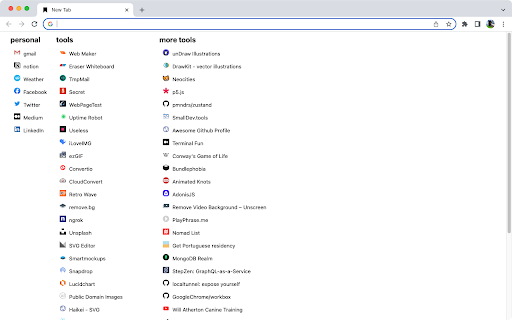
Displays your bookmarks in multiple columns for quick access from the new tab page - displays bookmars from Bookmarks Bar - supports dark mode (based on your operating system theme) - does NOT manage your bookmarks, use the built-in bookmarks manager for that (CMD+ALT+B / CTRL+SHIFT+O) - does NOT sync your bookmarks, your browser already does that - there are NO settings, deal with it - just displays your bookmarks in multiple columns for quick access from the new tab page - organize your bookmarks in folders under Bookmarks Bar to display in columns (or don't) - displays favicons for your bookmarks (via browser API) - display small "show" / "hide" toggle in bottom right corner to hide all your bookmarks (for when you are sharing your screen or someone is looking over your shoulder) - when you hide bookmarks a random photo from wallpaper topic on Unsplash is displayed once every 15 minutes

New Tab Redirect
Allows a user to provide the URL of the page that loads in a new tab. Allows you to change the new tab page to the New Tab Redirect app page, or a custom URL of your choice! Choose from chrome's about pages, *NewTab, Extensions, Downloads, History*, a few popular URLs, or provide your own. Your custom tab can also be a local file, allowing you to create your own new tab page. Saving blank text will cause your new tab to be about:blank. Files can begin with: file:\\, file://, and file:/// Important: This is not meant to replace your homepage, only new tabs. If your browser is set to load the New Tab page as your homepage, there may be odd consequences. Note: Because this extension perform a "redirect", I have no control over address bar highlighting or focus. I am not affiliated with Google or Google Chrome. Google Chrome is a registered trademark of Google, Inc. The 'Popular Pages' are taken from www.alexa.com/topsites. I am in no way affiliated with Google, Facebook, Twitter, Yahoo, Wikipedia, Digg, Slashdot or any other page listed here. These are provided as a convenience to the user of this extension. By using those pages or any others as a replacement for your new tab, you are still bound by any agreement between you and that site or service.

Speed Dial
Speed Dial allows you to add and manage bookmarks in the New Tab page. Manage bookmarks directly in the New Tab page of your browser. All important websites are displayed quickly in the browser tab. You could select from predefined background themes and set a custom background image. With the integrated search box you can start your search directly in the New Tab. The default search is changed to addonsearch.net in the New Tab. Your bookmarks are only stored locally in your browser and are kept private.

AnotherTab - New Tab page
Uses New Tab page to show bookmarks folder (Bookmarks Bar by default) for quick access to its items and allows to manage it This extension replaces Chrome's standard New Tab page with a very simple thing - a list of a content of a selected bookmarks folder (Bookmarks Bar by default), installed Chrome Extensions list and some useful Chrome shortcuts like settings, passwords, cookies, extensions and data cleanup. It also has a limited functionality for bookmark and extensions management - edit name/URL and position (and delete it) for bookmarks, and extension removal for extensions. In addition, extension also syncs with Google (if you have Chrome logged into your Google account) so you have settings synchronized across all computers you use Chrome at. Use edit mode (pencil button or menu item) to rearrange (drag to new location) and edit bookmarks, and also to change displayed bookmarks directory (by clicking on its name at the top in edit mode). The settings (gears icon) provides access to some internal settings you might want to use to change the page representation, and to some Chrome functionality shortcuts

Speed Dial Dogs
Speed Dial allows you to add and manage bookmarks in the New Tab page. Speed Dial Dogs allows you to manage bookmarks and select a beautiful background wallpaper with a dog picture. You could select from predefined dog background themes or set a custom background image with a image of your own dog. The bookmarks can be saved locally in JSON format using the included import and export functionality. With the integrated search box you can start your search directly in the New Tab. The search results of the optional search input field in the New Tab are provided by Yahoo. Your bookmarks are only stored locally in your browser and are kept private.
