
nemmanchfojaehgkbgcfmdiidbopakpp
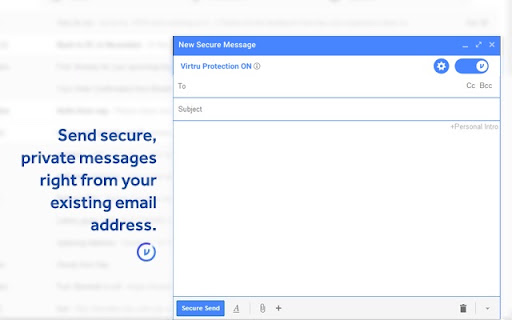
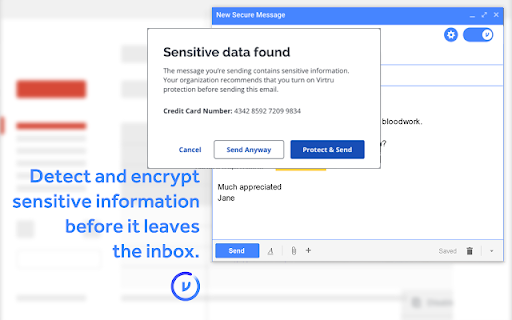
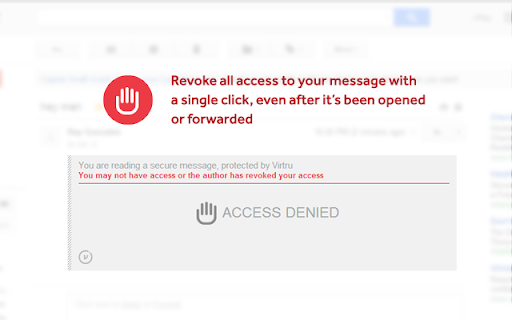
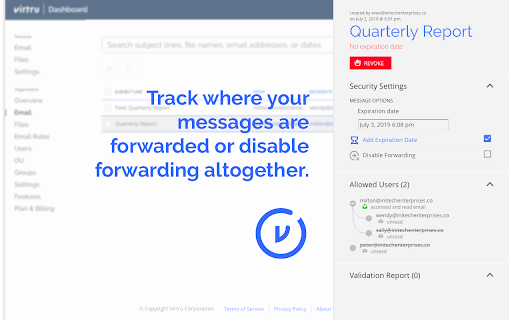

Surprisingly easy email protection and control for Gmail. Easily protect Gmail messages and attachments, and maintain control wherever they’re shared. At Virtru, we understand that data is an organization’s most valuable asset and sharing it is critical for business success. But sharing data creates significant risk. We believe no one should have to choose between protecting data and sharing it. We help more than 6100+ organizations, large and small, across almost every industry, protect data wherever it’s created or shared so they can collaborate with confidence. Privacy Ensure Gmail messages and attachments stay private so you don’t have to trust Google with your data. Compliance Maintain compliance with data privacy regulations such as HIPAA, GDPR, CJIS, ITAR, CCPA, FERPA, CMMC, NIST, and more. Secure, Seamless Sharing Protect Gmail messages and attachments and maintain control wherever they’re shared - both internally and externally, beyond Google. End-to-End Encryption Data-centric protection and object-level encryption for email messages and attachments directly within the Gmail client with a simple Chrome extension. Granular Access Controls Set expiration, disable forwarding, and watermark attachments with recipients’ names to deter them from leaking sensitive files. Instant Revocation Revoke access to messages and attachments immediately when emails are sent in error, or after the data within has become more sensitive. Persistent File Protection Keep attachments protected and controlled anywhere files are shared and stored (i.e. Gmail, Google Drive, desktops, network drives, and more) to ensure compliance with data privacy regulations and privacy throughout the full collaboration lifecycle. Data Loss Prevention (DLP) Automatically enable encryption with DLP rules that detect and protect sensitive data or reinforce security awareness with alerts that warn users to encrypt email. Contact us to learn more or try Virtru at your organization: https://www.virtru.com/contact-us/ By clicking the “Install” button above, or by otherwise downloading or installing the Virtru software referenced above, you consent to be bound by the Virtru Terms of Service (https://www.virtru.com/terms-of-service), which governs your access to and use of the Virtru software. If you are downloading or installing the Virtru Software, or otherwise accepting the Virtru Terms of Services, on behalf of an entity (such as your employer), you represent to Virtru that you have the legal authority to accept that Virtru Terms of Service on behalf of that entity.

Salesforce
Work with Salesforce records directly in your browser. Sales Cloud Everywhere lets you work on your to-dos, see engagement alerts, create records, and update multiple records. You can use it in your Gmail inbox, or in a standalone window alongside any web page. - Sell where you work: Move deals forward as you move around the web. - Access data anywhere: Bring context to every conversation. - Accelerate deals with real-time buyer data: Engage with people who want to engage with you. What you can do with Sales Cloud Everywhere: - Work with Salesforce directly in Gmail. - View, sort, and complete tasks like sending emails, reaching out on LinkedIn, and updating records, without returning to Salesforce.com. - Connect Salesforce to your Calendar and send calendar links, set availability, and more. - Get real time notifications of recent engagements as you browse the web. - Create and update records from within your Chrome web browser without leaving the current page. - Access and quickly update CRM records like leads, opportunities, and contacts. If you can’t access Salesforce via the extension, ask your Salesforce admin for help. Review the app’s terms of service: https://c1.sfdcstatic.com/content/dam/web/en_us/www/documents/legal/Agreements/software-order-form-supplements/gmail-integration-order-form-supplement.pdf

ScrambleID
ScrambleID is the fastest, simplest, and most secure way to log in—anywhere. Say goodbye to passwords, OTPs, and frustrating resets. With ScrambleID, every login becomes a seamless, secure experience across your digital and physical world. 🔐 Truly Passwordless Authentication ScrambleID eliminates static credentials and replaces them with dynamic, single-use identifiers. Nothing is stored. Nothing can be stolen. ⚡ Frictionless for Users. Powerful for Admins. Just scan or type a code—authentication is instant. Add biometrics, facial ID, or PIN for even stronger security. Admins get full visibility and control through Scramble's orchestration portal. 🌍 Protect Every Entry Point From web apps to workstations, bots to badging in, ScrambleID secures every user touchpoint—online, offline, in-person, or over the phone. 📱 Seamless Device Management Use your ScrambleID mobile app to register, authenticate, manage devices, or approve new logins—all from one interface. 🛠️ Built for Enterprises. Loved by Users. Supports SCIM, SAML, OIDC, WebAuthn, and deep integrations with IDPs. Enables phased rollout with dual-login support. 🧠 AI-Resilient by Design Prevents social engineering, deepfake spoofing, and AI voice cloning attacks—so you can stop tomorrow's threats today. ✅ Compatible with ChromeOS, Mac, and Windows 🔒 Trusted by security teams. Loved by end users. Visit www.scrambleid.com to learn more or get started with your organization.

Gmail - Reply at the TOP
Move the reply/compose box to the top of conversation thread. Allows you to refer the latest response as you compose the reply. If you are frustrated of scrolling up and down while composing your email replies in Gmail, THIS IS THE EXTENSION YOU NEED! This will move the reply/compose box from the bottom of the page to the top of the page. You can now see the latest email in the thread as you type, without have to scroll up and down. This is especially loved by Outlook users who are used to the reverse chronological view. I developed this after I could not find any solution. After using it for a while, I have noticed a significant boost in email productivity ... no more scrolling for those long conversation threads! NOTE: Refresh/reopen the Gmail tab for the extension to start working.

Degreed Extension
Track all your learning. Bring learning into your everyday workflow with the Degreed button. You can track your learning from any website, share content with others, save for later, add to a Pathway, or search for content in Degreed without ever leaving the site you’re on. Track your learning: Track all your learning directly from your browser without leaving the page you’re on — and save comments about what you learned. Share with others: If you love what you learned, you can recommend it to a friend or a group. Save for later: If you find an article you want to read later, you can save it. If you forget, Degreed will recommend it in your feed. Add to Pathway or Plan: When building a Pathway or plan in Degreed, you can add to it directly from the Degreed Button. Add to catalog: If you have the “Manage Content” permission, you can add directly to the catalog. The Degreed Button will scrape the title, description, and image for the content if available, removing the need to manually add the information. You can also review and modify the title and description before the item is added to the catalog. Find more learning resources: Find new learning resources and people to follow. If you want to learn more, search to see other learning items or find people to follow and see what they’re reading. Stay in touch with notifications: Your Degreed notifications are available directly. If someone recommends an item, you get notified without leaving the page you are on.
