
nekmpdfogingfnoenopddnlhfojcepdj

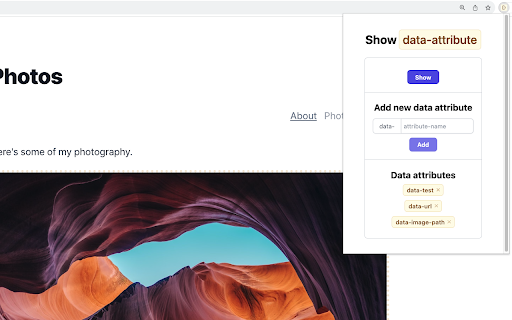
Show data attributes on your page Show data attributes on your page. This extension helps to display data attributes on page.

ChatGPT Search Bar & Send With Command Enter
ChatGPT Search Bar & Send With Command Enter Mandarin & English Description ChatGPT Search Bar & Send With Command Enter Mandarin & English Description ChatGPT Search Bar & Send With Command Enter Providing smooth chat title search functionality and a more user-friendly messaging experience. Version 2.1 has fixed the issue that line breaks can not be inserted on the UI. Still working on a better approach. Version 2.1 has fixed the issue of the plugin not working due to a URL change. (2024/6/29) In Version 2.0, we introduced a new "Express Search" mode, which allows you to find your desired chat titles immediately after you type it. Regardless of the date, it supports all your past conversations. Are you like us, managing your chats through their titles? Come and try it! We have also added terms of use to the settings page. To fully respect your wishes, we need your explicit consent to our terms of use in order to use the "Express Search" feature. In Version 1.2, we introduced a settings page, where you can choose to enable or disable certain features, as well as set your preferred key combinations for sending messages. In Version 1.1, we have added a chat search function. Now, you can perform chat title searches using keywords, with support for conversations up to 30 days old. Give it a try by clicking our button! If you're curious about how the search function works, feel free to refer to our screenshots. The default behavior of the Enter key has been changed. Instead of directly sending messages, it now adds a line break: - For Mac users, use `Command + Enter` to send a message - For Windows users, use `Ctrl + Enter` to send a message You can choose your preferred key combination on the settings page, or turn off this feature if you wish. The purpose of changing the Enter key's behavior is to prevent accidental message sending when editing prompts, especially given the current rate limits of GPT-4! By using our extension, enjoy a more user-friendly, error-free experience chatting with ChatGPT and take advantage of the convenient chat history search function! Our future plans include: 1. Allowing users to customize key combinations for sending messages, providing greater flexibility. (Partially completed) 2. Introducing customizable prompt templates to facilitate faster message composition. 3. Adding functionality to organize sent and received messages daily, for more efficient tracking and management of chat content. 4. Extending the search function to chat contents. 5. Scheduling batch messages to GPT-4, allowing you to handle AI-assisted tasks even while you're sleeping. Change Log: - Version 2.2.1: Fixed the issue where line break logic failed when sending messages. - Version 2.2.0: Fixed line break logic issue from interface changes. - Version 2.1.0: Fixed plugin not working due to URL change. - Version 2.0.0: Introduced "Express Search" mode and added terms of use. - Version 1.2.0: Added extension settings page. - Version 1.1.2: Improved search functionality, enhancing user experience. - Version 1.1.1: Enhanced user experience for search functionality. - Version 1.1: Added chat title search feature. - Version 1.0: Changed behavior of the Enter key.

Data Test Id Inspector
This extension helps you to inspect the 'data-test-id' attribute of the elements on the page. This extension helps you to inspect the 'data-test-id' attribute of the elements on the page by showing border around the elements with having this property. It also helps in finding out the duplicate test id's by showing a dashed border around it. We can copy the test id's by clicking the copy icon - whose visibility can be enabled/disabled from the popup screen.

Attribute Reporter
Dev Tools Extension to report on elements attributes and copy their value as text or xpath expression Attribute Reporter is a DevTools panel for inspecting HTML element attributes across a page. Select any element, type an attribute name (or pick class, id, or data-testid with one click), and instantly see a list of all matching child elements with their values — or which ones are missing them. - 🔍 Inspect any attribute by name across all child elements - ✅ Spot missing or empty attribute values at a glance - 📋 Copy individual values, XPath expressions, or CSS selectors to the clipboard - 📦 Export all results as JSON (element, value, CSS selector, XPath) - 🔒 No special permissions required What's New in v2.1.0 - 🔍 Missing attribute finder — Toggle "∅ missing" to instantly see all elements that lack the target attribute (e.g. buttons without aria-label). - 🏷️ Element-type filter — Filter results by element type (button, input, div…). Multi-select, composes with the missing toggle. - 🟢🟡🟠🔴 Status indicators — Every row now shows a color-coded status: OK, duplicate value, empty value, or missing attribute. Hover for details. - 📋 Copy as CSV — Export the current filtered list as CSV, ready for spreadsheets or bug reports. - 💾 Remembers your last attribute — The target attribute name is now saved between DevTools sessions. - aria-label shortcut added to the quick-select badges.

PromptSync
Ask ChatGPT, Bard AI, and Bing Chat with one single prompt! Unlock the power of four dynamic chat platforms with a single prompt! Introducing PromptSync, your all-in-one solution for chatting with ChatGPT, Bard AI, and Bing Chat, through a convenient Chrome extension. Multi-Platform Chat Engage in conversations effortlessly with ChatGPT, Bard AI, and Bing Chat from a single prompt. Get diverse perspectives and responses to your queries. Customizable Experience Tailor your chat experience to your liking! Enable or disable individual chat platforms according to your preferences through the settings menu. Efficient Workflow Streamline your workflow by accessing multiple chat services without switching tabs. Save time and stay productive as you harness the combined intelligence of four powerful chat systems.
