
ndnomcanokhgenflbdnkfjnhaioogmdk
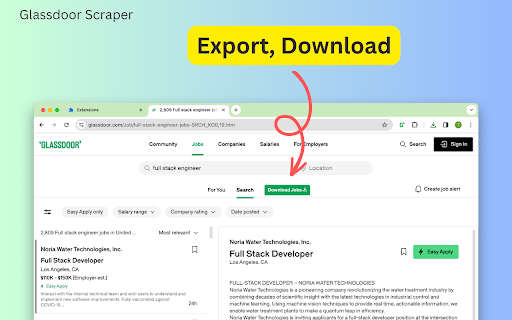
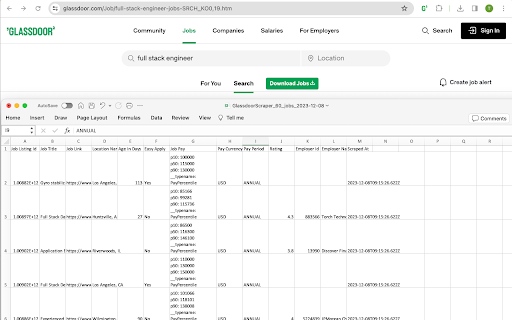
Automate your Glassdoor job search by intelligently scraping and exporting relevant postings directly into CSV/JSON/XLSX(Excel) file Boost Your Job Search with Glassdoor Scraper What is Glassdoor Glassdoor is a job posting platform like Indeed. It's one of the world's largest job and recruiting sites. also provide company reviews, CEO approval ratings, salary reports, interview reviews, etc. Glassdoor Scraper is an automated tool that extracts job posting data from Glassdoor.com. It works by programmatically scrolling through search results and capturing key details about listings like job title, company, location, description, and more. The scraped data is exported into a structured CSV/JSON/XLSX(Excel) format for easy analysis and searchability, saving you countless hours spent manually browsing postings. Benefits of Using Our Extension - Extracts up to 3000 postings matching your search criteria - Saves time compared to manual browsing - Provides structured data for sorting and filtering - Analyze job market trends and patterns - Create targeted, compelling job applications How to Use This Tool for Your Job Search Step 1: Enter Your Search Parameters Specify your target job title, location, keywords, and filters for optimal results. Step 2: Scrape Job Postings After searching, click the "Download Jobs" button to open the scraper. It will automatically extract data as it scrolls through listings. Step 3: Export Data to CSV/JSON/XLSX(Excel) The extracted info is cached locally. Click "Export Jobs" to export the scraped data to a CSV/JSON/XLSX(Excel) file. With the power of web scraping, you can indeed supercharge your job search and uncover opportunities tailored to your skills and interests. Automate the busy work and focus on crafting standout applications. How quickly will I receive the results? Data extraction begins immediately after you make a request. Duration varies based on the amount of information retrieved. Data Privacy Your data stays on your device and is not stored or transmitted to our servers. We prioritize keeping your information secure and confidential. Disclaimer Glassdoor is a registered trademark of Glassdoor, Inc. This independent project was developed by ExtensionBox and is not affiliated with Glassdoor, Inc.

G-Jobs Scraper: Export Jobs, Reviews, Salaries & More
Extract job listings, company profiles, employee reviews, salary data, and interview experiences from Glassdoor with this browser extension. All data processing runs locally in your browser, so your collected information stays on your machine. The tool includes monitoring capabilities to track page changes and alert you when specific conditions are met. ✓ Monitor any Glassdoor page for changes and receive instant alerts ✓ All data extraction and processing happens locally in your browser ✓ Export to CSV, Excel (XLSX), JSON, HTML Table, and Raw JSON ✓ Automatic pagination for multi-page search results ✓ Batch process multiple URLs in a single session ✓ Customizable field selection and conditional formatting What Data You Can Extract Jobs: Job titles, IDs, salaries (min, mid, max), locations, employer ratings, easy apply status, and application URLs from Glassdoor search results. Job Details: Full descriptions, required skills, education requirements, experience years, employer industry, sector, size, headquarters, revenue, CEO approval ratings, and detailed compensation and culture ratings from individual Glassdoor job pages. Companies: Company names, headquarters, sizes, industries, descriptions, job counts, overall ratings, career opportunity ratings, compensation ratings, culture ratings, and CEO ratings from Glassdoor company lists. Company Details: Mission statements, founding dates, revenue, stock tickers, websites, competitors, subsidiaries, certifications, review counts, salary counts, and benefit counts from Glassdoor company overview pages. Reviews: Summaries, pros, cons, advice, dates, overall ratings, career opportunity ratings, compensation ratings, culture ratings, work-life ratings, business outlook, CEO opinions, and employment details from Glassdoor review pages. Salaries: Base pay and additional pay at 10th, 25th, 50th, 75th, and 90th percentiles, total salary counts, and currency information from Glassdoor salary pages. Interviews: Experience descriptions, difficulty levels, outcomes, process details, advice, duration, questions, and negotiation details from Glassdoor interview pages. Additional Data: Company awards, branch locations with addresses, benefit ratings, and company photos from Glassdoor company pages. Use the Page Watcher to track changes on any Glassdoor page over time. Set conditions on specific fields, such as new job postings matching your criteria or salary updates for a role. Receive instant notifications via webhook or ntfy.sh when your conditions are met, so you stay informed without manual checking. The Batch URL Opener lets you queue multiple Glassdoor URLs for processing in one session. Add URLs manually or auto-collect them from search result pages. The extension processes each URL, extracts the data, and compiles everything into a single export file. Perfect For Ideal for recruiters, job seekers, and market researchers who need to compile employment data from Glassdoor at scale. Simplifies the process of gathering job listings, company information, salary benchmarks, and employee reviews for offline analysis. This extension supports Glassdoor domains across multiple regions, including the United States, United Kingdom, Canada, Australia, Germany, France, India, and other international Glassdoor marketplaces. All scraping and data exports are performed locally on your machine. The extension collects general usage metrics to improve performance and reliability, but your scraped data is never sent to external servers. This extension provides tools for extracting publicly available data. Users are responsible for ensuring their use complies with applicable terms of service and local regulations. The developer provides the tool and is not liable for how it is used. For assistance or questions, contact hello@nifty.codes. Glassdoor is a registered trademark of Glassdoor, Inc. (Indeed/Recruit Holdings). This extension is an independent tool and is not affiliated with, endorsed by, authorized, maintained, or sponsored by Glassdoor, Inc. (Indeed/Recruit Holdings).

Indeed Scraper
The best tool for exporting jobs from indeed Indeed Scraper is a powerful tool that allows you to extract all job postings from Indeed in just a few moments. This favorite nugget of online (human resources managers, recruiters) allows you to export offers in a structured format for analysis or database enrichment, thus offering you unparalleled simplicity and speed. ## The list of exported columns 1. - Position Name 2. - Company 3. - Company Rating 4. - Company Review Count 5. - Salary Min 6. - Salary Max 7. - Salary Type 8. - Salary Currency 9. - Salary Label 10. - Job Type 11. - Job City 12. - Job Postal 13. - Job State 14. - Job Location 15. - URL 16. - External Apply Link 17. - Posted At 18. - Scraped At 19. - Sponsored # It's free? Yes, Indeed Scraper is free. You can get basic functionality and upgrade to get more functionality. # Data confidentiality All jobs data is processed in your local computer, it never goes through our web server, no one knows what you have discarded. Questions? Write to us at the email address: indeed.scraper.com@gmail.com or directly on our site from this link https://indeed-scraper.com/contact # IMPORTANT NOTE: Indeed Scraper is in no way in partnership with the official indeed site. It is an unofficial application which is independently developed and maintained.

Job Scraper for LinkedIn™
Scrape, extract jobs from LinkedIn™ and export to CSV/Excel Extract jobs, locations from LinkedIn™ and exporting them to CSV, Excel or JSON file. Our scraper simplifies the process of searching and extracting detailed job data, requiring no coding expertise. # Features ✓ Extract jobs search results and all pages automatically ✓ Extract Company Details and Hiring Manager ✓ Capture external apply URLs (Greenhouse, Lever, Workday, and more) ✓ Export as Excel, CSV, and JSON # Supported fields: - Title - Description - Primary Description - Detail URL - Apply URL (direct link to company's application page) - Apply Type (External or Easy Apply) - ATS Name (Greenhouse, Lever, etc.) - Location - Skill - Insight - Job State - Poster Id - Company Name - Created At - etc. With the Pro version and settings activated, you can get additional fields such as: Company Details and Hiring Manager. # How to get started? 1. Enter Your Job Search Parameters Specify your target job title, location, keywords, and other filters. The more precise your search, the better the results. 2. Click the Download button next to the “Search” button. Then just wait to scrape complete. 3. Once extraction is done, click 'Export'. In the popup, we offer these extra features: Relevant-Ext: Brief recommendations and introductions to related extensions. # Data Privacy Your data's security is our top priority. Rest assured, all data remains on your device, ensuring 100% privacy and trustworthiness. # Statement LinkedIn™ is a trademark of LinkedIn Inc. Jobs Scraper for LinkedIn is not affiliated with, endorsed, sponsored, or otherwise related to LinkedIn, Inc. or any of its affiliates or subsidiaries. # About Pro Jobs Scraper for LinkedIn is a paid extension, you can get basic functionality and upgrade to get more functionality.

Indeed Scraper
Extract Indeed job titles, salaries, locations, and apply links and download in user-friendly formats like Excel with ease. Introducing our Indeed Scraper, the ultimate tool for extracting job listings from Indeed with ease. With just a few simple steps, you can scrape job details, salaries, locations, and apply links, and save them to a CSV file for use in Excel. Indeed is a leading job site with a massive database of job listings, providing valuable information on job openings, salaries, locations, and job seeker profiles. Our Indeed scraper enables you to effortlessly Scraping this information without the need for coding knowledge. The benefits of using our Indeed scraper are plentiful. HR managers, recruiters, and anyone looking to create a database of candidates, track hiring trends, and stay informed about the job market can benefit from the valuable insights that our scraper provides. With our Indeed scraper, you can save time, eliminate the need to build and test your own scraper, and have immediate access to all the job information you need. The data extraction process begins immediately after your request, and the duration of the extraction will vary depending on the amount of information you need to retrieve. Don't waste any more time manually searching for job information on Indeed. Try our Indeed scraper today and gain valuable insights into the job market. ------------------------------------------ Data Privacy ------------------------------------------ All data is processed in your local computer, it is never passing through our web server, no one knows what you explore. The extension will NOT attempt to offload, distribute, broadcast, sell, or in any way share collected data. ------------------------------------------ LEGAL ------------------------------------------ Indeed is a trademark of Indeed Inc., registered in the U.S. and other countries.This is an unofficial enhancement for Indeed. This extension is not related to Google Maps of Indeed Inc.
