
ndmmkmoglidbkahhbfmppecbplfhklhp

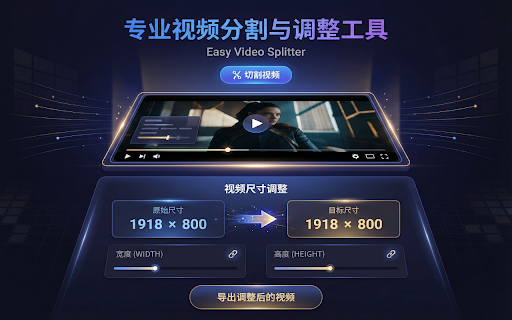

Split videos directly in your browser # Easy Video Splitter - Browser Extension **Split and Edit Videos Directly in Your Browser – No Server Upload Required!** - **100% Local Processing**: Your videos consistently stay on your device. - **Privacy First**: No data is ever uploaded to a cloud server. - **Fast & Secure**: Leveraging your browser's capabilities for secure and rapid video editing. - **Format Support**: Supports common formats like MP4, MOV, MKV, AVI, and more. - **Precise Cutting**: Split your videos into multiple segments with just a few clicks. - **No Installation**: Runs entirely as a lightweight browser extension. ### Visual Dual-Track Timeline - **Selection track** (top): Yellow dashed region shows current selection range with draggable handles - **Segments track** (bottom): Purple blocks show confirmed segments, selected segment glows - Real-time video preview while dragging handles - Snap-to-edge: handles automatically snap to other segment boundaries (toggle with 🧲 button) - Floating action buttons appear on hover: add/play above selection, play/delete below selected segment ### Segment Management - Click to select a segment; selected segment gets priority for handle dragging - Selected segment shows play and delete buttons below the timeline - Each segment has a ▶/⏹ play button that auto-pauses at segment end - Press Backspace/Delete to remove selected segment - Clear all segments with one click - When two segments share a boundary, dragging prioritizes the selected segment ### Video Resizing - Custom width/height with aspect ratio lock - Uses scale + crop to avoid black bars 1. **Install** the extension from the Chrome Web Store. 2. Click the extension icon to open the app (opens in a new tab for performance). 3. **Drag & Drop** your video file into the upload area. 4. **Edit**: - Click on the selection track to set start point; Shift+click or double-click to set end point. - Drag the yellow handles to fine-tune the selection range. - Click `+ Add Segment` to save the selection as a segment. - Or use "Quick Split" to auto-generate multiple segments. - Click a segment in the list to select and edit it. - Click the ▶ button on a segment to preview it. 5. **Export**: - Choose **Fast Mode** (Stream Copy) for instant cutting. - Choose **Encode Mode** if you need better compatibility or re-encoding. - Click "Export All" to save your clips. ## 🌍 Languages Supports **English** and **Chinese (中文)**. Language is automatically detected based on your browser settings. ## 🔒 Privacy Policy We value your privacy. **Easy Video Splitter** operates entirely offline within your browser sandbox. It does not collect, store, or transmit any of your personal data or video content. All processing happens locally on your machine.

Video Downloader Plus
Download and save videos from any website instantly. A fast, simple video downloader that just works. Video Downloader Plus detects videos as you browse and lets you save them in a few clicks. It picks up HLS, DASH, and MP4 streams the moment they load — no searching, no pasting links, no extra steps. 1. Visit any page with playable media 2. The icon lights up when something is found 3. Click it, choose your quality and format 4. Save to your device or upload to cloud storage WHAT YOU GET • Stream Detection — A smart video downloader that goes beyond direct file links. It captures adaptive HLS and DASH streams that basic tools miss entirely. • Up to 8K Quality — Whatever resolution the site offers, you can grab it. 720p, 1080p, 4K, and even 8K. • Audio + Video Merge — Some sites deliver audio and video separately. This video downloader combines them into one file automatically, ready to play. • Format Conversion — Convert to popular formats like MP4 or extract just the audio track. Multiple output options available. • Chromecast & AirPlay — Cast what you find to your TV directly from the browser. • Cloud Storage — Connect your preferred cloud provider and send files straight to the cloud. • Video Library — Save videos to your list and come back to them later. Syncs across devices when you are signed in. • Live Recording — Record live streams as they happen, before they disappear. • Filter by minimum file size to skip tiny clips and ad prerolls • Pick which formats to watch for • Block specific sites from detection • Set a preferred folder for all saves • Dark mode, light mode, or match your system • Badge style: video count or a simple dot FREE AND PREMIUM The free plan includes unlimited standard-quality saves and a daily allowance for HLS and DASH. Premium unlocks unlimited resolution, cloud uploads, format conversion, and priority support for users who need more from their video downloader. Choose monthly, yearly, or pay once with the lifetime option. Any site that delivers media over HLS, DASH, or plain HTTP is supported — news, education, social media, embedded players, and thousands more. Available in 59 languages. This video downloader does not support YouTube. Chrome Web Store rules do not allow it, and we follow those rules. Everything else that uses standard streaming is fair game.

Crop Video
Easily crop video online with this extension. Quick, simple, and efficient video crop. 🌟 Transform the way you edit videos with the best online video crop solution available. Whether you're a content creator, student, or someone new to video editing, this tool is the simplest way to crop video in just a few clicks. 🟢 Why Use Our Video Cropper? ➤ No downloads required – everything happens right in your browser. ➤ Supports multiple formats, including MP4 crop for quick edits. ➤ Effortlessly crop videos online to highlight the best parts. 💎 Features You’ll Love ✅ Crop your video online without needing professional software. ✅ Precision cropping with drag-and-drop functionality. ✅ Compatible with popular formats like MP4, making MP4 crop seamless. ✅ User-friendly interface, designed for everyone from beginners to pros. ✅ Quick and efficient – save time while editing. 💡 How to Crop a Video Online in 3 Steps 1️⃣ Select the file you want to edit. 2️⃣ Adjust the frame to cropping video exactly how you want it. 3️⃣ Save and export your perfectly cropped masterpiece. ☑️ What Makes It Stand Out? ▸ No Watermarks – Edit freely without branding. ▸ Multi-Platform Support – Works across devices for easy access. ▸ MP4 Croperr Integration – Easily handle even misspelled needs like videocrop or video gropper! ▸ Advanced Tools – Go beyond basic cropping with enhanced features. 📌 Who Is This For? 🟢 Students creating polished presentations. 🟢 Bloggers needing quick edits for posts. 🟢 Anyone asking, how to crop video online without hassle. 🤝 Growth Through Community ① Constant enhancements driven by user feedback. ② Active community involvement for ongoing improvements. ③ Devoted to innovative and user-centric development. 📑 Clear Usage Policies ♦️ Concise guidelines for the proper use of the conversion tool. ♦️ Committed to transparency across all operations. ♦️ Expanded FAQ section covering a broader range of user queries. 🎥 FAQs ❓ How can I crop a video online? Simply upload your file, adjust the frame, and click save. It’s that easy. ❓ Does this work for online crop a mp4 video? Absolutely. Our MP4 cropper is perfect for quick edits to MP4 formats. ❓ What if I need to crop from video multiple times? You can edit as many files as you want without limits. ❓ Is it safe? Yes – our extension ensures safety by not requiring internet access. You can have confidence in the security of your data, as it operates independently without relying on external online connections. 💎 Top Benefits of Video Cropping ➤ Enhance your storytelling by focusing on key moments. ➤ Eliminate unnecessary parts to keep viewers engaged. ➤ Perfect for resizing content for social media platforms like Instagram or YouTube. 🚀 Get Started Now Don’t waste time downloading software. With our online video cropper, editing is as simple as a click. 👍 Supported Use Cases 🔥 Crop online for presentations. 🔥 Trim social media clips with precision. 🔥 Resize MP4s with our mp4 cropper. 🔥 Highlight specific details by cropping into the action. 🌍 Language Support 🌐 Number formats tailored for local languages and dialects. 🌐 Cultural considerations for a more personalized experience. 🌐 Multilingual user support catering to a global audience. 👩💻 From answering how to crop in a video to offering the ultimate cropping experience. Install now and enjoy stress-free editing with the video crop online tool available.

Vidline Screen Recorder
Quickly record screen with audio and camera. Instantly share videos with one click. Vidline helps you to record your screen and cam quickly, and share the recording instantly. You can record screen with camera and audio, share videos instantly with links, collaborate with teams, upload recordings to the cloud, or download videos, and more! Get Vidline now for free! No ads! No recording time limits! KEY FEATURE ⏺️ Record screen, camera, microphone and system audio 🔗 Share recordings instantly with links, viewers could watch the video without login 🔒 Choose if viewers could download and save your shared videos 💾 Save videos to the cloud, without occupying your computer space ⏬ Download HD screen recording files without watermark 💬 Comment and interact with people on videos 🖌️ Mark contents and explain clearly through annotation tools 🎬 Right click web to start recording quickly 🖥 Manage recorded videos easily in the video library 📀 Record videos of different resolution at 720p, 1080p, 2k and 4k RECORD SCREEN - Record videos at full screen, in a window, a browser tab, or custom area - Record system audio, microphone, output Bluetooth, earphone, voice - Select cloud recordings, recorded videos will directly save to the cloud, with no space occupied - Select local recordings, recorded videos will directly save to your computer RECORDING SCENARIO - Study: record videos of online courses and remote teaching, connect educators and students, record screen of research reports, useful information - Work: Screen record business meetings, zoom meetings and personal presentation - Entertain: Screencastify game videos, and share them with friends and family, capture live stream, facecam reaction, music video, Youtube video - Daily life: Record everything you think that is worth stored and memorized VIDEO NOTES FOR WORK - Create workspaces for teams to collaborate, store materials - Leave time-based comments, tag team members to notify them - Get notified immediately when someone comments - Save time for meeting arrangements ABOUT VIDLINE Vidline is a video recorder created for hybrid workplaces and remote workers. There are now countless uses for short videos in the workplace from daily standups to online classes, from bug reports to design demos. Vidline is trying to be the best easy-to-use screen recorder extension to help improve video communication and productivity in work, study and daily life. If you have any questions or feedback, please feel free to contact us at care@vidline.com. We’ll be always here to help along the way.

Video Trimmer
Simple Video Trimmer – shorten video and clip instantly using a fast online trimmer extension. Trim smoothly and easily now. ✂️ Easy video trimmer is a powerful and intuitive solution for anyone who needs a reliable editor directly in the browser. 💎 Key benefits of using this video trimmer app: ⚡ Fast video trimmer any size support for both small clips and large files without performance loss 🎯 Accurate recording trim with frame-level precision for perfect results every time 🧼 Clean video trimmer no watermark output for professional and ready-to-share content 🦾 Reliable online trim video experience with consistent speed and minimal waiting time 🚀 Optimized engine for faster rendering and smoother workflow 📂 Video clip trimmer for multiple formats using a single extention interface 🎬 This video trimmer is optimized for all common formats. The video trimmer ensures smooth playback and editing, making it easy to trim mp4 and other formats files and create clean results without delays. 🎨 Beautiful design and modern UX make this tool comfortable to use for long sessions. The clean layout, intuitive controls, and responsive interface ensure that every video trimmer online action feels smooth, simple, and efficient. 🧠 This smart online video trimmer tool helps you trim records online without complexity and works as a fast, modern video trimmer for everyday tasks. 👤 Why users choose this footage clipper: ➤ Lightweight app extension that works directly in your browser ➤ Fast processing for trim tasks with minimal load time and instant response ➤ No limits for editing any size so you can work with any file length ➤ Simple controls to trim a recording without technical knowledge ➤ Reliable clipper performance for everyday editing needs ➤ Clean and minimal interface for distraction-free workflow ➤ Modern cut video trimmer UX focused on speed and usability ⚙️ How to use this online software: Open your file and load it instantly Select the part to trim footage using simple and intuitive controls Apply trim settings and preview before exporting Export your shorter recording instantly with high quality output 🎯 Supported actions include: 1️⃣ Trim mp4 and other formats quickly without quality loss 2️⃣ Clip video extention for social platforms like short-form content and stories 3️⃣ Use mp4 tools easily with fast response time 4️⃣ Create a shorter video in seconds for quick sharing 5️⃣ Manage recording trim tasks efficiently in one place 6️⃣ Adjust segments with precision and flexibility ➕ More reasons to use this solution online: Fast and responsive system for seamless editing Works as a full video online trimmer online solution without extra tools Optimized performance for consistent speed Easy workflow to trim a video from start to finish Flexible usage for different editing scenarios 📈 Efficiency highlights: ✅ Fast processing with support for all file sizes ✅ Smooth mp4 workflow for continuous editing ✅ Reliable recording trim without lag or interruptions ✅ Optimized speed for faster results ✅ Efficient handling of multiple editing tasks ✅ Use this online video clipper to quickly trim, cut, and edit your videos directly in your browser with ease. ✅ With a clean interface and smooth performance, the app ensures a distraction-free workflow. You can quickly select segments, make accurate edits, and export results in just a few clicks. 💡 This easy online video trimmer ensures that even complex tasks feel simple. You can use this software tool to clip footage, adjust timing, and export results quickly using a clean and responsive interface. 🔵 Convenience features include: 1️⃣ One-click trim video online actions for faster editing 2️⃣ Simple controls to clip recording without confusion 3️⃣ Quick access as a extension in your browser 4️⃣ Easy mp4 functionality for instant edits 5️⃣ User-friendly layout for smooth navigation 6️⃣ Videotrimmer clear controls for precise adjustments 🔵 More convenience benefits: ➤ Works online anytime without restrictions ➤ No setup required for app functionality ➤ Clean workflow for trim mp4 tasks and quick edits ➤ Easy navigation for clipper actions ➤ Reliable performance for daily use ➤ Flexible usage for any scenario 📌 Frequently Asked Questions: – video trimmer ❓ What is this app used for 💡 This online trimmer video tool allows you to shorten video quickly using a simple and efficient editing solution. ❓ Does this extension support mp4 files 💡 Yes, this mp4 video trimmer online and mp4 trimmer fully supports mp4 trim and lets you trim mp4 files without quality loss. ❓ Can I use this extension for any size files 💡 Yes, support for any size allows you to process both small and large files with ease using this online video trimmer. ❓ Is this software no watermark 💡 Yes, the tool works as a video trimmer no watermark solution, ensuring your output stays clean.
