
ndejijikabpibbcjdpoobfdecjfamlan


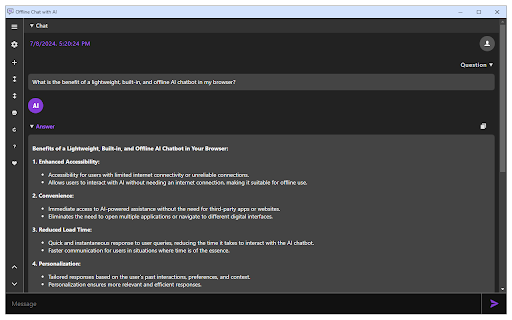
Chat with the built-in Gemini Nano in your browser (free & offline). Offline Chat with AI is an extension that enables you to chat with the built-in AI chatbot in your browser. In Chrome browser version 138+, the Gemini Nano is available as an offline AI engine. This extension lets you chat with this AI agent through a very user-friendly interface. Please note that when you first open the app, it needs to download training data. Read more about this built-in AI here: https://developer.chrome.com/docs/ai/built-in The app interface has a toolbar on the left side with a few buttons (self-explanatory with tooltips). Moreover, the interface can be opened in the toolbar popup, sidebar, separate window, or a new tab. Please right-click on the toolbar button to choose one. If you have a feature request or found a bug to report, please fill out the bug report form on the addon's homepage (https://mybrowseraddon.com/offline-chat-with-ai.html).

Page Resources
Easily view all the page resources for the active tab via the toolbar popup. Page resources is an extension that allows you to view and download all the resources for the active tab. To work with this addon, please browse a website with content and then open the toolbar popup. All the available resource categories are displayed in the top-left section. Please click each category to see the related resource entries in the right section. For each entry (if clicked) you can see the details at the bottom section within the interface. Moreover, when you hover over each resource entry, three buttons to Open, Copy, and Download the resource appear on the right. Note: This extension does not work for blank or browser's internal pages. If you have a feature request or found a bug to report, please fill out the bug report form on the addon's homepage (https://mybrowseraddon.com/page-resources.html).

Offline GPT: Offline (local) AI Chat Assistant
Chat with AI using locally downloaded models (WebLLM) and current page context Offline AI Chat Assistant - LLM in your browser 🎯 KEY FEATURES • 100% Offline AI - All processing happens locally on your device • Multiple Models - Choose from Phi-3-mini (2.3GB), Llama-3.1-8B (4.9GB), or Qwen2.5-7B (4.3GB) • Page Context Aware - Automatically reads current webpage to answer questions about it • Complete Privacy - No data sent to external servers, no API keys needed. Actually, no interned is needed. 🔧 HOW IT WORKS 1. Select a model from the dropdown 2. Model downloads once and caches permanently 3. Start chatting - AI runs entirely in your browser using WebGPU 4. Ask questions about the current webpage or general topics 💡 USE CASES • Summarize articles and documentation • Answer questions about webpage content • Code assistance and explanations • General knowledge queries • All without internet connection (after initial setup) ⚙️ REQUIREMENTS • Chrome 113+ (Stable, Beta, Dev, or Canary) • WebGPU support (enabled by default) • 2-7GB storage for models • 2-6GB available RAM 🔒 PRIVACY • All AI processing happens locally • No external API calls (except one-time model download) • No user data collection or tracking • Conversations stored locally in your browser only Models powered by WebLLM and MLC AI.

Search & Chat AI
Search smarter, work faster and do more with Search & Chat AI—a free Chrome extension powered by GPT-4o, the premium AI at no cost. Meet Your Personal AI Assistant for Smarter Browsing 💡 No Subscriptions. No Logins. Just Results. Say goodbye to boring sign-ups and expensive subscriptions. Start using GPT-4o immediately and completely free. 🌟 Your AI, Just a Click Away With the minibar, you can access GPT-4o anywhere in your browser without breaking your flow. Highlight text, right-click and the minibar will appear, ready to assist with explanations, summaries, translations or even creative ideas. It’s like having a pocket-sized genius that works wherever you do. 🌙 Light or Dark Mode? You Choose. Customize your experience with sleek light and dark themes designed to keep you comfortable. 💬 Chat Like a Pro Want to dive deeper? Switch from pop up to full-screen chat mode and get the full GPT-4o experience—perfect for brainstorming, problem-solving or casual conversations. 📋 Effortless AI-Powered Searches Not happy with search results? Let GPT-4o give you accurate answers, fresh ideas or deeper insights—all within your browser. No ads. No tricks. Just premium AI, totally free.

Offline Search
Default search extension that captures all your intended search queries when you are offline Have you ever encountered a situation where you needed to look up something important online, only to have your internet connection be weak or unavailable? Connectivity issues shouldn’t interrupt your vital inquiries. How Our Extension Helps 1. Save Offline Queries: Our extension automatically saves all your offline queries in one secure place on your device. 2. Seamless Resumption: Once your connection is restored, you can access your saved queries without missing a beat. How to Use 1. Type the Command: Enter the short command @offline into your browser’s address bar. 2. View Your Queries: All the queries you made while offline will be displayed. 3. Resume Your Browsing: Simply click on the offline queries displayed in the autocomplete area and continue your search. Once the query is clicked on and looked for, it will automatically disappear from your list. To enable full functionality, you must change your default query provider to our domain, powered by Yahoo. For more details, visit: https://offlinesearch.net/
