
acdhfaeahhchcnhnjemfmjliajmohhjc
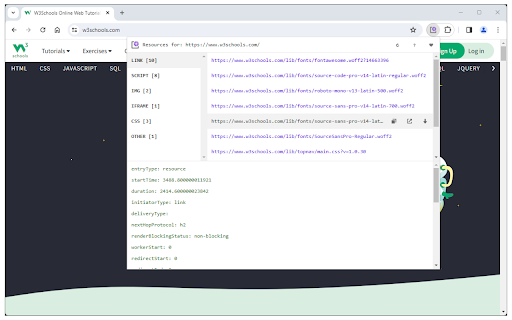

Easily view all the page resources for the active tab via the toolbar popup. Page resources is an extension that allows you to view and download all the resources for the active tab. To work with this addon, please browse a website with content and then open the toolbar popup. All the available resource categories are displayed in the top-left section. Please click each category to see the related resource entries in the right section. For each entry (if clicked) you can see the details at the bottom section within the interface. Moreover, when you hover over each resource entry, three buttons to Open, Copy, and Download the resource appear on the right. Note: This extension does not work for blank or browser's internal pages. If you have a feature request or found a bug to report, please fill out the bug report form on the addon's homepage (https://mybrowseraddon.com/page-resources.html).

Search the current site
Search any site you're on by the simple click of a button. The search is done not only on the 1 page you are viewing as [Ctrl]+[F] does but instead Google is used to "site search" within ALL pages of the site. How to customize: Right-click the 🔍 "Search this site" button, then click "Options". See second screenshot above for what options are available. If you find the extension useful, you can leave me a tip if you want: ko-fi.com/tschmidbauer Want the same functionality for searching websites in Firefox? Install the "Site Searcher" add-on from https://addons.mozilla.org/addon/site-searcher/

Reload All Tabs
Reload All Tabs is a lite extension that let you easily reload all tabs with click of a button. Simply add this add-on to your browser and click on the - Reload All Tabs - toolbar icon. All open tabs will be reloaded upon clicking on the toolbar button. You can exclude tabs based on pin, active, audible, discard or private states. If you want to exclude certain tabs from reloading, please visit the options page and mark the desired option. Please note that, you cannot exclude a tab based on the URL. If you have a feature request, or you want to report a bug, please fill the bug report form in the addon's homepage (https://mybrowseraddon.com/reload-all-tabs.html).

Undo Closed Tabs Button
Easily undo closed tabs via your browser's toolbar popup! Undo Closed Tabs Button is an extension to allow users to reopen closed tabs via the toolbar popup. To work with this addon, simply open the toolbar popup and click on the desired tab to open. By default, 25 items are shown in the popup, but you can change this from the options page. Each item has a title and a favicon (if available). Within the UI bottom section, there are few buttons. On the bottom-left side, there is a button to open all closed tabs. There is also a button to open the history tab. On the bottom-right side, the first button is to reload the UI. Next is the settings button to open the options page. The last two buttons are for the support page and donation. Note: The extension interface supports dark mode. To switch the toolbar popup interface theme to dark, please press the moon icon in the bottom-right toolbar. If you have a feature request or found a bug to report, please fill out the bug report form on the addon's homepage (https://mybrowseraddon.com/undo.html).

Full Screen Button
Easily switch to full-screen view from toolbar! Full Screen Button is a simple extension for your browser that helps you full-screen the current tab. There is also an option which let you maximize the active "video" element (if it is playing) instead of the tab. Please note that, you can disable this setting from the option's page. You can also use the keyboard shortcuts to maximize the active tab (Ctrl+Shift+F). If you have a feature request, or found a bug to report, please fill out the bug report form on the add-on's homepage (https://mybrowseraddon.com/fullscreen-button.html).
