
biidfoapgncnlhpdhjapkkbankbnnhnj
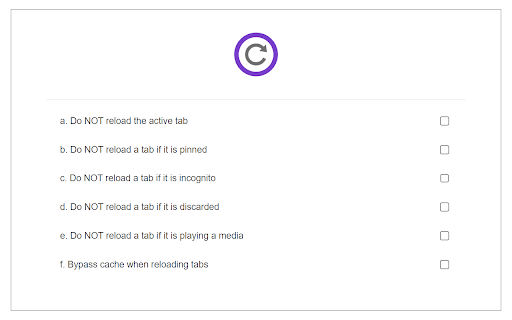
Reload All Tabs is a lite extension that let you easily reload all tabs with click of a button. Simply add this add-on to your browser and click on the - Reload All Tabs - toolbar icon. All open tabs will be reloaded upon clicking on the toolbar button. You can exclude tabs based on pin, active, audible, discard or private states. If you want to exclude certain tabs from reloading, please visit the options page and mark the desired option. Please note that, you cannot exclude a tab based on the URL. If you have a feature request, or you want to report a bug, please fill the bug report form in the addon's homepage (https://mybrowseraddon.com/reload-all-tabs.html).

ProTABS - The Tab Manager for Pros
"I got 99 problems, but a tab ain't one." An intelligent tab manager for the everyday user. ProTABS is an intelligent tab manager designed to to make your life easier. It's particularly useful when dealing with large amounts of tabs, empowering you to work and browse more efficiently. ProTABS effectively replaces many other extensions such as tree tabs, tab suspender, tab recycler, etc, and enables many powerful workflows such as: ▶ Pin your frequently used tabs (like email!) so you can refer back to them quickly and see any notifications at a glance. ▶ Create groups from your tabs and windows to categorise them by topic. ▶ See tabs grouped automatically by site and by topic. ▶ Save individual or groups of tabs for future reference. Star them, close them, then come back to them later! ▶ Quickly search for tabs by name, group, or by URL and switch back to them easily. 100% keyboard friendly, for the real Pro's! ▶ Rapidly switch back to your previous tab with a simple keyboard shortcut! ▶ Quickly find and restore tabs that you closed accidentally. ▶ Pop open a group of related tabs to a new window so you can focus on one topic at a time. ProTABS can also work in the background to help keep your browsing efficient by: ▶ "Pausing" tabs after period of disuse, freeing up memory and making your browser run faster! ▶ "Tidying-up" your tabs automatically after a period of disuse by Saving and then closing them automatically. We'll tidy-up your tabs so that you don't have to!

Fake Filler
A form filler that fills all inputs on a page with fake/dummy data. Fake Filler is THE form filler to fill all input fields on a page with randomly generated fake data. This productivity boosting extension is a must for developers and testers who work with forms as it eliminates the need for manually entering values in fields. • Fill all inputs with randomly generated names, emails, phone numbers, etc. • Sensible defaults to allow you to start using the extension without any configuration. • Ignores CAPTCHA, hidden, disabled and readonly fields.

Reload
A simple Reload button, for those who want one to the right of the Address Bar. (Stop function not included.) For a separate Stop button, see: https://chrome.google.com/webstore/detail/stop/kkeehnmfddjhlojogndpeaklfhaokkbn

Close Duplicate Tabs
Find and close duplicate tabs fast, with optional auto-close and smart tab grouping. MAJOR UPDATE: Now with automatic tab grouping & automatic duplicate tab closing! Check options to enable settings! Too many duplicate tabs can quietly slow down your browsing and make it harder to stay organized. Close Duplicate Tabs helps you spot duplicate tabs quickly and clean them up in one click. Use the popup to review duplicates before closing them, or turn on automatic duplicate cleanup for a more hands-off workflow. The extension also supports a keyboard shortcut, tab-count hover summaries, optional automatic tab grouping, URL matching controls for # fragments and ? query strings, and an exclusion list for domains you do not want to deduplicate. - One-click duplicate cleanup - Optional auto-close for new duplicates - Popup review with per-URL manual close - Keyboard shortcut for closing all duplicates - Hover summary with tab count and duplicate count - Optional smart tab grouping by domain - Matching controls for # fragments and ? query strings - Exclusion list for domains to ignore - No data collection v3.2 * Using latest Chrome APIs * Auto Group Tabs based on their domain. * Auto close duplicate tabs so you save on memory. v2.5 * Top domains listed on hovering over the extension icon. v2.3 * Now see titles for duplicate tabs, not long URLs * Special case handling for websites that "replace" tabs behind the scenes. Short version: more accurate duplicate tracking. v2.0 * Options page, with list of upcoming capabilties * NEW: Reorder (sort) pages by URL v1.8: * Lists open tab count, and duplicate tab count * List duplicate URLs, and their counts * Groundwork for options v1.6: * Now identifies & closes duplicates across windows * More accessible colors for duplicate count badge
