
hagccgdaknhhkbmchgnmeapckfipacfi


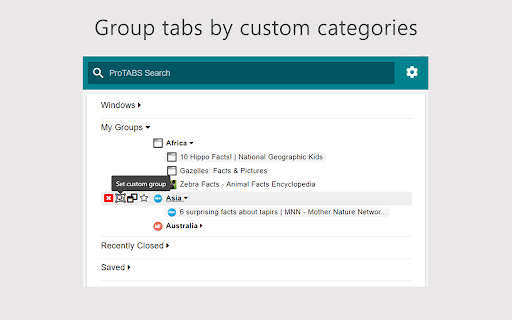

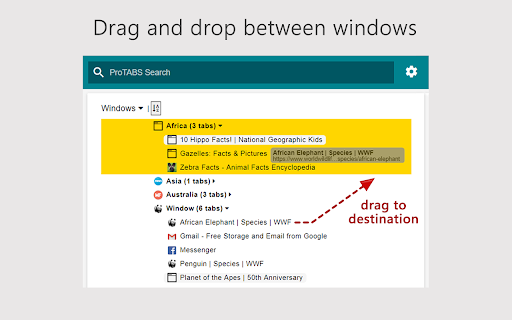
"I got 99 problems, but a tab ain't one." An intelligent tab manager for the everyday user. ProTABS is an intelligent tab manager designed to to make your life easier. It's particularly useful when dealing with large amounts of tabs, empowering you to work and browse more efficiently. ProTABS effectively replaces many other extensions such as tree tabs, tab suspender, tab recycler, etc, and enables many powerful workflows such as: ▶ Pin your frequently used tabs (like email!) so you can refer back to them quickly and see any notifications at a glance. ▶ Create groups from your tabs and windows to categorise them by topic. ▶ See tabs grouped automatically by site and by topic. ▶ Save individual or groups of tabs for future reference. Star them, close them, then come back to them later! ▶ Quickly search for tabs by name, group, or by URL and switch back to them easily. 100% keyboard friendly, for the real Pro's! ▶ Rapidly switch back to your previous tab with a simple keyboard shortcut! ▶ Quickly find and restore tabs that you closed accidentally. ▶ Pop open a group of related tabs to a new window so you can focus on one topic at a time. ProTABS can also work in the background to help keep your browsing efficient by: ▶ "Pausing" tabs after period of disuse, freeing up memory and making your browser run faster! ▶ "Tidying-up" your tabs automatically after a period of disuse by Saving and then closing them automatically. We'll tidy-up your tabs so that you don't have to!

Super Focus Tabs
Quickly find out tab/page. Reduce much more time while working with multiple tabs/pages. + Quickly find out tabs. + Quickly closing current tab by pressing double esc + Quickly find the page in your bookmark/history. + Quickly save the page by using shortcut key. + Quickly go back to previous active tabs by shortcut key. + Quickly go to latest created tab. + Support auto close unused tabs. + Support real time update. + Support page screenshots. + Support list view, thumbnail view and tree view, preview. + Support tabs, bookmarks, history, saved pages. + Support sorting, filtering, grouping, etc. + Support many functions such as saving and closing all tabs, merging windows, closing the duplicated pages, etc. + Many options for you to customize. Reduce much more time while working with chrome. Let try and experience.

Tab Manager v2
Search, group, move, and clean up tabs across browser windows with a keyboard-first workflow See every tab across every window, find what you need fast, move matching tabs in bulk, manage native tab groups where supported by the browser, and clean up duplicates without window hopping. - Search open tabs by title or URL, with optional browser history results in the same search box - Select matching tabs and move, group, or close them in bulk - Manage native tab groups directly where supported by the browser: rename, recolor, collapse, and ungroup them in place - Reorder tabs with drag and drop across windows from one focused view - Highlight duplicate tabs and clean them up quickly, with an option to ignore URL hashes - Stay on the keyboard with shortcuts, focus mode, and the command palette - Adjust theme, tab width, font size, toolbar visibility, URL display, and more - Support Firefox container-aware workflows when the browser exposes those APIs Free and open source. Core functionality runs locally in your browser. Open source: https://github.com/xcv58/Tab-Manager-v2 Support and issues: https://github.com/xcv58/Tab-Manager-v2/issues

Awesome Window & Tab Manager
Displays a list of all windows and tabs open in Google Chrome. Allows filtering, sorting, refreshing, bookmarking, and saving. Awesome Window & Tab Manager does the following: (1) - Tells you how many Chrome windows and tabs are open. (2) - Displays all the windows and tabs. (3) - Allows text filtering (searching) on the windows and tabs. (4) - Allows alphabetic sorting of tabs. (5) - Categorizes tabs by window, domain, or category. (6) - Categories are determined by your own bookmark structure. (7) - Window, domain, or category groups can be refreshed or closed. (8) - All windows and tabs can be saved and restored later. (9) - Window, domain, or category groups can be saved and restored later. (10) - Unbookmarked tabs can be bookmarked. Note: Google Chrome version 16 or higher is required for tab refreshing functionality.

TabPlus
The most feature-packed tab manager. Save & organize your tabs, sync across devices! Tab++ allows you to save your tabs for later. You can organize, categorize, and name them, then restore individual tabs or tab groups at any time. You can even sync them across devices! Tab++ is inspired by similar extensions like OneTab, only with WAY more features... Like folders, cloud-syncing, easy backup and restore, and more! # Note: Usage help can be found in the options page. # NEW IN v1.7.3 - Dark mode, woot! - Implemented more settings in the options page - Confirmation prompt before clearing all data - Don't save pinned tabs by default (configurable) - Bug fixes & improvements to automatic corruption recovery
