
ncnbgakinjdnjlflheaomkchhhhjjhpo


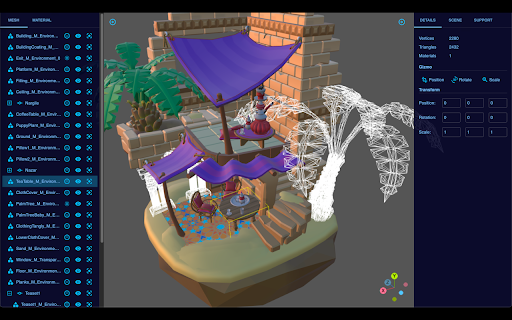


A viewer for 3D models. EwoViewer is your gateway to the fascinating world of 3D modeling! This state-of-the-art 3D model viewer supports a wide array of popular formats, including glTF, 3D Tiles, DAE, MMD and STL. With EwoViewer, you can delve into the intricate details of your 3D models, zooming in to appreciate the fine craftsmanship. Need to focus on a specific part? No problem! EwoViewer allows you to highlight, hide, or even set parts of your large 3D model into wireframe mode for a more focused viewing experience. EwoViewer also comes with the functionality to showcase simplified scenes with different decks and light types, as well as environment map. This feature allows you to visualize complex 3D scenes with ease. But that’s not all! EwoViewer also empowers you to capture snapshots of your models or export them into glTF (text or binary) formats for future use. Whether you’re a professional designer or a 3D modeling enthusiast, EwoViewer is the perfect tool to bring your creations to life. Experience the power of 3D visualization like never before with EwoViewer! version 1.1.4 * Migrate to the latest three.js and remove IFC support as the library is deprecated version 1.1.1 * Update core engine for multiple bug fixes version 1.1.0 * Support new formats: 3MF, AMF and LWO * Add material penel for more texture types version 1.0.2 * Support drag and drop ZIP files with models inside version 1.0.0 * Preserve the last model * Multiple bug fixes

BPM RunWalkYou Ext
---------------------------------------------------------------------------- You will be able to do BPM running (walking) with your favorite YouTube videos. (Supports playback speed adjustment.) ・If you can use the chrome extension on your mobile device, you can easily perform BPM running (walking) on YouTube videos. ・You can keep the BPM you want to run even if you go to the next song in the playlist.

3D Mview Extractor
Detects and extract 3D Mview files 🎯 3D Mview Extractor - Your Ultimate 3D Model Detection Tool Discover and download 3D Mview files with just a few clicks! This extension automatically detects 3D model files on any webpage you visit, making it easier than ever to collect and manage 3D content. ✨ Key Features: • Automatic Detection: Instantly identifies 3D Mview files on any webpage • Easy Downloads: Download detected models with a single click • Real-time Scanning: Continuously monitors pages for 3D model content • Clean Interface: Simple, intuitive popup window shows all detected models • Format Support: Specifically designed for Mview file formats 🎯 Perfect For: • 3D Artists • Game Developers • Design Professionals • 3D Printing Enthusiasts • Anyone working with 3D models 💡 How to Use: 1. Install the extension 2. Browse any website with 3D content 3. Click the extension icon to see detected models 4. Download your desired models with one click 🔒 Privacy & Security: • No data collection • Works locally in your browser • Requires minimal permissions • Open and transparent operation 💪 Technical Details: • Lightweight and efficient • Minimal system resource usage • Regular updates and improvements • Compatible with all modern websites Get started with 3D Mview Extractor today and streamline your 3D model workflow! Note: This extension is designed to work with publicly accessible 3D model files. Please respect copyright and usage rights when downloading content.

Kompositor
Design web animations with ease. Dive into 3D transformations using mouse control to transform and captivate your creations Discover Kompositor, the powerful and user-friendly web extension that revolutionizes the way you create animations and visual effects for your web projects. Design and implement stunning motion graphics, digital visual effects, and compositing applications with just a few clicks. From dragging elements to creating nested 3D transformations, Kompositor offers a world of possibilities for web designers and developers. a. Effortless animations: Craft engaging animations by simply dragging elements into place. Build visually striking designs without the need for complex coding. b. Easy HTML element transformations: Quickly and effortlessly transform any HTML element using your mouse. The extension supports both 2D and 3D transformations, allowing you to create truly immersive and dynamic web experiences. c. Nested transformations: Achieve even more with nested transformations, where transformations sum up from ancestor to child elements. Unlock new creative possibilities for your designs through this advanced feature. d. SVG elements support: Bring your vector graphics to life with support for SVG elements. Animate and manipulate your SVG designs to create interactive and visually appealing web content. e. Animate plain JS objects: Go beyond HTML and SVG elements, animating plain JavaScript objects for a flexible and versatile solution to all your animation needs. Upon completing your design and animations, export your work to the GreenSock Animation Platform (GSAP) effortlessly with just one click. Generate GSAP-ready code to seamlessly integrate your stunning animations into your web projects. Unleash your creativity and transform your web designs with Kompositor. Experience the power of intuitive and dynamic animation creation right at your fingertips.

Blender 3D creation suite
This extension allows users to use the Blender software program. Blender is a program for 3D computer graphics to create animated films, visual effects, art, 3D-printed models, motion graphics, interactive 3D applications, virtual reality, and video games. • Modeling - The creation of a 3D scene needs at least three key components: Models, materials and lights. In this part, the first of these is covered, that being modeling. Modeling is simply the art and science of creating a surface that either mimics the shape of a real-world object or expresses your imagination of abstract objects. • Rendering - Rendering is the process of turning a 3D scene into a 2D image. Blender includes three render engines with different strengths: - EEVEE is a physically based realtime renderer. - Cycles is a physically based path tracer. - Workbench is designed for layout, modeling and previews. • Video Editing - Blender can be used to edit videos. There are two possible methods for this, one being the Compositor and the other, described in this chapter, being the Video Sequencer. The Video Sequencer within Blender is a complete video editing system that allows you to combine multiple video channels and add effects to them. You can use these effects to create powerful video edits, especially when you combine it with the animation power of Blender! • VFX - Motion Tracking is used to track the motion of objects and/or a camera and, through the constraints, to apply this tracking data to 3D objects (or just one), which have either been created in Blender or imported into the application. • Compositing - Compositing Nodes allow you to assemble and enhance an image (or movie). Using composition nodes, you can glue two pieces of footage together and colorize the whole sequence all at once. • Texturing - Image textures are typically needed when the desired look is hard to achieve with procedural textures, or if the texture is not uniform. For example, a car would only have scratches in a few places where they make sense, not in random places all over its body. • Many types of Simulations. Blender’s physics system allows you to simulate a number of different real-world physical phenomena. You can use these systems to create a variety of static and dynamic effects such as: Hair, grass, and flocks, Rain, Smoke and dust, water. This extension also includes access to a file manager to upload and download the files, animations and videos created. This extension is the Blender online distribution so it is compliant with the Blender GPL
