
nbnfkhblcofmmbeamohjmmjfmfmhknpj

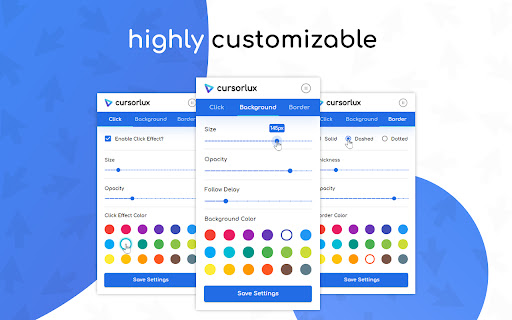

A customizable mouse highlighter extension to highlight your cursor and clicks! What Cursorlux does: ★ Highlights your cursor and clicks ★ Allows you to customize the color, size, opacity, etc. ★ Provides you options for click, background, and border styles ★ Syncs your custom settings across your various Google accounts ★ Enables you to activate/pause the extension on the fly Use Cases: ★ Screen Sharing ★ Screen Recording (Tutorials, Demos, etc.) ★ Accessibility Needs for the Visually Impaired ★ Or you just want your cursor to stand out more! Free and Open Source: https://github.com/joshuajadaniel/cursorlux

spotlight
✨Spotlight your cursor🔦 ✨Highlight your mouse pointer while sharing your screen! 🔦 1. Click toolbar icon. 2. Press `shift` key. Mouse wheel to change circle size. 3. Toggle off to disable spotlight. 4. Mouse over toggle button and click cancel button to close.

Mouse Highlight & Annotation Tool
Highlight your cursor and draw temporary annotations on any webpage. Perfect for presentations, demos, and screen sharing. Quick Start 1️⃣ Click “Add to Chrome” 2️⃣ Use the popup buttons to activate Cursor Highlight and Temporary Drawing tools 3️⃣ Draw and highlight effortlessly with annotations that fade away in 1 second — no clutter, no permanent marks Key Features 🎯 Cursor Highlight: A purple circular overlay follows your mouse cursor across all websites to help you point out key elements during live demos or screen sharing. ⌛ Temporary Drawing Tool: Draw with a forest green pen that automatically fades your annotations after 1 second — perfect for quick, ephemeral markup without leaving traces. 🔄 Activate or deactivate anytime via popup buttons for fast, seamless control 💡 Minimal & lightweight: Designed to stay out of your way and not slow down your browser 🔐 Privacy-focused: No data collection or tracking; everything runs locally in your browser Why Use Mouse Highlight & Annotation Tool? Whether you're a teacher, presenter, UX reviewer, or remote worker, this tool helps you communicate visually without cluttering your screen. Use it to: Direct attention during live presentations or screen shares Highlight important points smoothly with a visible cursor overlay Keep your workflow clean and distraction-free Permissions This extension requires minimal permissions — it runs entirely in your browser without accessing your data or sending information externally. Customizable cursor and pen colors Additional shortcut options for even faster activation 📌 Do my annotations stay on the page permanently? No. All drawings automatically fade out after 1 second, keeping your browsing clean. 📌 Is this extension safe and private? Absolutely. It runs locally and does not collect or send any user data. 📌 How do I activate the features? Simply open the popup and click the buttons to activate or deactivate the cursor highlight and drawing tools. Boost your presentations, screen shares, and live demos with Mouse Highlight & Annotation Tool. Add it to Chrome today and start communicating visually — cleanly and effortlessly!

AnyTab Laser Pointer
Adds a laser pointer to any browser tab, making it easier for your audience to follow along during video calls. *** NOW WITH GESTURE DETECTION AND AUTOMATIC HIGHLIGHTING!!! *** Have you ever found yourself lost in a sea of mouse movements during a virtual presentation, desperately trying to keep up with where the presenter is pointing? "AnyTab Laser Pointer" adds a laser trail to your mouse pointer (similar to the one on Google Slides) on ANY Chrome tab. And YES... that includes spreadsheets!!! Think of it as your on-screen spotlight, leaving a vivid trail in its wake, turning your mouse into a laser pointer that can cut through the most cluttered of spreadsheets, the busiest of designs, or the densest of texts. No more digital hide and seek with the cursor, just a simple, clear path to follow. With the "AnyTab Laser Pointer", your viewers will always be in sync, even if you're moving at the speed of light. No more frantic pleas of "wait, where are you pointing?" or "could you go back a bit?". Now, everyone can easily follow your digital dance across the screen. This is not just an extension, it's your breadcrumb trail, your neon marquee in the bustling city of shared screens. Point, Direct, Engage. It's that simple. Embrace the power of clarity, and never lose your viewers again! PS: as a bonus, AnyTab Laser Pointer also tells you how many tabs you juggled in the last 24 hours! CHANGELOG v2.0 - February 11th, 2024 - Highlight Gesture Detection: it recognizes when you're pointing at an element on the page to show it to your viewers and it adds on the page a shape to highlight that element! - minor fixed and performance improvements. v1.5 - February 7th, 2024 - Fixed bug: improved variable naming to shat it won't interfere with the debug environment of developers. FIXED. v1.4 - December 12th, 2023 - Fixed bug: the laser trail did not display when scrolling up the page. FIXED. v1.3 - December 12th, 2023 - Improved the count of tabs used in a day. - Improved the implementation of the rating popup to make it more user-friendly. v1.2 - December 11th, 2023 - Added in-extension rating support. v1.1 - December 9th, 2023 - Fixed an issue that was causing the mouse trail to go off-screen and the browser reacting by adding the horizontal scroll bar. - Other minor fixes Please, leave a review! It helps more people find the extension. Thank you for using AnyTab Laser Pointer. -

Mouse Pointer Highlighter
This extension will highlight your mouse cursor and your mouse clicks. This is a very simple plugin that will highlight your cursor in chrome and indicates click actions. It should simplyfy screen sharing sessions and help your screen sharing participants comprehend your actions.
