
lpccnbaohcggmnnciajjbkeinjkfdonp
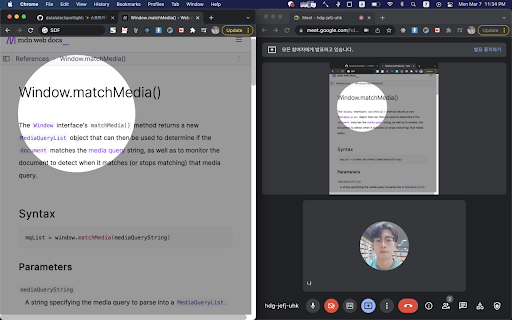

✨Spotlight your cursor🔦 ✨Highlight your mouse pointer while sharing your screen! 🔦 1. Click toolbar icon. 2. Press `shift` key. Mouse wheel to change circle size. 3. Toggle off to disable spotlight. 4. Mouse over toggle button and click cancel button to close.

CursorLight
Highlight the mouse cursor position. Click on the extension icon to run it. Choose highlight shape, blur background, and various other settings in options.

Figma Cursor Toggle
Toggle between touch and default cursor in any Figma prototype Toggle between touch and default cursor in any Figma prototype. This is especially useful when you want to record mobile prototypes in non-standard frame sizes. No more desktop cursors on mobile UI!

Someity
Making the Web Accessible for All More than 70% websites on the Internet have been classified as in-accessible. This is inimical to people with disabilities and restricts involving them within the Internet Community. We were determined to change this. We built Someity to serve as an all-in-one accessibility and productivity tool without having the website makers change a single line of source code. We want our users with varied abilities to feel empowered and confident on the Internet just like their more fortunate peers. We want them to feel brave and fearless - just like Someity. • Someity Actions • Color Blind Aid • Font Type • Focus Mode • Text-to-speech • Text Zoomer • Font Color • Magnifier • Cursor Customizer • Screen Capture • Print Page With Someity Actions you can have Someity: • Open any website on the Internet by just naming it. • Google anything for you. • Play a song on YouTube. • Translate from any language to English. • Google Map directions from any location to any other location in the world just by naming the two cities. Support Features, bugs and improvements welcome over here: https://github.com/RonLek/Someity/issues

Mouse Pointer Highlighter
This extension will highlight your mouse cursor and your mouse clicks. This is a very simple plugin that will highlight your cursor in chrome and indicates click actions. It should simplyfy screen sharing sessions and help your screen sharing participants comprehend your actions.
