
nbllaikcjebbpdemmekhnciekkjodlla
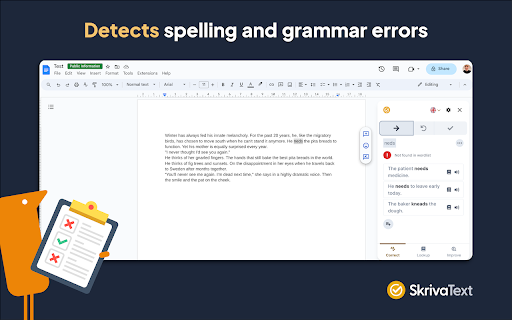

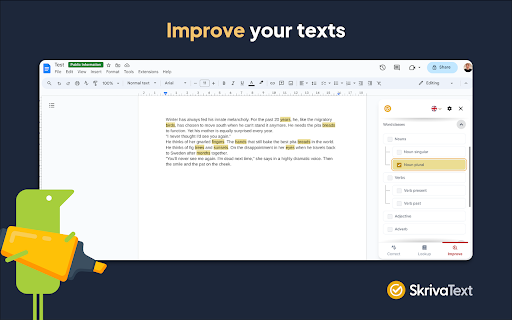
Discover the spelling and grammar checker of the future, created by experts in language, speech therapy and pedagogy. SkrivaText is a Chrome extension that corrects spelling errors and grammatical errors in Swedish and English. The product is developed for people with reading and writing difficulties, but can be used by everyone who needs help with writing. SkrivaText helps you increase the quality of your text with features such as: CORRECT Detects spelling and grammar errors and gives correction suggestions. LOOK UP Look up Swedish and English words and get word explanations, synonyms and example sentences of how the word can be used. IMPROVE Highlight the essential elements of your text, helping you to understand and enhance your writing. SkrivaText can be used in Google Docs and Word Online. BECOME AN INDEPENDENT WRITER SkrivaText helps you find and understand errors. INCREASE THE QUALITY OF YOUR TEXT By highlighting different elements in your document, SkrivaText helps you enhance your writing. UNDERSTAND DIFFICULT WORDS Look up words in both Swedish and English

Video Freeze
Play a youtube video for a random number of seconds. Great for musical chairs, musical statues and more! Play a youtube video for a random number of seconds. Great for musical chairs, musical statues and more!

Net iD Client
Provide access to security tokens, for example, smart cards, on your local computer. The extension acts as a bridge between a website and the local computer, using the web browser's native messaging interface. The extension requires that Net iD Client is installed on the computer and that the native messaging interface is enabled. The functionality provided depends on the configured access level in Net iD Client. The lowest access level allows the creation of digital signatures, and with maximum access level is it possible to administrate the security token. See the Net iD Client documentation for more information. Adding the functionality to a website requires communication between the website and the extension. The recommended solution is to use the javascript file provided with Net iD Client. It delivers the same interface for different communication methods, for example, this extension, other web browser extensions, or older interfaces like ActiveX and NPAPI. See the Net iD Client documentation for more information. This extension is only applicable to users with Net iD Client installed and this extension enabled. If you have any questions or concerns, please contact your support organization or visit us at www.pointsharp.com.

OrbitNote
Create, convert, connect: take your digital documents to the next level with OrbitNote. Create, convert, connect: take your digital documents to the next level with OrbitNote. Searching for a way to make digital documents accessible, dynamic and more collaborative? Download OrbitNote to transform and interact with digital documents in a completely different way! With OrbitNote you can make digital documents accessible and actionable, while demonstrating and giving feedback in multiple formats. It’s a great tool to boost productivity, connections and collaboration! Open digital documents in Google Drive, OneDrive, on the web app, in your LMS (Google Classroom and Schoology), or on your local device, then use OrbitNote to: • Collaborate in real-time within digital documents • Read text, including math & science equations, aloud with easy-to-follow dual color highlighting • Type text on top of your PDFs with the Text feature • Highlight and extract information with colored highlighters • Add text and voice comments or use pushpins for helpful hints or instructions • Use freehand or shape drawing to scribble and draw on your digital documents • And more! Try OrbitNote today to check out all of the above features for a limited time. We have much more planned for this tool later in the year. As OrbitNote grows and new features are added, a premium version requiring a subscription will be introduced. Get more information on OrbitNote’s features and future plans at https://www.texthelp.com/products/orbitnote/ For any technical questions, contact us at: support@texthelp.com

OpenText Core SCA Select Extension
Open Source Select will help developers find and use the right open source and reduce friction between organisations and developers Open Source Select helps you find and use policy compliant and great open-source for any development project. The OpenText Core SCA Select Extension is a free plugin created with developers in mind, enabling you to check the health metrics and license information of an open source project at a glance. If you need more granular data, the extension can lead you to Open Source Select for more detailed information. The three types of metrics you can examine are: Community - How healthy the community around a project is. Popularity - Is it used by many? Is the usage declining? Security - How well does the maintainers apply security best practices. The extension now supports Start Left Policies. This lets you immediately see if the open source you are browsing is compliant with your company’s open source policy, without the need to import and scan code with Software Composition Analysis tools and common source code repositories and package registries such as GitHub, pypi, npmjs, nuget and many others are supported.
