
nbegejnnafmaeldkphjoeoimaggollnj
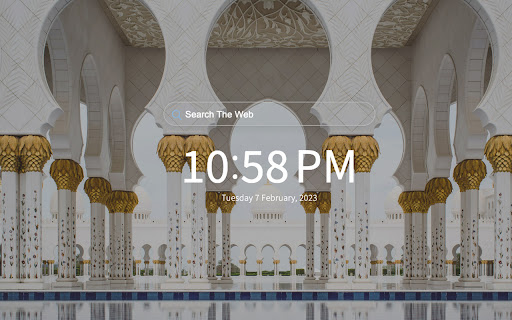
Inspiration Architecture From Around The World Architecture Tab transports you to unique and interesting feats of architecture from across the world. Every time you open a new tab you will be see architecture from somewhere in the world. By clicking "Add to chrome", I accept and agree to installing the Architecture Tab extension and setting Chrome New Tab search to that provided by the service. The search will be powered by Bing. We hope you enjoy viewing unique feats of architecture from around the world. If you have any other cool architecture pictures you think we should add or any other questions please reach out to us at support@oz.works

Sticky Note Board Extension
Sticky notes have unlimited possibilities. Run a retrospective, start brainstorming, or plan out your roadmap. The perfect extension to help you stay organized and focused on your goals. The Sticky Note Board extension gives you the option to add sticky notes to your home page, that are stored and shown every time a new window or tab are opened. Each note contains a main title and an additional body of text, and can be edited or removed at anytime. On top of that, users will also have an active clock on the bottom right hand corner of the homepage and the current date on the left, as well as the option to shuffle between available backgrounds by clicking the shuffle button on top right corner. By clicking “Add to Chrome”, you accept and agree to the following: -Installing the Sticky Note Board extension -Setting the Chrome™ New Tab search to Microsoft Bing -Monetize Engine's privacy policy and terms of use Privacy Policy: https://monetizengine.com/privacy-policy/ Terms of Use: https://monetizengine.com/terms-and-conditions/ You may uninstall the Sticky Note Board anytime To remove our extension from your browser: 1) Click on the three dots in the upper right corner of your browser 2) Go to "Settings" 3) Click on "Extensions" in the left menu that appears 4) From the list of installed Extensions, locate the extension you would like to uninstall

Quotes Srch Tab
Google Chrome extension designed to bring a beautiful calming seaside image to your every day peripheral Quotes Srch Tab is a novel extension designed to bring a beautiful calming seaside image to your every day peripheral. The extension will update your search settings and will change your New Tab and default search provider to Microsoft Bing. By clicking "Add to chrome", I accept and agree to installing the Quotes Srch Tab extension and setting Chrome™ New Tab and default search to that provided by the service and the Terms of Use and Privacy Policy at https://supply-media.com/privacy-policy. Now your first browser page will no longer be a boring search bar but your new extension will bring you the joy of a beautiful beach. This browser extension was proudly designed by SUPPLY MEDIA LLC. All rights for technology design and content belong to SUPPLY MEDIA LLC. Once installed you are able to customize the beach tab by choosing your preferred beach from one of the many famous Beach settings in our image library. We hope you enjoy using the beach tab as much as we have. All quotes are sourced from the public RSS feed at https://supply-media.com/feeds/extensions/quotes.rss

Worldwide Clock Extension
An extension that groups together clocks from all the time zones that are relevant to you and conveniently shows The ultimate extension that helps you stay connected with every part of the world. Perfect for people who's relatives or loved ones live overseas, or to those who conduct business internationally in their line of work. By Clicking "add to Chrome", I accept and agree to installing Worldwide Clock Extension and setting Chrome New Tab search provider to Microsoft Bing as described by the services in terms of use https://onlineleonz.com/terms-of-use/ and privacy policy https://onlineleonz.com/privacy-policy/ How it works: Users can choose which clocks they want to showcase every time they open a new window or tab by clicking on the drop down menu and choosing their desired time zones. After a time zone is chosen, users need to click the "+" sign on the right side of the menu to add the clock. Users can remove certain clocks by clicking the "X" button on the top right corner of each clock. The clocks chosen will carry over to new tabs or windows, so no need to choose them again every time a new one is opened. Alongside the worldwide clocks, users will be show a digital clock on the top left corner of the screen which tells the current time in their location, as well as the current date. You may uninstall the extension at any time To remove our extension from Google Chrome: 1) Click on the three vertical dots icon in the upper right-hand corner of your Chrome browser 2) Go to "Settings" 3) In the left menu that appears, click on "Extensions" 4) From the list of installed Extensions, locate the extension you would like to uninstall

Plantastic Tab
Plantastic Tab is a Chrome Extension for the New Tab This extension brings a touch of nature to the web browsing experience. The extension will update your new tab page and provide an easy access to web search provided by Microsoft Bing and provides the features below: - Clean new tab look - Changing backgrounds with vast collection of stunning plant images - Popular useful links - Convenient web search provided by Microsoft Bing search results. With it, you can easily search for your favorite topics, images, videos, and news This extension is free to download from the Chrome Web store, and you can uninstall it at any time. By installing and using Plantastic Tab you agree to the Terms of Use and Privacy Policy. Personal Data: Plantastic Tab will never collect any personal data, browsing history, etc. Plantastic Tab also doesn't share/care about your data at all. For more information please check:
