
nbahcogbeaeegpeifcibkmbhmkohcfjj

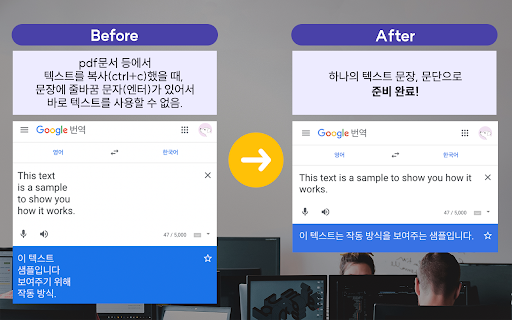
Clean text for purpose (remove newline, or remove '\', '/', ':', '*', '?', '"', '', '|') -----------------[사용 방법]----------------- (방법 1) Extension 실행 시 자동 동작 - 프로그램 실행 시, 클립보드에 있던 텍스트의 줄바꿈 문자를 자동으로 없애줍니다. - 바로 붙여넣기 하여 사용할 수 있습니다.

Read Clean Text
Read Clean Text strips non text from a web page and displays clean text for reading and copying. Read Clean Text allows you to view the underlying text of a web page striping out non text items including most blocking scripts. It provides a text only version of the web page. All interactive content is removed including adds and blocking scripts. It works on most web pages including news and article pages. Read Clean Text can run as a browser extension or a standalone web page. When run as an extension on the web page to read highlight a few words of text to start reading from and then from the extensions tool click the Read Clean Text icon Read Clean Text icon. Use filter from or with to display required clean text. Click on a clean text block to copy. From the top right you can ? goto help, ⋀ scroll to top, and when used as an extension Close.

AI Text Cleaner: Remove Text Formatting
Use AI Text Cleaner to clean up text, remove formatting styles, and clear watermarks online - all in one tool. Meet AI Text Cleaner, your all-in-one solution for turning messy content into clean text with zero effort. This powerful text cleaner tool helps you remove text formatting, fix broken layouts, and cleanup text instantly. Whether you work with articles, documents, code snippets, or copied web content, this extension does the job fast and reliably. AI Text Cleaner is built for writers, students, developers, marketers, and anyone who needs a consistent text formatting cleaner. Just clean paste your content and watch the magic happen. Perfect for boosting productivity and keeping your workflow smooth. With advanced algorithms from ai text cleaner technology, this extension acts as both a simple cleaner text utility and a professional chatgpt text cleaner enhancement for daily use. Its goal is to give you clean, readable, and ready-to-use text every time. If you work with automation, code, or data processing, you will appreciate features inspired by nltk text cleaning, nlp text cleaning, cleaning text data in python, and cleaning text in python. The extension simplifies your pipeline, offering a convenient online text cleaner that removes unnecessary formatting. Use AI Text Cleaner as your go-to google docs text cleaner, html text cleaner, or mac text cleaner. No extra tools needed. It also works great as a text cleaner add on for your browser, giving you instant cleanup text tools without switching tabs. 💡 Why users love AI Text Cleaner: 🟢 clean text output that is ready to use anywhere 🟢 one-click text format remover for fast tasks 🟢 ability to remove formatting text online instantly 🟢 perfect for students, content creators, and developers 🟢 helpful for editing docs, emails, and online content This extension is also suitable for technical workflows, especially when you need to text remove unnecessary code styles, inline HTML tags, or exported formatting junk. Developers enjoy using it due to its precise remove format text functions. AI Text Cleaner also works as an ai cleaner for anyone who deals with data, logs, or web content extraction. Just click, paste, and enjoy clear text without distractions. Use it daily as your text formatting remover to speed up your content workflow. It works especially well for writing platforms, CMS systems, email editors, and social media tools where formatting issues often appear. For researchers and engineers, the extension is a great companion for cleaning text data in Python-related workflows, allowing quick manual pre-processing before applying scripts. 💎 Additional scenarios where AI Text Cleaner helps: 1️⃣ clearing formatting from emails 2️⃣ removing leftover styles from Word or Google Docs 3️⃣ generating clean text for ChatGPT prompts 4️⃣ simplifying copy-pasted HTML or markdown 5️⃣ preparing content for translators or editors AI Text Cleaner is created for maximum comfort. No ads, no sign-ups, no friction. Just a clean paste and instant formatting removal. It is the fastest way to clear text and produce structured output. Q&A Section 📌 How does AI Text Cleaner work It scans your input and uses ai text cleaner logic to remove format text, strip styling layers, and produce clean text instantly. 📌 Can it remove formatting text online Yes, it works directly in your browser, offering remove formatting text online with one click. 📌 Does it support HTML content Absolutely. It acts as an html text cleaner, removing tags, inline styles, and layout artifacts. 📌 Can I clear watermark elements In many cases yes. The clear watermark function removes lightweight watermark patterns when possible. 📌 Is it useful for developers Definitely. It helps with cleanup text and is inspired by nltk text cleaning and cleaning text in python techniques. If you want a simple, effective, and reliable text formatting cleaner for everyday tasks, AI Text Cleaner is the perfect tool to speed up your workflow, improve accuracy, and make every piece of content spotless.

Accessible EPUB Viewer
독서 장애인을 위한 읽어주는 전자책 뷰어 독서 장애인을 위해 출판한 접근성 전자책을 손쉽게 읽을 수 있습니다. ——— 전자책(EPUB)을 볼 수 있으며, TTS를 지원합니다. 독서 장애인을 위하여 접근성이 향상된 전자책 서비스를 지원하며, Accessible EPUB의 표준을 수용합니다. 브라우저에서 바로 전자책을 볼 수 있습니다. 전자책 샘플은 다음의 경로(https://github.com/IDPF/epub3-samples/releases/download/20170606/accessible_epub_3.epub)에서 다운로드 가능합니다. 뷰어를 실행한 후 파일 선택을 통해 사용자의 PC에 있는 EPUB 파일을 엽니다. TTS를 통해 재생/정지할 수 있습니다. epub:type 및 ARIA role 읽기를 통해 표지, 목차, 주석 등을 구분하여 안내합니다. 전자책에 포함된 이미지, 표, 주석, 수식, 유니코드, 한자, Audio, Video, SVG, MedioOverlay 등의 콘텐츠를 확인할 수 있습니다. 목차 및 객체 목록, 검색, 단위 이동 기능을 제공하여 원하는 내용을 손쉽게 탐색할 수 있습니다. 설정을 통해 음성 속도, 피치, 볼륨 등을 사용자에게 맞게 조정할 수 있습니다. 한 번 읽었던 전자책은 위치를 기억하여 열 수 있습니다. 브라우저를 종료하면 뷰어도 함께 종료됩니다.

Open Links In New Tab
🌟Important Refresh Page! 🌟
