
naepdomgkenhinolocfifgehidddafch
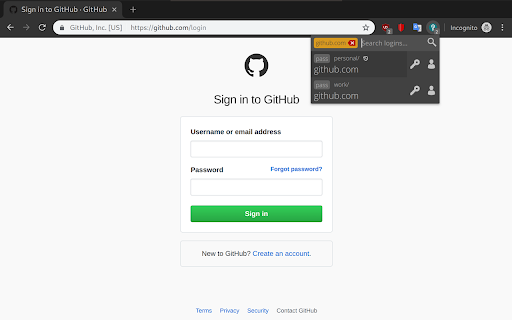
Browser extension for zx2c4's pass (password manager) Browserpass is a browser extension for Chrome (and Firefox) to retrieve login details from pass (passwordstore.org) straight from your browser. It uses native messaging to talk to a local binary to retrieve the login details in a secure manner. Hit "Ctrl+Shift+L" to open up the password search or click the lock icon , cycle through the logins with TAB and hit ENTER to auto-fill & submit the login form of the current site. This add-on depends on a small binary you'll need to install on your OS. Installation instructions can be found here: https://github.com/browserpass/browserpass-native

Plasma Integration
Provides better integration with the KDE Plasma desktop. Multitask efficiently by controlling browser functions from the desktop, even while Chrome is in the background. Manage audio and video playback, check downloads in the notification area, send files to your phone using KDE Connect and more inside the KDE Plasma Desktop! The plasma-browser-integration package must be installed for this extension to work. It should be available from your distribution's package manager when running Plasma 5.13 or later.

Joplin Web Clipper
Capture and save web pages and screenshots from your browser to Joplin. This is a web clipper that allows you to save web pages to Joplin and take screenshots while you're browsing the internet. You can either save complete web pages or simplified versions of it. You will need the Joplin desktop application to use this extension.

pass-browser-chrome
Make secrets easily accessible from your pass' ~/.password-store pass-browser-chrome is a browser plugin for your secrets managed by pass: https://www.passwordstore.org/

KeePass Tusk - Password Access and Autofill
Readonly KeePass password database integration for Chrome and Firefox Tusk adds KeePass functionality to your browser. It does not require KeePass to be installed, and is suitable for using KeePass with Chromebooks. Tusk is read-only and can be configured without granting the extension access to manage your cloud storage accounts. It can be used with these cloud providers. * Google Drive (somewhat reliable) * Dropbox (recommended) * OneDrive (unreliable) * OwnCloud and NextCloud via WebDav (somewhat reliable) * KDBX Version 4 Support * WebDAV support * OTP support * Shared Link support * HTTP fetch support * Better security practices and updates. Tusk is a fork of CKP and seeks to provide improvements to the UI, better security practices, and KDBX version 4 support. Visit https://subdavis.com/Tusk for more information. Tusk is Open Source and provided under an MIT license. ** UPDATE LOG ** ================ v2024.8.12 - Google Drive permissions regression fix --------------- v2024.8.10 - Fixes for OTP and Credential caching --------------- v2024.8.7 - Fixes for non-Chrome browsers. --------------- v2024.8.2 - Updates Google Drive integration, fixes for shared URLs. ---------------- v2024.07.30 - Upgrade to manifest v3, various bug fixes. Removes PCloud. Updates many dependencies. ---------------- v2018.9.27 - Bugfix #257 ---------------- v2018.9.16 - UI Update, new settings, bug fixes. ---------------- v2018.6.27 - Bug fixes ---------------- v2018.6.16 - CRL+SHIFT+SPACE opens popup, other fixes. ---------------- v2018.5.19 - Pcloud and hotkey navigation! ---------------- v2018.2.25 - WebDAV support! ---------------- v2018.2.17 - KDBXv3.1 (chacha20+AES KDF) ---------------- v2018.2.12 - Solve race condition when opening before cache expires. ---------------- v2018.1.31 - TUSK_URLS custom field ---------------- v2018.1.23 - KeeOTP support; clipboard timeout preferences. ---------------- v2018.1.16 - solve #64, add Hotkeys Ctrl+Shift+Space ---------------- v2018.1.8 - fix bug with XML-based keyfiles ---------------- v2018.1.7 - use persistent background page ---------------- v2018.1.5 - Tusk! A ground-up rewrite of the UI + major bugfixes.
