
mpnckpmpddjcgkpjkmmakcamjhceadne
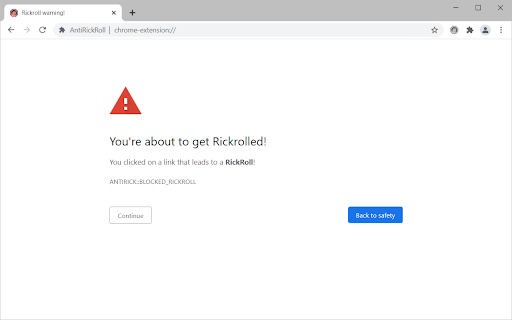
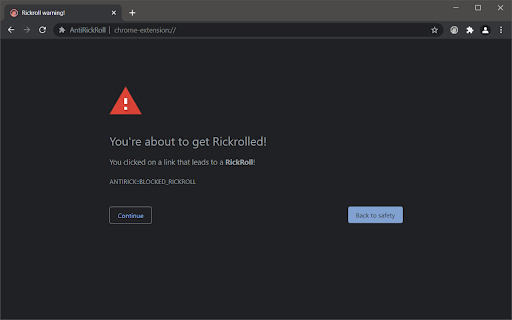
Never gonna rickroll you, never gonna let you get rickrolled. AntiRickRoll is a browser extension that helps protect you from the classic internet prank of being rickrolled. If you've ever clicked on a link thinking it was going to take you to something interesting or informative, only to find yourself watching the "Never Gonna Give You Up" music video by Rick Astley, then you know how frustrating it can be. With AntiRickRoll, you can browse the internet with peace of mind, knowing that the extension is silently working in the background to detect and block rickroll attempts. It's a simple and easy-to-use tool that is available for both Chrome and Firefox browsers. One of the great things about AntiRickRoll is that it is privacy-respecting, meaning that it doesn't collect or share any of your browsing data. Additionally, the extension is frequently updated to ensure that it is effective at blocking the latest rickroll attempts. Overall, if you're tired of falling victim to the rickrolling prank, then AntiRickRoll is the extension for you. It's a reliable and efficient tool that helps you stay productive and focused while browsing the web. Give it a try and experience the peace of mind that comes with knowing that you'll never get rickrolled again.

Scratch Addons
Scratch Addons provides customizable features and themes for the scratch.mit.edu website and project editor. Choose from 100+ options: • Quickly read and respond to messages by clicking the extension icon. • Jump into active multiplayer games with the cloud games tab. • Beautify every page on the Scratch website with the 3.0 style and options for dark mode and custom color themes. • Easily leave studios, promote or remove curators, and browse followers to invite. • Improve project management with the My Stuff search bar and the unshare button. • Enhance the project player with a pause button, 60FPS, and gamepad support. • Animate more easily with onion skinning, exact color picking, and costume search. • Supercharge your coding efficiency with block search, searchable dropdowns, block switching, single-grab, and copy/paste. • Stay tidy with the auto-hiding block palette and sprite folders. • Directly set and freeze project thumbnails to any image or GIF. • Bring back the cat blocks from April Fools. • Debug projects with logging, performance monitoring, and step-by-step execution. • And more with each update! This extension is open source software licensed under GPL v3. To contribute or check the source code: https://github.com/ScratchAddons For more information, go to: ScratchAddons.com This project is not affiliated, associated, or in any way officially connected with the Scratch website or the organizations that maintain it.

RoGold - Level Up Roblox
Your new and improved Roblox experience RoGold adds many features to improve your Roblox experience. With over 40 different features, there is something for both developers and players! Join our Discord for news, support, and a welcoming community at https://discord.gg/rogold You can also visit our website at https://rogold.live/ Some of our features: - Keep track of games you love by pinning them with the Pinned Games feature. - Join a small or empty server in a flash without tediously finding them with the Small Server feature. - Prioritise your best friends and see them on your Roblox home page with the Best Friends feature. - See Roblox game stats update in realtime with the Live Game Stats feature. - Get more detailed group stats with the Group Stats feature. - Get greeted when you visit the Roblox home page, just like the old days! - Bulk Unfriend. Do you have a lot of Roblox friends? Now you can easily remove some. - Improve the look of your Roblox experience, with our Theme Creator system. - Are you a Roblox developer? With RoGold you are easily able to copy item, group and game ids. - View banned Roblox accounts with our Banned Users feature. And much much more! You can use this extension with others like RoPro, BTRoblox, Roblox+, etc. Full support for these is not guaranteed.

AutoDraw for skribbl.io
How to use (when it's your turn to draw): 1. Search for an image using Google (https://images.google.com) 2. Drag and drop it onto the canvas 3. Sit back and relax Is AutoDraw active? Look for the starfish icon in Chrome's list of extensions. If it has color then the extension is active. Just drag and drop an image onto the canvas when it's your turn to draw.

RoGold Ultimate - Roblox Enhancer
Transform your Roblox experience with RoGold Ultimate - Unleash advanced customization, streamlined gameplay, and exclusive insight. RoGold Ultimate is more than an extension - it’s the all-in-one suite for Roblox players, traders, and developers. From advanced trading dashboards to custom profiles and developer tools, RoGold gives you the power to control and enhance your Roblox experience like never before. 📈 Trading Suite - Smart trade search, filters, analytics dashboards, bulk actions, and real-time market insights. ⚒️ Developer Tools - Studio Plugin and Desktop App designed to speed up building and testing. (Developer Edition) 🎨 Customization - Profile homes, animated borders, banners, and more to stand out in the community. 🕓 Leveling System - Earn XP for playtime and achievements, unlock rewards, and show off your progress. 💾 Server Controls - View server regions, join random servers, and find the fastest servers near you. …and dozens of other enhancements, all built to give you the most powerful Roblox experience possible. Why RoGold? Unlike simple “theme” extensions, RoGold is a complete Roblox Suite. Whether you’re trading, developing, or customizing, RoGold Ultimate provides the tools you need to play smarter, create faster, and stand out.
