
mpijfmkbemcfeopdjmffocfbidnokdki
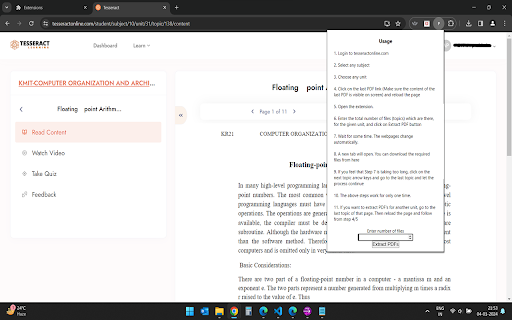
This extension helps the user to extract PDF links and create a download page for all the PDF's on the tesseractonline.com website. Enhance your experience on tesseractonline.com with the PDF Extractor Chrome extension! This powerful tool simplifies the process of extracting PDF links, allowing you to effortlessly create a convenient download page for all the PDF files available on the website.

PDF Extractor
Extracts links and images from PDF files. PDF Extractor Plugin to export all images and links from PDF documents. Searching for a relevant & tested approach to extract images from PDF files? You can go with the PDF Extractor plugin. This plugin is developed to provide ease to the users for extracting hyperlinks and images from PDFs. User groups such as content creators and marketers, business professionals, web developers, trainers, etc. Can use this powerful plugin to bulk download links and images from PDF files. Moreover, this plugin also comes in first place in terms of data security. As this PDF image extractor plugin never stores any user data on its server. Additionally, one prime functionality is that this plugin can work offline without having any active internet connection. Now let's discuss some of the exciting features if the PDF link and image extractor. Key Functionalities of PDF Extractor Plugin This addon can bulk extract images and hyperlinks from PDF documents. Users can use this plugin without connecting to the internet. Supports all types of PDF formats like PDF/A, PDF/E, PDF/X, etc. The plugin also supports the downloading of individual images. Another highlighting feature of this plugin is the user-friendly UI/UX. How to Use the Best PDF Extractor Plugin? Initially, click on the Add to Chrome button to install the PDF image extractor plugin. Next, go to the extensions button from the top-right corner of the Chrome browser. Then, find and click on the PDF Extractor plugin from the already installed extensions. Simply insert the PDF into the plugin interface and click on the extract images and link button. Finally, to download bulk images and links click on the "Download All" button. Technical Support: If you are facing any challenges while using the PDF extractor plugin. Our engineer's team is available to support you.

PDF Link Extractor
Export all URLs and their related page numbers from PDF files with one click PDF Link Extractor is a Chrome extension designed specifically for handling links within PDF files. Whether you want a quick glance at all the URLs within a PDF, or you need to export these links along with their corresponding pages into a neatly organized CSV file, PDF Link Extractor has got you covered. Our extension is not just an ordinary tool, it's an efficiency booster that makes dealing with PDFs easier than ever. 🙂How it works: 1. Drag your PDF file into the designated area. 2. The system will automatically extract all URLs from the PDF. 3. Copy all URLs instantly or export them along with their corresponding pages to a CSV file. 🔒Data Privacy: We highly value the trust of our users and are committed to the security and privacy of your data. PDF Link Extractor operates in full compliance with all privacy regulations and guidelines, including the General Data Protection Regulation (GDPR) and the California Consumer Privacy Act (CCPA). Our process is local, not storing or accessing your data at any point. The extraction of URLs from your PDFs happens solely on your device. We do not share any data with third parties, respecting your privacy at all times. ✉️Contact us: If you have any feedback or suggestions, please don't hesitate to reach out to us at xtcodetech+pue@gmail.com. We'd love to hear from you.

All Links Extractor - SEO Link Audit Tool
Extract, audit, check, crawl, save, and export links for SEO with filters, history, reports, and broken link checks. Extract, audit, organize, and export links from any web page. Built for SEO audits, research, QA, developers, and content workflows. All Links Extractor is a fast and easy Chrome extension for collecting links from websites, selected text, embedded assets, and open tabs. It helps you extract URLs, analyze internal and external links, find duplicates, review link types, save every extraction automatically, and export results in multiple formats. Whether you are auditing a website, collecting references, checking SEO links, researching competitors, reviewing landing pages, or organizing URLs from multiple tabs, All Links Extractor gives you a clean link audit workspace without complicated setup. Extract links from the current page Extract links from selected text Extract links from all open HTTP/HTTPS tabs Automatically save every extraction to history Optional auto-capture for newly loaded tabs Detect internal, external, subdomain, media, download, email, phone, social, tracking, affiliate, and hidden links Detect canonical, hreflang, iframe, image, video, audio, document, and dynamically loaded links Group results by domain Filter by domain, keyword, file extension, URL type, rel attributes, query parameters, URL length, category, and regex Search and sort links instantly Show duplicate counts and cleanable URLs Clean tracking parameters such as UTM values and common tracking IDs Copy selected or visible links Open selected links in background tabs Highlight extracted links on the source page Fetch page title and meta description previews Run link health checks for HTTP/HTTPS links Identify healthy links, redirects, broken links, errors, and unchecked links Create SEO-focused link reports Export results as TXT, CSV, Excel-compatible CSV, Markdown, HTML report, JSON, domain list, or clipboard copy Save and reopen previous extraction sessions Rename, export, and manage saved sessions Use light mode, dark mode, accent colors, compact rows, grouped results, and helpful tooltips Supports multiple interface languages SEO And Audit Tools All Links Extractor includes a dedicated Link Audit page with analytics for total links, unique links, internal links, external links, PDFs, duplicates, nofollow links, sponsored/UGC links, empty anchors, cleanable URLs, link type distribution, top domains, and health breakdown. You can use it as a URL extractor, link grabber, website link extractor, SEO link audit tool, broken link checker helper, page link analyzer, and research URL collector. Export your links in formats that real users can work with: You can export all links, visible links, filtered links, or selected links. Useful For SEO professionals Website owners Digital marketers Developers QA testers Content teams Researchers Bloggers Students Competitor research Broken link audits Internal linking checks Sitemap and page review Lead and resource collection All extracted data is saved locally in your browser storage. The extension does not require an account and does not sell your data. It only uses permissions needed to extract, analyze, save, and export links from pages you choose to scan. Fast one-click extraction Clean and modern audit interface Automatic history saving Multiple export formats Useful filters and analytics Works across normal websites, dynamic pages, selected text, and open tabs Built for real SEO, research, and web audit workflows All Links Extractor helps you move from “I need all links from this page” to a clean, searchable, exportable link audit in seconds.

PDF Mage
Click to save page as PDF PDF Mage lets you save the page you are currently viewing as a high quality PDF file. Features: - Saves a page with a single click of a button - Works with any page you are currently viewing, even if it requires a login - No watermarks applied - Automatically downloads the saved PDF file - Capable of saving parts of a web page as PDF Note: this extension requires an Internet connection to operate. It uses an external API to convert a web page into a PDF file and lets you download the file once the conversion is completed.
