
mphgmadkligoedhahoinkjghofkpmedf

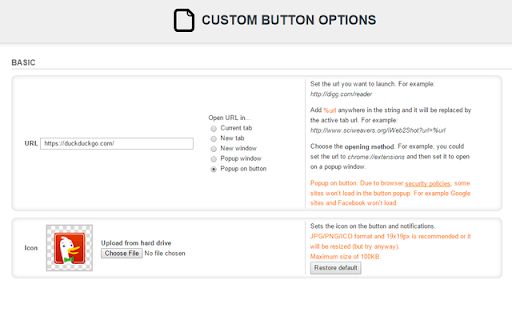


Custom button it's just that, a button that you can customize with an URL and icon. Features: - Set a custom URL to open on click. - Open in current tab, new tab, new window, new popup window or popup on button (this doesn't work with every site). - Change the icon. - Set the domains where it should work using a regular expression. - Show notification when domain doesn't match.

Extension List
Extension List

TabStacks: tab and history search
View and search through open tabs and browser history. TabStacks is a vertical tab menu that helps you find the content you were looking for. Filter the tabs you have open and TabStacks will list the open tabs that match. If TabStacks can't find an open tab, it searches through your history to see if you had a tab open previously! TabStacks is designed to be keyboard and screen reader accessible. Press [CTRL]+[SHIFT]+[K] to open the menu, start typing to filter your tabs, and use the [DOWN] arrow key to navigate to the tab you want, and [ENTER] to open that tab. You can always use your mouse as well. You can search through your history during a tab search by pressing [CTRL+SHIFT+S]. You can close a tab by highlighting it in the list using the arrow keys or right-click and pressing [DELETE] or by clicking the close button on the tab. TabStacks is a high performance and secure extension for Chrome. TabStacks doesn't download external files, doesn't store any information about your activity. *** UPDATES *** Version 2.0.2 * Fixed bug where the popup doesn't close on tab change * Added a settings item to allow the option to hold the popup open Version 2.0.1 * The default keyboard shortcut for toggling the search is now CTRL+SHIFT+S due to the browser using nearly all possible combinations of CTRL+ a single key. * The keyboard shortcut key is now configurable, you can modify it in the settings page. Click the gear icon at upper right of the popup to access settings. * Minor cosmetic updates to the settings page. Version 2.0 * Tabs shown in the popup are synchronized with the state of the tabs in the browser: * Title updates are reflected in real-time. * New or deleted tabs are reflected in the tab list. * Close tabs using a button on the tab. Close buttons show on hover or focus. * Tabs display an audio icon if playing audio. * For audible tabs, clicking the icon will mute and unmute the tab. * Settings page has been added, click the gear icon top-right to access settings. Version 1.0.8 * Added lazy loading for site icons to speed up rendering * Reduced requested browser permissions Version 1.0.7 * Linux support for launching TabStacks from keyboard with [CTRL+SHIFT+K]. * PopupMenu now has a max-height instead of fixed height. * Fixed bug on Windows where the scroll bar was rendered even if the tabs would not scroll. Version 1.0.6 * Improved search algorithm for both tabs and history. * Searches much longer history time period. * Tabs in the current window always appear at top when popup is opened (User suggestion). * URLs for tabs appear on focus or mouseover (User suggestion). * Engineering improvements under the hood to use Web Components for rendering.

Home Button At Top Right
Provides a button at the top-right of Chrome that links to any pages. This extension provides a button at the top-right of Chrome that links to any pages. Regarding upgrade: you now have version 1.7 because Chrome requires a manifest change before June 2024. The new system uses different storage, so your homepage url has been deleted. You just need to re-add it (via right-click > options). Regarding new installs: you have to click the Extensions icon at the top-right of Chrome and pin the new extension in order to see it in your top-bar. Clicking this new home button initially redirects your current tab to Google. Right-click the new home button and choose Options to edit the home-page urls. You can also choose a white icon if you have a dark theme. You can hide the official home button at top left via: Chrome Settings > Appearance > Show home button > Disabled. This extension only uses the storage permission to remember your settings. This extension never monitors your activity. It only redirects your tabs when requested. The source code is very simple and is posted here https://holtstrom.com/michael/blog/post/412/Home-Button-At-Top-Right-Chrome-Extension.html, so you can inspect it for yourself. Use the "Feedback" button at the top of that article if you want to ask any questions. Be sure to include contact info if you want a reply. This extension will always be free and will never have ads. Some people want to link to a local url like "file:///C:/MyFolder/MyFile.html". As described at the above link, Chrome 118 and later removed the ability to redirect to local files. You can enable local navigation for this extension in your windows registry as shown below.

GLaunch
GLaunch is a simple tool which provides a popup panel linking to various Google services - Chrome Extension. GLaunch is a simple extension that provide a popup link panel to numerous Google services. Services can be quickly filtered by typing the name of the desired service name. GLaunch can be used as your new tab page, opened as a new tab or standalone window along side the Chrome extension panel. Features: - Improved Material based Design. - Quickly search and find Google Services (+ Quick actions to common functions). - Ability to add custom links. - Filters services as you type. - Links open in a new tab (+ Incognito window support). - Open with Key binding (CTRL + SHIFT + Y) or customise to your own preference. - Discover Google Services you did not know existed! - Right click context menu based quick searches for Google Maps and YouTube. - Select & Search; you can use GLaunch to highlight an address and right click to search Google Maps. - Select & Search; You can also highlight sentences and search Youtube for videos. Please note that the icons used to represent each service are the official icons by Google they were sourced from the service itself. Any of the trademarks, service marks, collective marks, design rights or similar rights that are shown, mentioned or cited on the extension are the property of their respective owners and not of Integrated Brands, its contributors or visitors. The word mark, "Google" and the logo, and any associated service logos are copyright. The copyright is held by Google.
