
bfejcgpdahgpmgadhgdadfiekmhgnifm

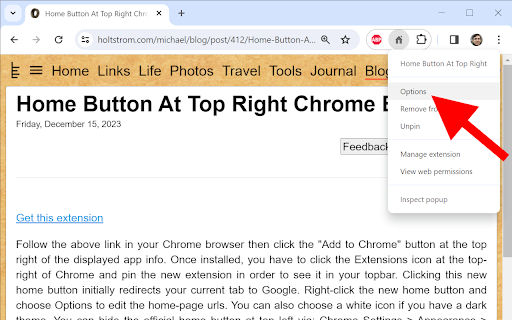


Provides a button at the top-right of Chrome that links to any pages. This extension provides a button at the top-right of Chrome that links to any pages. Regarding upgrade: you now have version 1.7 because Chrome requires a manifest change before June 2024. The new system uses different storage, so your homepage url has been deleted. You just need to re-add it (via right-click > options). Regarding new installs: you have to click the Extensions icon at the top-right of Chrome and pin the new extension in order to see it in your top-bar. Clicking this new home button initially redirects your current tab to Google. Right-click the new home button and choose Options to edit the home-page urls. You can also choose a white icon if you have a dark theme. You can hide the official home button at top left via: Chrome Settings > Appearance > Show home button > Disabled. This extension only uses the storage permission to remember your settings. This extension never monitors your activity. It only redirects your tabs when requested. The source code is very simple and is posted here https://holtstrom.com/michael/blog/post/412/Home-Button-At-Top-Right-Chrome-Extension.html, so you can inspect it for yourself. Use the "Feedback" button at the top of that article if you want to ask any questions. Be sure to include contact info if you want a reply. This extension will always be free and will never have ads. Some people want to link to a local url like "file:///C:/MyFolder/MyFile.html". As described at the above link, Chrome 118 and later removed the ability to redirect to local files. You can enable local navigation for this extension in your windows registry as shown below.

Search the current site
Search any site you're on by the simple click of a button. The search is done not only on the 1 page you are viewing as [Ctrl]+[F] does but instead Google is used to "site search" within ALL pages of the site. How to customize: Right-click the 🔍 "Search this site" button, then click "Options". See second screenshot above for what options are available. If you find the extension useful, you can leave me a tip if you want: ko-fi.com/tschmidbauer Want the same functionality for searching websites in Firefox? Install the "Site Searcher" add-on from https://addons.mozilla.org/addon/site-searcher/

Emoji Keyboard for Google Chrome™
Emoji keyboard helps you create and copy Emojis to any website. Emoji Keyboard for Google Chrome ™ is a free extension that lets you input emojis on the web browser of your computer Emoji Keyboard for Google Chrome ™ - This Emoji Keyboard extension lets you input emojis right in a web browser. It also comes with an extensive search functionality that helps easily get emoji by keywords. Click on the extension icon to invoke an emoji keyboard. Please hover on emojis to see their meanings. And just click on an emoji to copy it to the clipboard & insert it to an input element. Disclaimer: Please note this extension is NOT made by Google and is made by an independent development team. All copyrights belong to their respective owners. Google does not endorse or sponsor this Chrome extension. Emoji Keyboard for Google Chrome ™ is not owned by, it is not licensed by and is not a subsidiary of Google Inc.

Background
A Chrome extension to set the background of ANY page A Chrome extension that can help you add background to almost any website you go. 1. Why using this extension: ---> If you tired of having boring background of websites and want to change it then this is a solver for you, with this extension you surf your favorite website with a background of your choice. 2. Benefits from this extension: - Lightweight extension and optimized, not taking up your RAM and usage - No ads and not sending user information to anywhere, everything is running under your local machine and google account (open-source soon?) - Works with any other website manipulation extension - Help you have a better focus on websites =w= 3. Features: - Live Updates on websites whenever the settings changed - Able to set the Z-index of the background to wherever you think it works for you - Options to remember websites settings - Can disable any time you want - Dark mode for preview popup and options page or better preview since some websites are dark and others are light - Works for local image too (this option actually help the extension to work anywhere since some website restricted to load image from links) - Remember your settings across all your devices connected to your account (not the same case for the Local Image option, this require your account to turn on sync) - Notice when the URL changed to activate the extension running, this will help on SPA websites - Smooth User Interface for better experience Disclaimer: image URL must be raw image, not the link of some image upload page, to get raw image right click into it and "open image in new tab" then copy that link in the new tab. (The link should ended with a image file extension .png .jpeg .jpg .gif etc... videos are not supported) CHANGE LOG --------------------------- 1.1.0 | 20/9/2024 Big changes with shortcut: - Added shortcut keys: opacity up/down, z-index up/down You can change the shortcut binding in your browser settings: chrome://extensions/shortcuts --------------------------- 1.0.1 | 11/9/2024 (dev) background element now is inside a div for easier debugging.

XML Sitemap
A Chrome extension to view the sitemap of any website. This Chrome extension XML Sitemap allows you to easily view the sitemap of any website you visit. Simply click the extension icon, and it will attempt to fetch and display the sitemap from the current website's domain. This tool is particularly useful for web developers, SEO specialists, and anyone interested in exploring the structure of a website. Key Features: Automatic Sitemap Detection: The extension checks for the presence of a sitemap at the standard location (/sitemap.xml) for the current website. User-Friendly Interface: The sitemap is displayed in a clean and readable format, making it easy to navigate and find specific URLs. Cross-Domain Compatibility: Works with most websites, regardless of their domain or protocol. How to Use: Install the Extension: Add the Sitemap Viewer to your Chrome browser. Visit a Website: Go to any website you want to explore. Click the Extension Icon: Click the Sitemap Viewer icon in your toolbar to view the sitemap. This extension simplifies the process of accessing and viewing sitemaps, making it a valuable tool for anyone working with websites.
