
mpeeomopiogbgfgboeclndgdacciclmo
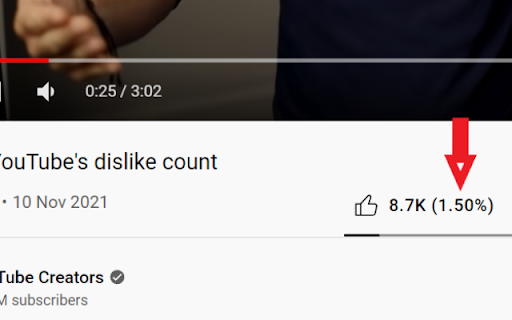
This extensions will add to the side of the Like Count, a percentage of how many likes the video have per views in percentage.

PocketTube: Youtube Subscription Manager
Group YouTube subscriptions into YouTube folder. Video Deck for Youtube. Mark as watched videos. Filter YouTube video. Youtube mode You can create collections that seamlessly fit into the layout using this Youtube extension. This is an easy way to manage your subscriptions. This extension enables you to: ★ Create groups / sub-groups with subscriptions based on topic ★ Group YouTube subscriptions / channels to collections / groups. One subscription/channel can have a few collections ★ Add custom icons for any collection. Set icons from prepared icon packs or upload your own. ★ Show the latest videos feed by collections / group. Play all videos by collections using the auto-generated playlist on YouTube ★ Auto-sync your collections on Android, iOS or other browsers using Google Drive or your Chrome profile ★ Integration on the main page ★ Integration in the left sidebar ★ Ability to video filter by topic on the subscriptions page ★ Filter and sort videos by duration, activity, and date on feed mode and channel page ★ Auto Youtube Tags ★ Enable Youtube Deck mode - special mode like TweetDeck ★ Notification about new videos on group ★ Health status for your subscriptions and bulk unsubscribing channels without activity ★ Mark as watched which sync with history ★ Remove shorts or watched videos on subscriptions or channel page ★ Export subscriptions to CSV Install an extension to organize your subscriptions. After installing, please reload all tabs for the extension to take effect. For issues/suggestions, please get in touch with us via email: hello@pockettube.io 250,000+ users trust us with more than 4,000 5-stars reviews. --- Become a Patreon to help support the continued development of this plugin if you enjoy it! It takes time to update the extension every time: Patreon https://www.patreon.com/join/ysub Please buy me a coffee https://www.buymeacoffee.com/ysub Android https://play.google.com/store/apps/details?id=com.youtubesubscriptionmanager iOS https://apps.apple.com/us/app/pockettube-for-youtube/id1475688814 --- ⓘThis Chrome extension is about Subscription Manager and has no affiliations with the popular video hoster Youtube™. All copyrights belong to their respective owners. PocketTube: PocketTube is not owned by, licensed by, and is not a subsidiary of Google Inc.

Return YouTube Dislike
Return YouTube Dislike restores the ability to see dislikes on YouTube. Starting December 13th 2021, YouTube removed the ability to see dislikes from their API. This extension aims to restore power to users by using a combination of archived like and dislike data, as well as the likes and dislikes made by extension users to show the most accurate ratings. Actively growing and keeping up to date with uploads after December 13th, 2021 The more users that use the extension, the more accurate it will be This extension is currently in an active development phase, so if you experience any issues, don’t hesitate to report them on our GitHub page or in our Discord server.

Youtube Progress Viewer
Shows the percentage of a YouTube video that has been watched. Never lose track of your video progress again! This lightweight extension adds a sleek percentage counter to your YouTube videos, showing exactly how much of the video you've watched. Perfect for: • Students tracking lecture progress • Content creators checking video lengths • Anyone who wants to know exactly where they are in a video • Users who like to customize their YouTube experience Simple to use, yet powerful to customize! Just install and watch the percentage appear on your videos. Access settings easily by hovering over the display. No ads, no tracking, no unnecessary permissions - just a clean, useful addition to your YouTube viewing experience. Key Features: ✓ Clean, minimal display shows exact video completion percentage ✓ Fully customizable appearance: • Choose from 4 corner positions • Adjust transparency • Customize colors to match your theme • Set your preferred font size • Show/hide when video is paused ✓ Precise control with adjustable decimal places ✓ Settings persist across sessions ✓ Zero impact on video performance ✓ Works seamlessly with YouTube's interface Version 1.0.0 • Initial release with full customization options • Compatible with all YouTube video pages

YouTube Chapters In Player
Shows YouTube chapters right in the player Just click on chapters button at the bottom of YouTube video player to show chapters list right in the player. Key features: - Shows chapters right in the player. - Works in Fullscreen and Theater modes. - Works for embedded videos. - Previous/Next chapter buttons. - Key Moments support. - Chapters from pinned comment. - Open Source https://github.com/ris58h/youtube-chapters-in-player
