
fkmdkegjncccmjgohllockmjaefgagno
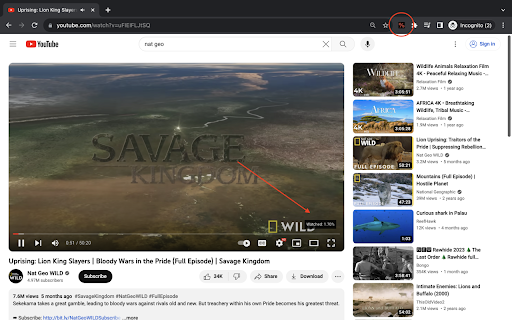
Shows the percentage of a YouTube video that has been watched. Never lose track of your video progress again! This lightweight extension adds a sleek percentage counter to your YouTube videos, showing exactly how much of the video you've watched. Perfect for: • Students tracking lecture progress • Content creators checking video lengths • Anyone who wants to know exactly where they are in a video • Users who like to customize their YouTube experience Simple to use, yet powerful to customize! Just install and watch the percentage appear on your videos. Access settings easily by hovering over the display. No ads, no tracking, no unnecessary permissions - just a clean, useful addition to your YouTube viewing experience. Key Features: ✓ Clean, minimal display shows exact video completion percentage ✓ Fully customizable appearance: • Choose from 4 corner positions • Adjust transparency • Customize colors to match your theme • Set your preferred font size • Show/hide when video is paused ✓ Precise control with adjustable decimal places ✓ Settings persist across sessions ✓ Zero impact on video performance ✓ Works seamlessly with YouTube's interface Version 1.0.0 • Initial release with full customization options • Compatible with all YouTube video pages

Video Duration for YouTube™
Adjust YouTube video playback speed, save time, and navigate with ease. Whether you want to speed up a lecture or slow down a tutorial, "Video Duration for YouTube™" gives you full control over your video viewing experience. With this extension, you can easily try out different speeds and see how much time you could save or add based on your selection. Also, the remaining video length is shown so you can plan your viewing time more efficiently. 1. Video Speed - Adjust video playback speed to up to 16x - Jump to 1x speed, then switch back to the previous speed in one click - Set the default speed at which every video starts with - Change speed in smaller or bigger increments 2. Video Duration - Find out how much time will be saved or added compared to watching at 1x speed - See your watch progress in percentage - Know how long it takes to watch the rest of the video at current speed - Know your YouTube Shorts: know video length, change video speed, skip through video 3. Flexibility - Continue using your favorite shortcuts already provided by YouTube - Tailor appearance and functionalities to your liking with settings in the extension popup We respect your privacy and don't collect any data. 💥 Keyboard shortcuts 💥 Works with any keyboard layouts. Here are the QWERTY shortcuts for reference: Change speed: A / D Jump to x1 speed: S Restart video: R Rewind / advance 10 seconds: J / L Play / pause: K Mute / unmute: M Show / hide controller: V Left controller: Z Right controller: X Time to end: E Watch progress: P 😦 Troubleshooting 😦 Refreshing the video page should fix most issues. 🚨 Future Release 🚨 Please use the support form to report problems, request features, and make suggestions. If this extension is helpful to you, please leave a rating or review so more people can find it. Thank you for your support!

YouTube Likes Ratio
Shows percent of viewers who liked the video. Useful proxy for the old like:dislike ratio. Now that the dislike count is gone and with it the like/dislike ratio, this extension calculates the percent of viewers who liked a video, giving some idea of viewer sentiment.

Youtube Likes / Views rating
Calculates the views/likes ratio and displays it in a user friendly way It doesn't serve as a replacement for the dislikes YouTube removed, but it gives a pretty good indication as to whether the audience enjoyed the video. *This extension does not store or send any data to 3rd parties* - This extension reflects how much people like the video and it's creator - It does not reflect the quality of the content in a video. - Views / Likes ratios vary widely based on the type of content you're watching and how engaging the creator of that content is. Therefore some creators might average lower ratings even if their videos are top quality. - As views count goes up, views/likes ratios trend downwards. Once a video reaches hundreds of millions of views it's very likely that the video will display lower ratings even if the video performs well in the previous like/dislike metric that YouTube removed. - It does not work in live streams ------------------------------------- If this small extension gets any traction I will update it to add improve the metrics and allow customization.

Permanent Progress Bar for YouTube
Always display a tiny progress bar with buffer loading on YouTube's player even in the fullscreen mode This extension brings a small, persistent progress bar to the YouTube player, enhancing your viewing experience. You can customize the extension to adjust the bar's height and color on the options page. The beauty of this feature lies in its adaptability ? it remains hidden until the default YouTube progress bar disappears, even in fullscreen mode! The primary goal is to offer a constant visual cue of the player's progress status. If the bar appears too slim for your screen, head to the options page and tweak the height setting. Exciting Features: 1. Keep track of the loaded percentage (buffered video progress). 2. Monitor the current position of the player. 3. Updates of these percentages every 2 seconds (adaptive). 4. Almost all features are fully customizable through the options page. 5. Compatible with the YouTube website and embedded YouTube players on any website. 6. Hides the permanent progress bar on live streams Recent Changes: Version 0.2.0: 1. The extension has been upgraded to manifest v3, ensuring improved functionality and performance.
