
mpdjhieodgnmhmhdemdccnamgjllogdj
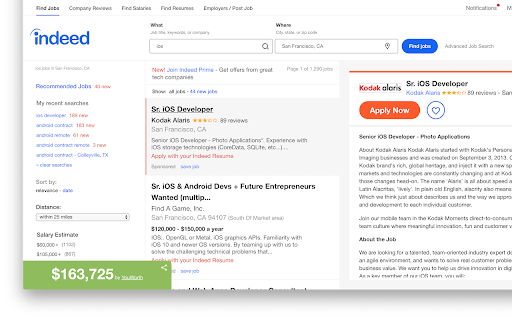

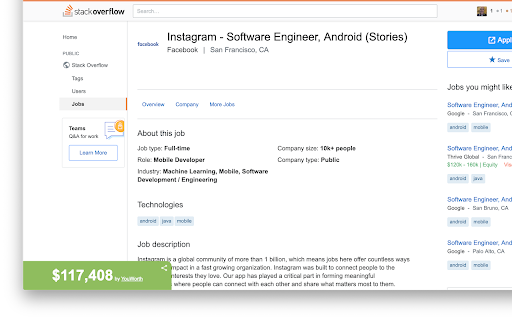


💰 YouWorth for Chrome YouWorth instantly reveals what a job is really worth—right where you're browsing. Powered by an intelligent pricing engine trained to identify real-world compensation patterns, YouWorth analyzes job listings, salary surveys, and market signals to estimate current market pay. As new data signals emerge, YouWorth continuously recalculates salary estimates so you’re always seeing up-to-date numbers—not outdated ranges or vague guesses. 🎯 Who YouWorth is for ✨ New in v3.0: Salary estimates now appear directly on LinkedIn job listings, in addition to top job boards like Indeed, ZipRecruiter, Dice, and Stack Overflow. Using the extension requires signing up for a YouWorth account. This benefits users in two important ways: 1️⃣ Prevents abuse & protects accuracy Authentication ensures YouWorth serves real users and prevents anonymous or automated abuse that can degrade service quality and accuracy. 2️⃣ Enables personalized salary estimates After signing up, users can export their LinkedIn profile and upload it to YouWorth. This allows YouWorth to understand your skills, education, and work experience—producing salary estimates tailored to you, not just generic job titles. These tools are available through YouWorth after sign-up. While they are not yet embedded directly in the Chrome extension, they are designed to complement the salary insights you see while browsing jobs. YouWorth is privacy-first by design and only requests permissions needed to deliver its features. 🔎 Salary estimates Permissions are used to detect supported job listings and display salary estimates on the page. 📣 LinkedIn sharing permissions Some permissions—such as the ability to post to LinkedIn—exist only for optional sharing features. • YouWorth does not post anything automatically • YouWorth does not modify your LinkedIn timeline • Nothing is shared without your explicit action If you never choose to share content, these permissions are never exercised. You are always in control of: ✔️ What content is shared ✔️ When (or if) anything is posted ✔️ Which permissions are granted or revoked Your data is used solely to provide salary insights and personalization. It is never sold or shared with third parties. 💡 Know your value. Understand your money. Make smarter career and financial decisions with YouWorth.

Indeed Scraper
Scrape Indeed jobs, salaries, locations, and apply links and save to CSV or Excel. Easy to use. Our Indeed Scraper extension is a powerful tool designed to extract valuable job data from Indeed's extensive database. Whether you're a job seeker looking for specific opportunities or an HR manager seeking insights into the job market, our extension provides the information you need without the hassle of manual searches or coding. Access Fresh and Extensive Data: With over 250 million users worldwide, Indeed is a goldmine of job information. Our scraper allows you to quickly gather fresh and extensive data, providing valuable insights into job trends, hiring patterns, and more. Extract Comprehensive Job Details: Our scraper extracts essential job details such as titles, dates posted, company names, locations, salaries, ratings, full job descriptions, and apply URLs. Using our Indeed Scraper is simple: 1. Open indeed.com and perform your desired search. 2. Click the "Export Jobs" button and wait for the extraction process to complete. 3. Download the extracted data in CSV or Excel file format. 🔹 No Coding Required: Our user-friendly interface eliminates the need for coding knowledge, making it accessible to users of all levels. 🔹 Real-time Results: Receive fresh and accurate data within seconds, eliminating the wait time for requested information. 🔹 Customizable Search Queries: Tailor your search criteria to match your specific needs, ensuring relevant and targeted results. 🔹 Time-saving: Our scraper saves you time by automating the data collection process, allowing you to focus on your core tasks. 🔹 Regular Updates: We consistently update our scraper to ensure compatibility with any changes made to the Indeed website.

Jobscan: Job Search Tracker
Collect, track and manage your job applications from across the web Collect, track and manage your job applications from across the web Are you still tracking jobs in Excel or Google Sheets? It’s time for an upgrade. Save your favorite jobs into your Jobscan Job Tracker directly from the job listing from job boards like Indeed, LinkedIn, and Glassdoor. The Chrome extension will automatically populate all of the details from the job listing, including the company, job title, job description, listing URL, and salary. To see how closely you match a job, run a resume scan to compare your resume to the job listing. You can do all of this directly from the job listing page with the Job Tracker Chrome extension. No more switching tabs and manually entering job information. Organize your resumes and job descriptions, keep track of important interview dates, take notes, and manage multiple job opportunities in one place. Save jobs from major job boards Easily save job details from popular job boards. Information is auto-populated to save you time. See your Match Rate Are you a good match for that job? Now you can find out in seconds by scanning your Jobscan resume against a job listing. Organize your job searches Keep track of interview schedules, meeting links, contact details, pending tasks, important notes, and other job information for each application. Plot your progress Track the jobs you’re interested in and visualize your progress as you move forward with each one. Move each application across the board from “Applied” to “Interviewed”. Nail your interview Organize your upcoming interviews and include all information like the date, time, and interview medium in Job Tracker. Automated calendar events and email reminders mean you never miss an interview or show up unprepared. Optimize your resume Optimizing your resume for ATS is key. See your match rate on every application card within Job Tracker, and click the match report to edit your resume in real time. Use Jobscan's resume scanner to see customized tips on how to optimize your resume for each job application.

LazyApply : Job Application Bot
Apply to 100’s of jobs in just one click… Automate your application for Job with the lifetime job application system LazyApply. LazyApply Job application bot will save you hours by automating the tedious parts of applying for jobs. You can use it to automate your job application process and automatically on 100's of jobs in single click. Automate Job applications with LazyApply

Autofill Smartly - JobFill
Autofill any form (job applications, registrations, booking,...) smartly and conveniently! Save time and effort with JobFill. Our extension offers the following main features: 👉 Autofill basic information: Automatically fill in personal details, educational background, work history, and more. (Currently supports English only.) 👉 Custom autofill: Create your own rules (conditions) to autofill any information. These rules can override the default information and support all languages. 👉 Capture / Auto-capture: Manually or automatically capture data from any form. The captured information is saved and reused for future autofill. 👉 Auto-trigger: Autofill runs automatically without needing to click the "Fill the Form" button. In addition, for job seekers, our AI-powered features include: 📝 Resume tailoring based on the job description For more details, visit: https://jobfill.ai/docs/ PERMISSIONS - host_permissions (*://*/*): JobFill requires this permission to detect forms and auto-fill them. The permission will display a warning message: "Read and change all your data on the websites you visit". - unlimitedStorage: This permission allows JobFill to store data on your hard disk. - cookie: JobFill uses this permission to access jobfill.ai cookies for authentication and data encryption.
