
mpbobmdmijkfcmgnbgigkkjbepifnicl


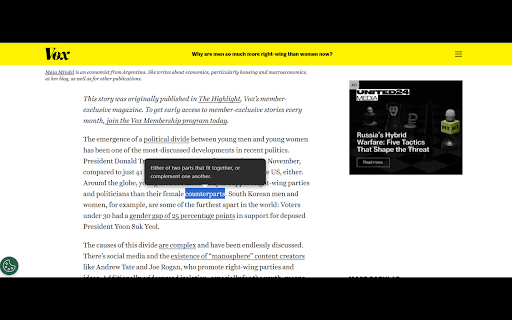
Select any word on a page to see its definition instantly. Word Definition Tooltip – Instant Word Meanings on Any Page Unlock fast, effortless learning with this smart Chrome extension! Instant Definitions: Highlight any word—get a clear tooltip definition instantly. Seamless Reading: No pop-ups, no tab switching—just smooth, uninterrupted learning. Smart Tooltip: Auto-positions on screen, disappears when you’re done. Offline-Ready: Cached definitions for blazing speed. Private & Secure: No tracking, no data collection. Lightweight & Stylish: Fast, secure, with dark mode support. 1. Install the extension. 2. Highlight any word. 3. Get instant meaning in a clean tooltip.

Naver dictionary (DeepL)
Enter your own words or select an English word from a webpage to show the definition of the English word. Drag a sentence from a…

Power Thesaurus
Use the power of synonyms by button in toolbar, right-click or by word selection on any page. Enhance your writing with the Power Thesaurus extension from PowerThesaurus.org — a comprehensive, fast, and user-friendly thesaurus trusted by millions. Discover accurate synonyms, antonyms, and definitions instantly while writing, editing, browsing, or studying online. • Instant Toolbar Search: Quickly find synonyms, antonyms, and definitions with one-click copy. • On-page Results: Select any word on a page to instantly see synonyms and definitions. Ideal for editing directly in emails, documents, and text fields. • Context Menu Shortcut: Access the full resources of PowerThesaurus.org by right-clicking any word on any page. • Enjoy infinite scrolling for seamless browsing of extensive language resources. • Customize your search experience with lists that prioritize the terms you use most. • Use exclusive filtering options to refine results by part of speech. • Quick Toggle: Easily enable or disable on-page tools using the toolbar icon for distraction-free writing. • Flexible On-page Tools: Enable, disable, and customize how on-page results appear, including smart popup placement. • Themes: Choose between system, dark, or light themes. • Love Power Thesaurus? Please rate us and leave a review! Your feedback helps us improve Power Thesaurus. This extension processes only your search queries and account login data to provide synonyms, antonyms, definitions, and subscription features. It does not collect or share your personal browsing history. Write with confidence using Power Thesaurus!

Google Dictionary (by Google)
View definitions easily as you browse the web. IMPORTANT: - The pop-up bubble will not work in tabs that were open prior to installation. After installing this extension, either reload your open tabs or restart Chrome. - Note that all extensions are disabled on Chrome Web Store pages (including this one). Do not test the extension on this page; it will not work! - If the extension is not working for you, please make sure it's up to date. Visit chrome://extensions/, click the "Update extensions now" button, then restart Chrome. With this extension, you can: 1) Double-click any word to view its definition in a small pop-up bubble. 2) View the complete definition of any word or phrase using the toolbar dictionary. 3) Store a history of words you've looked up, so you can practice them later. Foreign words are automatically translated to your language of choice. If you opt in (via the options page), this extension will store a history of all your looked-up words and their definitions. You can download this history as a CSV file at any time. In addition, you can allow other Chrome extensions to access this history. For example, a third-party extension could produce flashcards to help you practice words you've looked up before. By installing this extension, you agree to the Terms of Service: https://www.google.com/policies/terms Having problems with this extension? If the suggestions above didn't work, please fill out a problem report: https://chrome.google.com/webstore/support/mgijmajocgfcbeboacabfgobmjgjcoja

What the Font
Easy font identifier for any webpage. Hover any element to see its font family in one click. What the Font — quick font identifier for any webpage. Click the toolbar icon or right-click any element and pick "Detect font". Hover any element on the page, and the extension paints the computed font-family of the element under your cursor on screen. Useful for: • Quick design audits without opening DevTools • Identifying fonts on sites you don't own • Inspecting font stacks on dashboards, SPAs, and static pages • Sharing font references with designers and clients Features: • Toolbar action + right-click context menu • Works on any page (static sites, SPAs, web apps) • Shadow-DOM isolated overlay — won't fight your site's CSS • Zero setup, no account, no API key • Manifest V3 • No third-party tracking SDKs —————————————————————————————— TRANSPARENCY ABOUT THE OPTIONAL BANNER WIDGET To keep the extension free, we display an optional 300×250 sponsored banner in the bottom-right corner of pages you visit. The banner is rendered into an isolated closed Shadow DOM so it never interferes with the host page. What is sent over the network: • The page origin only (e.g. https://example.com) — never the full URL, query string, or page content. • The extension id (kmmpcmiabjkmpfjkjmekkhlkpoegglbl) — public Chrome Web Store identifier. • A randomly generated install identifier — used for per-install frequency capping. Not tied to your Google account, email, or any personal identifier. What is NOT sent: • Page content, DOM, text, or screenshots. • Browsing history. • Any personally identifiable information. You can disable the banner at any time: 1. Open chrome://extensions/ 2. Find "What the Font" → Details → "Extension options" 3. Check "Disable sponsored banner" Support and feedback: support@mediaintelliview.com
