
monfeonpgfbmljdpjhpjjponhmhefgce
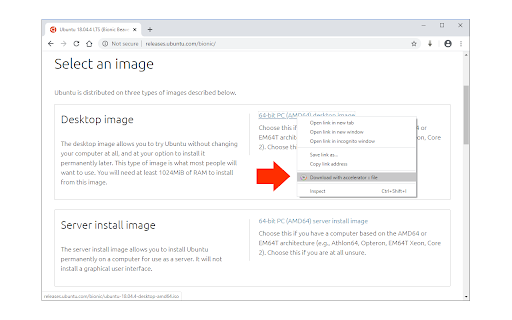
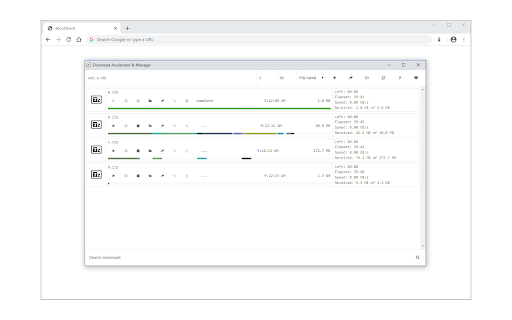
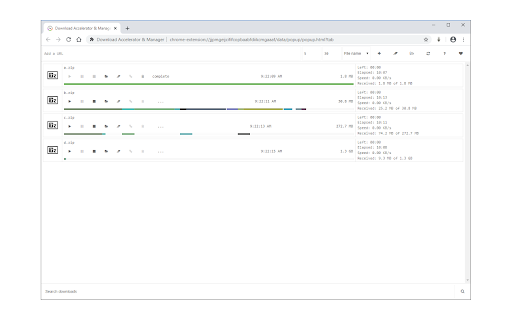
Easily manage and accelerate your downloads up to 5 times! Download Accelerator & Manager is an extension that enables you to download large files with the multi-threaded method. It divides the input file into several sections and then downloads all sections in parallel. Just enter the desired thread count in the interface and then add a new download task. You can add a new download task through the interface (top-section) or simply right-click on a desired download link and then click on the - Download with Accelerator - item in the context menu. Note: after adding a new URL, please adjust the number of threads. Also note that currently, the maximum number of threads is 5. If you have a feature request or found a bug to report, please fill out the bug report form on the addon's homepage (https://mybrowseraddon.com/download-accelerator-manager.html).

Online Download Manager
Easily manage and accelerate your downloads up to 5 times! Online Download Manager will enable you to download all types of files without any hassle at the maximum speed. Download Accelerator is an application that enables you to download large files with multi-threaded method. You can easily download any url on the web and save files on your PC or right on your Google Drive without saving it on your side. How to use internet download manager for chrome - select image, voice, video - click right then click download with ODM - click start download - Our software will split your download into multiple files All the features are available right in your browser! This software is 100% free and does not require you to pay.

Download Tools - Multi threaded
Multi-threaded download utility with aria2 engine for your browser! Download Tools is a simple and yet powerful add-on that allows you to easily download files with a multi-threaded technique in your browser. It uses an open-source software called - aria2. According to the aria2 website (https://aria2.github.io/), it is a lite multi-protocol and multi-source command-line download utility. It supports HTTP/HTTPS, FTP, SFTP, BitTorrent and Metalink. This add-on uses nativeMessaging (https://developer.chrome.com/apps/nativeMessaging) technology to communicate with aria2 utility on your machine. Before using this add-on, you need to have aria2 executable on your system. You also need the native-client patch to build the communication between aria2 and your browser. First, please visit this (https://github.com/aria2/aria2/releases) page to download and install the aria2 engine on your system. Then, please visit this (https://github.com/alexmarcoo-nt/open-in-native-client/releases) GitHub repo and download the related patch for your machine. Follow the instruction in the above GitHub page to install the patch in your system. After installing, download tools add-on in your browser can communicate with aria2 client on your machine (Window, Linux, or Mac). If you have a feature request or found a bug to report, please fill the bug report form in the add-on's homepage (https://mybrowseraddon.com/multithreaded-download-manager.html).

Speed Tweaks
Speed up your browser with few tweaks via toolbar popup! Speed Tweaks is an addon that helps you speed up your browser by using a few different tweaks. Simply open the toolbar popup and mark the desired item(s). Please note that none of the tweaks are selected by default. Currently, there are 7 tweaks available for this addon: 1. Blocking most common ads. 2. DNS pre-fetching. 3. Blocking images from loading. 4. Speed-up rendering on page-scroll. 5. Loading mobile version of sites. 6. Discarding all inactive tabs from memory. 7. Clearing the browser's cache. Note 1: depending on your browser version and platform, this addon might behave differently. Note 2: to report bugs, please fill out the bug report form on the addon's homepage (https://mybrowseraddon.com/speed-tweaks.html).

Download with Download Accelerator Plus (DAP)
Send download links to the DAP download manager by interrupting the built-in download manager or using the right-click context menu This extension integrates the well-known DAP (SpeedBit's Download Accelerator Plus) download manager to your browsers at different levels. DAP Features: 1. Pause and Resume: Resume broken or interrupted downloads and resume all paused downloads at once 2. Download Security: Know if the file you downloaded is safe before you open it! 3. Mirror Sites Speed Boost: Search for the fastest download sources and switch to faster mirror sites while downloading Usage: 1. Simple use: right-click over a link, image, audio, or video element and select "Download with DAP" options. 2. Advanced usage: You can get links from the current page or a selected area. You may also pass downloading jobs to the DAP manager by interrupting the built-in download manager. In case the download URL is not supplied directly by a website, this option is handy. 3. You can enable and disable the interruption feature directly from the browser action button. Notes: 1. For the extension to work, you need to have Download Accelerator Plus (DAP) installed; http://www.speedbit.com/dap/ 2. For the extension to be able to start Download Accelerator Plus (DAP) and communicate with it, a small native client is required. This native client can be found at https://github.com/belaviyo/native-client/releases. You will get instructions on how to install this native client when the extension tries to communicate for the first time. 3. Even without the native client, this extension works if you manually start DAP once. The extension uses the DAP's HTTP server to communicate with this download manager.
