
mohdgdcdkibdljkppnmnihdacpbpllmj
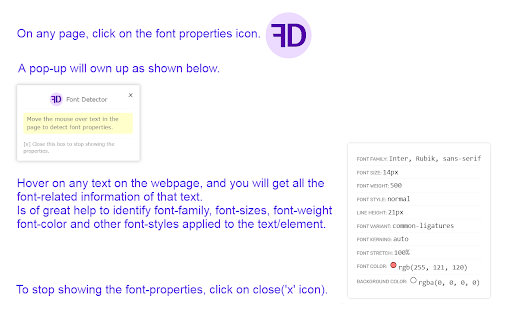
Detects font properties and styles On any page, click on the font properties icon. A pop-up will own up as shown in the screenshot. Hover on any text on the webpage, and you will get all the font-related information of that text. Is of great help to identify font-family, font-sizes, font-weight, font-color and other font-styles applied to the text/element. To stop showing the font-properties, click on close('x' icon).

Font Properties
Detects font properties and styles On any page, click on the font properties icon. Hover on any text on the webpage, and you will get all the font-related information of that text. Is of great help to identify font-family, font-sizes, font-weight, font-color and other font-styles applied to the text/element. To stop showing the font-properties, click on close('x' icon).

Color by Fardos - Color Picker
Pick colors from websites, save colors & gradients, get matching shades and tints and create beautiful gradients. ✅ Color pick and save multiple colors from any site (using zoom technology) ✅ Customize your color picker keyboard shortcut in options (default: Cmd/Ctrl + Shift + e) ✅ Add the color picker as the default in options ✅ Save your favorite colors and gradients, click any color and it's HEX is saved to your clipboard ✅ Find shades, tints, complementary and other color combinations for any color ✅ Create linear or radial gradients with unlimited stops ✅ Browse hundreds of beautiful gradients, edit, save and copy it's CSS whenever you need it ✅ Get color palettes from any gradient you create ✅ Site pallete fetches all the colors of any page ✅ Customize the color type when auto copying Have any new ideas to improve Color? Email us at support@fardoss.com and we will look into it. There are 5 different built in tools including a color picker to help you through your design journey. The first tool is the Color Picker. Our color picker uses zoom technology that will accurately get you the closest color to where you hover over. You can access the color picker by right clicking the page or Cmd/Ctrl + Shift + e. We made sure the experience of picking colors was smooth, quick and efficient. When you color pick on any website, we generate a picture from the site, and pinpoint the exact location of your cursor to find that color. Choose as many colors from any site, click Save & Exit and they are automatically added to your overall saves. Great color pickers are very hard to find which is why we added countless hours to make sure our color picker is the best. Our color picker is the most accurate, the fastest and we guarantee you will have the best experience with it. We created our color picker with the mind set of ease. Our color picker ensures that every color you pick is exactly that color or at least the closest color to it. With that in mind, our color picker is super quick and calculates that color hex wherever you hover over. The second tool is a Color Search. When developing this functionality, we took our personal experiences into consideration and found that finding colors that match each other was one of the hardest things. We would go to so many websites to find what we are looking for. We wasted so much time just to get the colors that worked together. If you are a designer or developer, you know what we are talking about. With Color by Fardos, it now takes seconds to get matching color combos like Shades, Tints, Complementary, Triadic, Analogous, Split Complementary and Tetradic colors. Within any color, there is an explosion of new similar colors that will work perfectly together all built into one extension. Within any color you choose, you can now save those colors so they stay with you wherever you go. We made sure this was a feature because everyone knows the pain of trying to find the color they used before. Accessing those colors on any Chrome browser is super easy. The third tool is a Color Chooser. We designed our color chooser with a black theme because we wanted to remove any distraction when trying to choose that perfect color. Whenever you change the color, it automatically changes the selected color within the entire extension. So, if you change from white to black and go to Color Search, that color is now black. This allows for a much more fluent experience within the entire extension. The fourth tool is Gradients. Gradients are incredibly painful to code. Finding the perfect blend of colors contributes largely to what works and what doesn't. We made sure that our gradient builder took that into consideration. With our gradient builder, every gradient is beautifully composed and generated. Add as many stops as you want, use your saved colors to make something beautiful, choose whether linear or radial and most importantly, save them so you can use them whenever you want. After you have created that gradient, all you have to do is click Copy CSS, and you are set. No more hassling if you missed a comma between your colors. Every gradient comes with a generated palette. Whether you are creating your own gradients, choose one of our gradients, color palettes help you find the perfect blend-able color. Copy the colors just by clicking and start using them in your designs. The fifth tool is Site Pallete. Site Pallete allows you to get all the colors of a page instantly. We quickly screenshot each section and allow you to add any of the colors you like, directly to your saved colors. Site Pallete is quick and easy and can be located in your toolbar next to the Eye Dropper / Color Picker. If you have any questions or issues about our Color Picker, Gradient, Color Search or other features, feel free to contact us at support@fardoss.com. Stay tuned for more life changing extensions like our Color Picker!

What Font - font finder
What font? Easy identify the font on a web page, html font size, color and font family. So many brilliant fonts are used at a numerous websites. What is the easiest way to find out the fonts used in a webpage? Firebug and Webkit Inspector are easy enough to use for developers. However, for others, this should not be necessary. It's an easiest way to find out which exactly font is on the page - use the extension What Font. Extension has simple and intuitive interface for the more pleasant experience. Font extension is multifunctional and reliable tool that’s so easy to use. You’ve got a task, and we’ve got the best tool - find font extension. Easily detect any html fonts on a web page from your favorite sites using the What font chrome extension. How to use WhatFont for Chrome : 1. Click on the “Add to chrome” button to install it 2. Tap on “What font” icon, this will enable the extension 3. Click the mouse pointer on any word for which you want to get font details 4. After clicking the word you will get all the font details 5. In order to exit What font you need to click the right top corner button "Exit ". What Font allows you to know the font name, its family, color, style, size, position. Such a great tool to create designed web pages fastly. Now you can simply identify a liked font and select exactly the same for your needs without a long search for a suitable one. This extension supports Google API as a font finder, so you will have info about all popular Google Fonts. WhatFont will be useful for web designers, marketers, and developers and is useful for quickly getting information about all the fonts on a web page. Web Developers: To create a beautiful website web developers need to use attractive fonts & this extension will surely help them to pick the right font details very quickly. Freelancers: Freelancers can use this extension if their client needs to have the same font style as their competitor’s website. Designers: It can make a huge difference if you choose the right font style for your website. Fonts can have a profound psychological impact on visitors and affect their ability to read your content. As simple as just hovering the cursor to any word you want to fully inspect web fonts. Take the info about font name and color, style and position and more. Make up on the web page easily with What Font for quick inspecting web fonts. We hope you find our Font Finder useful! We are waiting for your feedback and ratings! If you’re experiencing problems or app isn't working on, please contact us.

Balance – perfect daily ToDo list for New Tab
Balance - a very simple to-do list that will change your Life. By clicking "Add to chrome" you accept and agree to installing "Balance™" extension and setting Chrome New Tab to that provided by the service and the Terms of Use and Privacy Policy. The extension will update your search settings and will change your search engine to be provided by Microsoft Bing. Each new day like absolutely pure sheet and every new day you can choose how to fill this day. Each time it is only your decision. Every new day you have the opportunity to go either the usual way or completely new way. Most of us devote a lot of time for work and little time for ourselves and our lives. It depends on the social priority - the modern world every day plunges us more and more into the race for financial well-being, which forces us to work harder and better, and forget about the pleasure that we can get from both work and life. That is why every new day you will start with two empty lists of tasks that you will fill: each new day you have to choose between completing the tasks of the previous day or starting your day from scratch and follow the new path. You will have to divide Life and Work Tasks and write them in separate lists. Thanks to this division, it will be possible to note the existing disbalance between these two lists and focus your thoughts on what is really important, but ignored. We have created this Custom New Tab extension exactly for people who feel that there is another life way and everything can change. And we will show that it is real. And some legal links below: Read few words about our team and contact us: https://monetizi.net/
