
mognjodfeldknhobgbnkoomipkmlnnhk


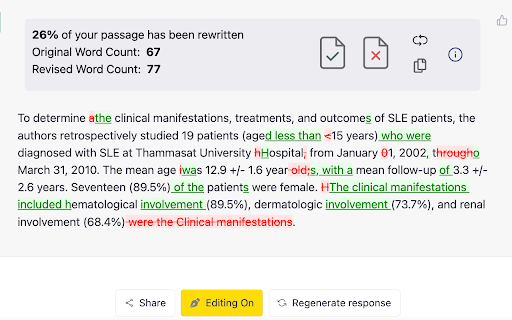
Easily proofread, edit, and track changes to your content in ChatGPT. Easily proofread, edit, and track changes to your content in ChatGPT with editGPT's web app and chrome extension. IMPORTANT: For the most powerful AI proofreader experience, use the full web app at www.editgpt.app If you want to edit with editGPT in ChatGPT, download the chrome extension. editGPT Chrome Extension Instructions 1. Install the extension 2. Go to the chatGPT website. The editGPT extension only works on https://chat.openai.com/. Note: For the most powerful AI proofreader experience, go to www.editgpt.app 3. Type in a prompt that includes the text you want to edit, for example: "Proofread this: [insert your text here]." 3. Wait for the response! The 'editGPT' button only appears after the response is complete. 5. Click on the button to turn on editing mode. With the chrome extension, the 'editGPT' button will appear in the top corner of ChatGPT after a message is sent. Select (highlight) the text and press Accept or Reject button to accept or reject changes in the highlighted portion. Reset button will reset to original. Markup button will show/hide markup. Clipboard button will copy your text including any changes you've made to clipboard (without markup). These four prompts typically increase how intrusive chatGPT's editing is. 1. Proofread this but only fix grammar: 2. Proofread this: 3. Proofread this, lightly improving clarity and flow: 5. Proofread this, improving clarity and flow: Other prompts: Proofread this, significantly improving clarity and flow: Rewrite this, improving prose: Proofread these bullet points from my CV, keep it in CV language: Proofread these bullet points: Note: Everything after 'Proofread' or 'Rewrite' and before the first colon (:) will be considered a prompt and removed from the text comparison

SciSpace: Do hours of research in minutes
Your AI research assistant for understanding scientific literature. Your AI research assistant for discovering and analyzing scientific literature. With SciSpace, you no longer have to open new tabs and Google unfamiliar concepts every time you come across one. Just ask SciSpace for research-backed explanations or summaries for any text, maths, and tables in any research paper, technical blog post, or report you’re reading. You can also ask follow-up questions, and it will give you answers with citations. With SciSpace for Chrome, you can: 👌 Simplify technical language — SciSpace gives you simple explanations for jargon, acronyms, and complex paragraphs. All you need to do is highlight them. 🤿 Delve deeper while learning — Choose from SciSpace’s preset questions or ask your own if you have doubts while reading an article. 🔢 Understand math and tables in PDFs — Clip unfamiliar math equations or tables using SciSpace to find out what exactly they mean. 🌐 Toggle between multiple languages — Interact with SciSpace in 13 languages and get explanations in your native language. 🔖 Bookmark the URL — Save any article or PDF to your collection in SciSpace. Come back to it any time and pick up right where you left. 📡 Find related papers – Discover research papers related to any passage you highlight. Literature Review – Want to inquire about a research question or topic you have in mind? Ask the Lit. Review tool and find insights from 270 million+ papers in the SciSpace repository. Citations in answers – No more fake references or misinformation. Copilot now gives a citation with every answer along with the location of the source.

ChatHub - ChatGPT, Gemini, Claude side by side
Use ChatGPT, Gemini, Claude, Llama and more chatbots simultaneously Stop switching apps. Compare AI responses side-by-side with ChatHub! ChatHub is a powerful browser extension that revolutionizes your AI chatbot experience. With ChatHub, you can simultaneously use multiple AI chatbots, such as ChatGPT/GPT-4o, Gemini, Claude 3.5, Llama, and more, and compare their responses side by side. We offer users various ways to access AI models: 1. Use your own account: If you're already logged into services like ChatGPT or Claude in your browser, we automatically utilize them, meaning you can use your own ChatGPT Plus privileges within ChatHub! 2. Use your own API key: We've integrated official APIs from various services, allowing you to use them with your API key on a pay-as-you-go basis, ensuring stability and reliability. 3. Use our AI service: We provide ready-to-use AI services, giving you access to over 20 AI models with a simple subscription to ChatHub. In addition to these, ChatHub offers: 1. Prompt library: Manage and discover commonly used prompts. 2. Local chat history: Save your chat history locally and perform full-text searches. 3. Markdown support and code highlighting for enhanced readability. 4. Dark mode for comfortable viewing in low-light environments. 5. Smart web access: Improve chatbot responses by incorporating up-to-date information from the internet. 6. Custom chatbots: Integrate any OpenAI-compatible API to create your own chatbots. 7. Quick access within your browser using keyboard shortcuts. Experience the future of AI chatbot interaction with ChatHub. Install the extension now and unlock a world of powerful AI conversations at your fingertips.

Voice Control for ChatGPT
Expands ChatGPT with fast voice control in multiple languages, read aloud, and more! Voice Control for ChatGPT gives you a smoother, faster way to interact: use speech input, hands-free replies, keyboard shortcuts, and custom voice commands with a personal dictionary. Ideal for power users who want speed, flexibility, and automation. Key Features: 🎤 Fast speech recognition in multiple languages ⌨️ Push-to-talk: hold spacebar or click mic to speak 👐 Hands-free mode: auto-submit + auto-read (if enabled) 🌍 Pre-select speech input language ⚡️ Custom Dictionary: Define your own voice actions and word replacements — perfect for fixing misheard words or triggering full prompts with short phrases 📣 Automatic read-aloud with shortcut to skip (if enabled) 🤖 Voice input also works on Claude AI (enable via popup) How to use: 1. Install the extension 2. Go to chat.openai.com 3. Log in or create a free ChatGPT account 4. Click the mic or hold spacebar to speak 5. Allow microphone access when prompted To use with Claude AI, open the extension popup and click “Enable Claude.” Accept the permission when asked. 🛟 Need help or found an issue? Contact us via the support section or email us directly at support@voicecontrol.chat. About: This extension is made by the creators of Talkio and TalkaType — tools that help you practice pronunciation, improve fluency, and type with your voice. Explore more: 🔗 Voice Control Pro — AI-powered dictation for your computer 🔗 Talkio — AI-powered speaking practice 🔗 TalkaType — Dictation for productivity

Superpower Chat
Superpower Chat is a browser extension trusted by over 400,000 people. Save and reuse your multi-step prompts, organize chats into folders and subfolders, search past conversations instantly, organize and search your images in the gallery, save notes for each conversation, bulk delete/export/archive your chats in a few clicks, and many more. It helps you keep ChatGPT organized, productive, and easier to use every day. ⭐️⭐️⭐️⭐️⭐️ New Pro Feature: ✨ Prompt Optimizer: Optimize your prompts with one click 📚 Advance Prompt Manager: Manage all your prompts in one place with NO LIMIT 📝 Notes: Save notes for each chat and access them later. Synced across devices and can be searched 🌉 Image Gallery: Now you can see all your images in one place. Read the prompt, search images, download all images, and more... 🔄 Automatic folder: Automatically create folders for conversations created with Custom GPTs 🔊 Side-by-side Voice mode: Use the Advanced Voice mode from ChatGPT in a side-by-side view while looking at the conversation. 🖱️ Right-click menu: Easily access and run all your custom prompts on any website from the right-click menu. 🌉 Send screenshot with right click: Use the right click menu on any page to quickly send the screenshot to ChatGPT 🤑 Enhanced GPT Store. Discover over 100,000 custom GPTs and try them with one click! 🔗 Reference Conversations: Easily reference one or more conversations from your history inside the current conversations 🔁 Auto Delete and Auto Archive: Option to automatically delete or archive old messages after a certain number of days 🎧 Download audio: Option to download the audio for ChatGPT responses 📥 Select and export individual messages from a conversation ⭐️⭐️⭐️⭐️⭐️ ★ Chat Management for ChatGPT: • 🗂 Folders and subfolders for your chats: Create folders easily and organize your chats in folders and subfolders. Assign different colors and images to each folder. Drag and drop conversations to add/remove them from folders. Favorite folder at the top. • 🗺️ Minimap. See a reduced overview of the entire conversation on the left edge of the screen • 📥 Export: Select and Export any number of your chats from ChatGPT into multiple formats (PDF, .txt, .json, .md) • 🔎 Search and Highlight: Search through all your previous chats on ChatGPT and highlight results for quick review • 📌 Pinned Messages: Pin important messages in each conversation and quickly access them using our quick navigation sidebar • 🗑️ Group Deletion: Select and delete a group of chats on ChatGPT • 🕰️ Timestamps: Timestamps for all chats and individual messages ★ Prompt Management for ChatGPT: • ⛓️ Prompt Chains: Save and run a series of prompts with one click. • ⚡️ Auto Complete Menu: Simply type / to open a menu of all your prompts right above the input box • 🔙 Recent Prompt: Your recent prompt saved privately on your computer. • 🔼🔽 Quick Access: Just use the Up/Down Arrow key in the input box to go through your previous prompts • ⭐ Favorite prompts: Mark your prompts as favorite in your prompt history • 📄 Prompt templates: Put words inside {{double curly brackets}} in your prompt to create variable in your prompts • 🔍 Search Function: Easily search through your prompt history and thousands of public prompt examples from the ChatGPT community • 📜 Public Prompts: Get inspiration from thousands of other prompts created by the community and share your prompts too. Upvote, downvote, and report prompts, and sort them by the most used or most upvoted. Filter prompts by category and language • 🔗 Prompt Sharing: Easily share a direct link to the community prompt on ChatGPT with a single click ★ Language and Style for ChatGPT: • 🌍 Language Selection: Change the response language with one click (Supports over 190 different languages) • 🎭 Tone and Writing Style: Change the Tone and the Writing style of the Response ★ Utilities for ChatGPT: • ❌ Block ads on ChatGPT • ⮐ Disable Enter to submit prompt. Instead, use CMD/CTRL + ⮐ to submit prompts. • 👥 Custom Instruction Profiles: Why create only one Custom Instruction on ChatGPT when you can easily create and save multiple profiles and quickly access them with a click of a button • ✂️ Auto Splitter: Automatically split your long input into smaller chunks and send them to ChatGPT individually. • 🗒 Auto summarize: Using the power of auto-splitter, your long text will be summarized into a shorter version so you can ask questions • 📏 Custom Conversation Width: Adjust the width of the conversation on ChatGPT to your liking • 🔄 Smart Replace: Automatically replace pre-defined phrases with longer text as you type prompts • 🖱️ Auto Click: Automatically click on the default favorite prompt button at the end of each response • 📊 Word and Character Count: Add the word and character counters to both the user input and the responses • 🎛 Model Switcher: Easily change the model (GPT-5.2, GPT-4, GPT-3.5, etc.) in the middle of the conversation. Simply hover over the avatar icon to see what model was used for each response • 📋 Copy and Paste: Easily copy each chat with a click of a button and keep the formatting (support plain text, markdown, and HTML format) • 🕶️ Copy Mode: Setting to copy either both user input and response or only the chat response • ⌨️ Short keys: Quickly access your most used features using our growing list of short keys • ⏫⏬ Scroll to the top/bottom or scroll one message at a time • 🗄️ Newsletter Archive: Access the newsletter archive and read all the previous versions ____________________________________________________________ ▶️ Watch our YouTube Channel for Tutorials and Tips https://youtube.com/@spchatgpt 🤑 Become an Affiliate (Link to our affiliate program is also provided in the extension) https://spchat.co/affiliate/ 📜 Try Snipman extension: https://chromewebstore.google.com/detail/snipman/obpihkiilednknalffilmhopfifnbbha
